4. Observe the status displays in the top of the
transmitter and receiver screens and insert a
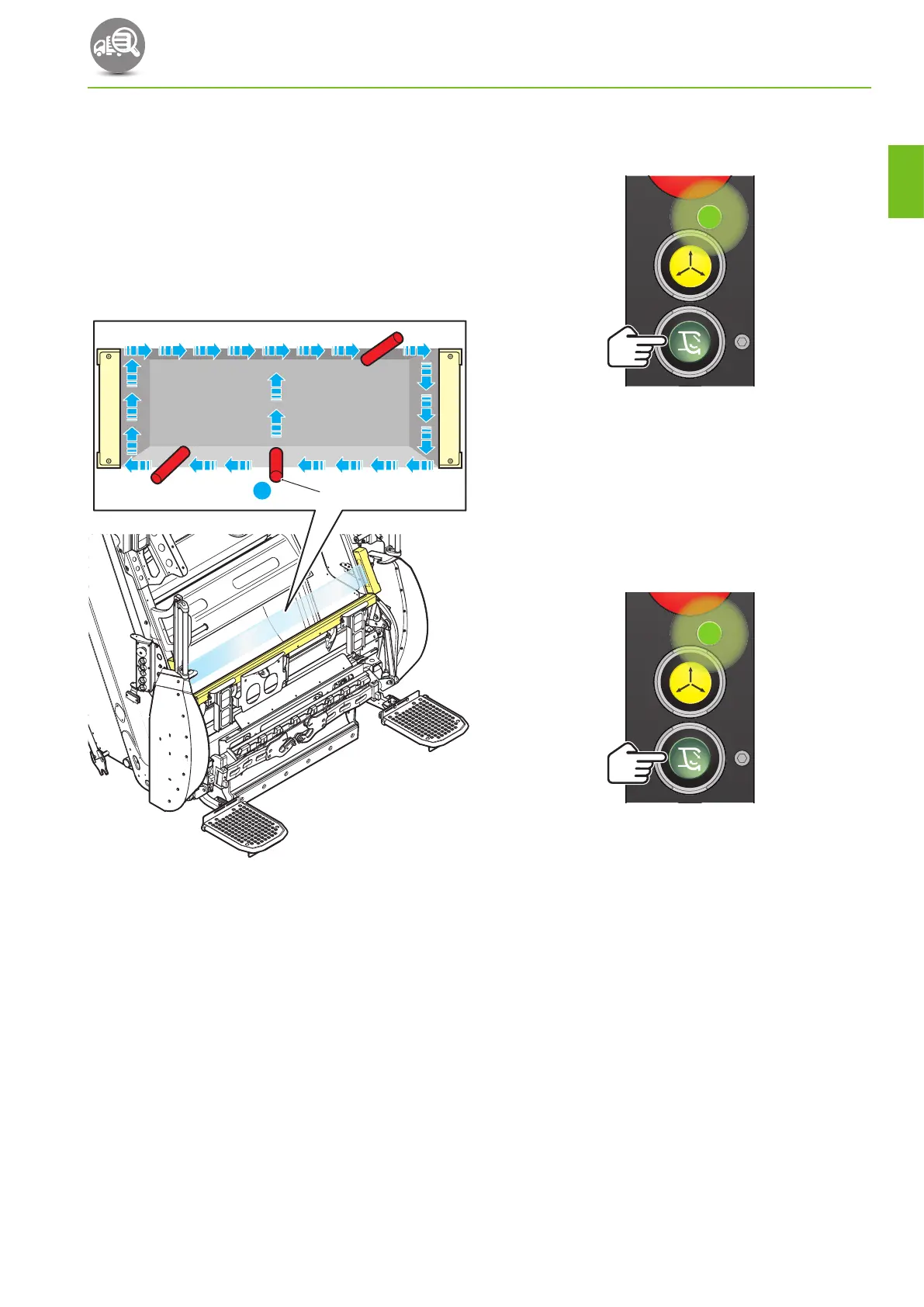
suitable soft test rod (1) into the light curtain at
point X and steadily move the test rod around the
path indicated by the arrows (See Fig.3‑2 Safety
light curtain test path).
• LED A should turn red immediately the test rod
enters the safety curtain and not turn green
again until the test rod is removed from the
curtain.
1
X
Fig. 3-2 Safety light curtain test path
5. Remove the soft test rod from the light curtain.
6. Press and release the ‘Start pack cycle’ push‑
button.
7. While the packer plate is closing and the carriage
plate is moving upwards, place a suitable soft test
rod into the light curtain.
• The mechanism should continue to operate and
complete the packing cycle.
8. Remove the soft test rod from the light curtain.
9. Press and release the ‘Start pack cycle’ push‑
button.
10. As the carriage plate is moving downwards, place a
suitable soft test rod into the light curtain.
• The compaction mechanism should stop
immediately.
11. Remove the soft test rod from the light curtain.
• The cycle should now complete automatically.
DAILY CHECKS
3‑27
OM1R-SM-GB01R
3


 To Next Page