3.4 Daily safety check - safety light
curtain (when fitted)
If a safety light curtain is fitted, the following Daily
safety checks must be carried out, in addition to
checks specified in the chassis manufacturer’s service
information and sections 3.1 Daily safety checks ‑refuse
collection body and 3.2 Daily safety checks ‑ waste
container lifting device (when fitted) before the vehicle
commences service.
The following checks assume that the aforementioned
daily safety checks have been carried out, the engine is
running and the refuse collection bodywork operating
system is switched off.
WARNING:
USE A SOFT TEST ROD TO TEST
OPERATION OF SAFETY LIGHT CURTAIN.
DO NOT USE YOUR HAND(S).
1. Check that the tailgate area is clear.
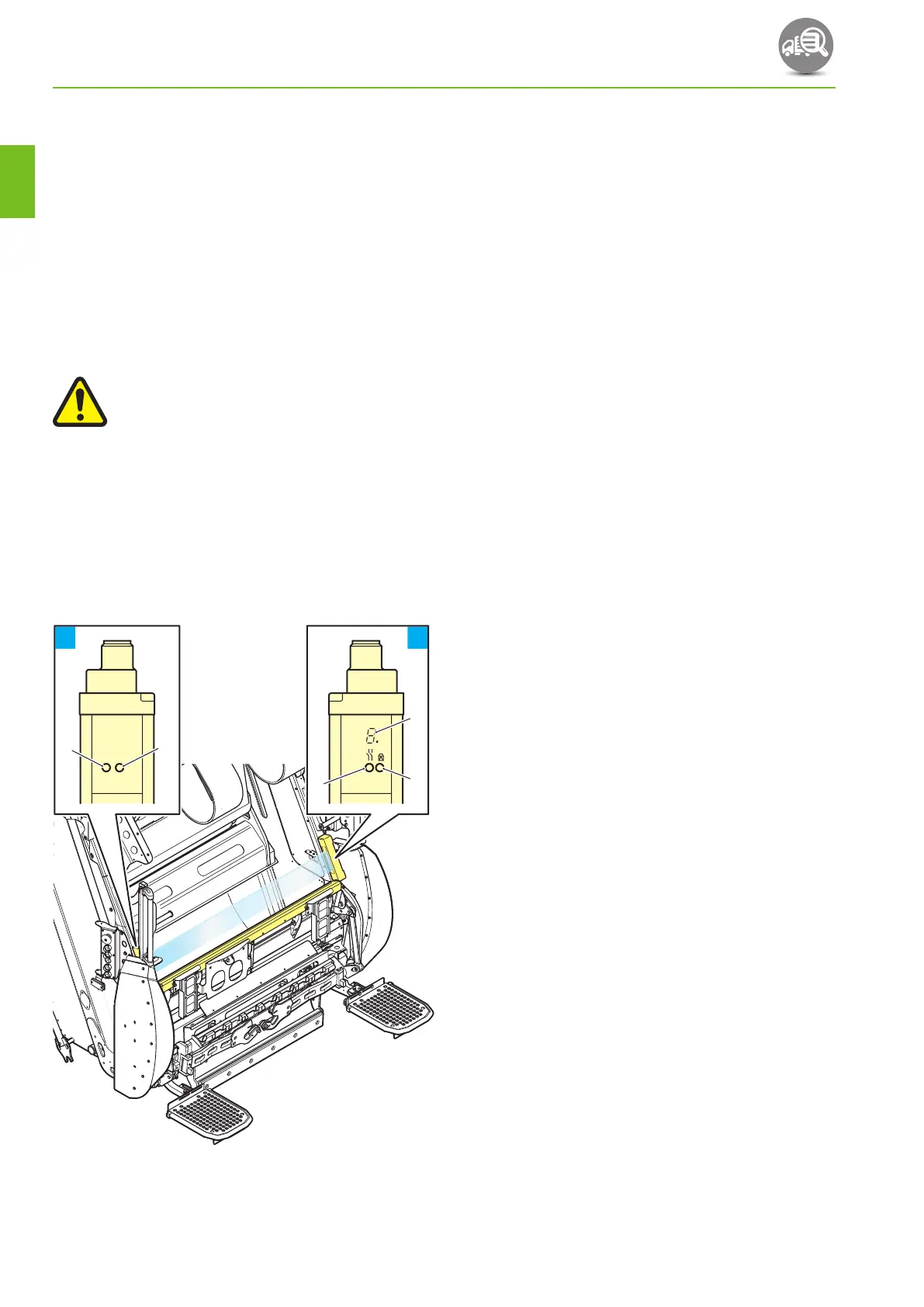
2. Check the status displays in the top of the
transmitter screen (see Fig. 3‑1, 1) and receiver
screen (see Fig. 3‑1, 2).
When the body main switch is turned off:
• LED’s A, B, C & D should be off.
• 7‑segment display E should be off.
21
Power
Transmitter
Receiver
AB
C
D
E
Fig. 3-1 Safety light curtain status displays
3. Turn the body main switch on:
• LED A should turn green.
• LED B should be off.
• LED C should turn green.
• LED D should turn yellow.
• 7‑segment display E should show ‘8’
(momentarily), then ‘S’ for approximately
1.5 seconds while the system runs a self test
sequence after which it should show 1 to
indicate normal operation.
If LED A is red, a fault has occurred. If this happens
refer to the manufacturer’s operating instructions.
If the 7‑segment display E shows ‘1’ flashing, the
transmitter and receiver screens should be cleaned
using a mild detergent.
If the 7‑segment display E shows ‘F’ alternating
with a number, a fault has occurred. If this happens
refer to the manufacturer’s operating instructions.
DAILY CHECKS
3‑26
OM1R-SM-GB01R
3


 To Next Page