OPERATIONAL MAINTENANCE
7‑6
OM1R-SM-GB01R
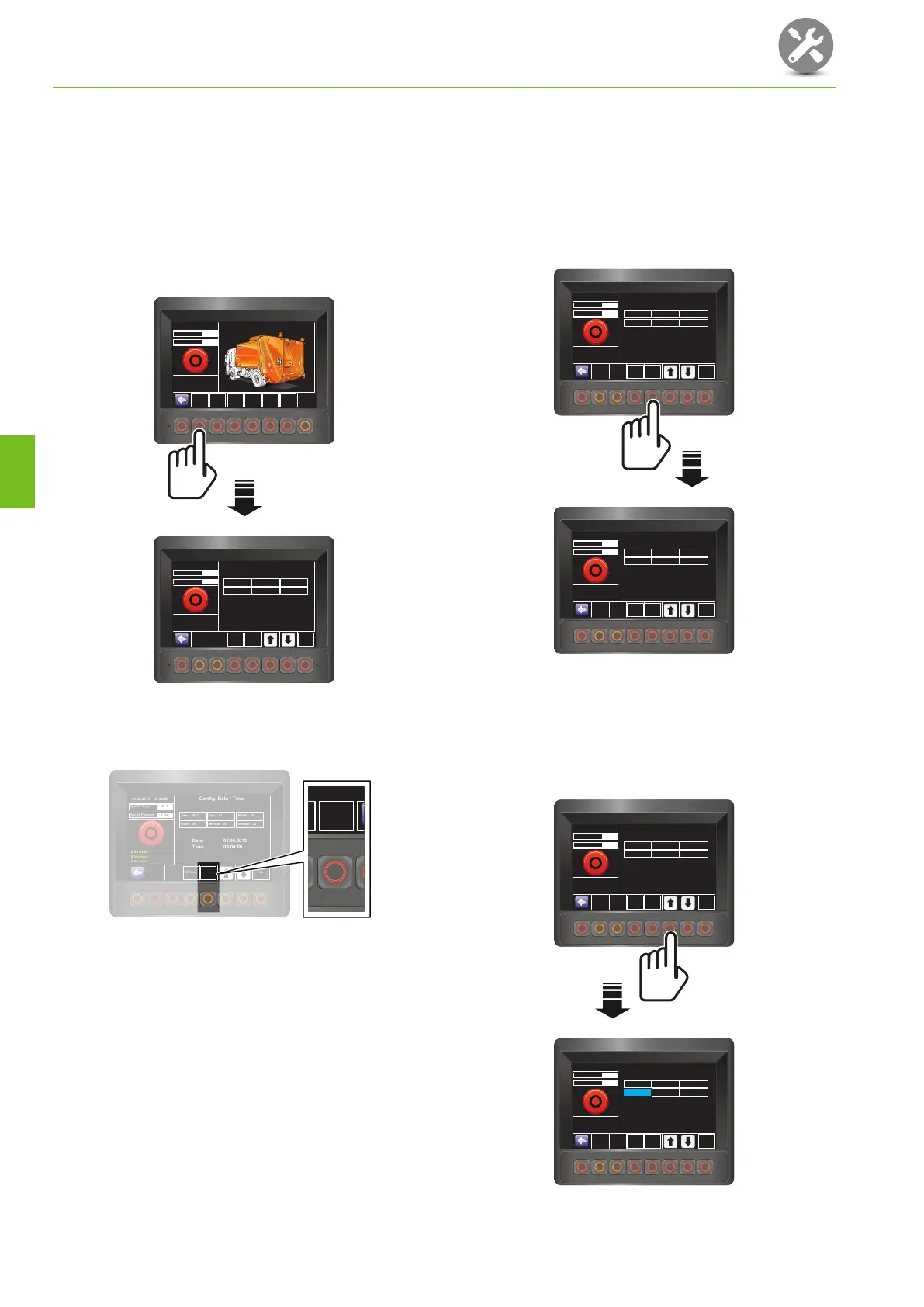
7.2.2 Adjusting the clock/calendar
Adjustment of the clock and/or calendar can only be
made from a password protected ‘Maintenance’ screen
• To demonstrate the procedure, changing the
time from 09:00:00 to 11:15:00 is shown.
1. Press the switch under ‘Config. Date / Time’.
• The ‘Config. Date / Time’ screen will display.
0 No errors
Hyd Oil Temp
0 No errors
0 No errors
32
o
C
01.06.2013
Maintenance
09:00:00
Config.
Date / Time
Data Logger
Inform.
Monitoring
Inform.
Config
Inform.
Monitoring
In-Out
Config
RCV
R
I
D
E
O
N
R
E
A
R
E
N
T
E
R
B
O
D
Y
W
ITH
E
N
G
IN
E
R
U
N
N
IN
G
D
O
N
OT
W
A
L
K
U
N
D
E
R
R
A
IS
E
D
H
O
P
P
E
R
D
R
IV
E
W
IT
H
B
IN
S
R
A
IS
E
DR
E
A
C
H
IN
T
O
B
IN
S
R
E
A
C
H
I
N
T
O
H
O
P
P
E
R
W
A
L
K
U
N
D
E
R
R
A
IS
E
D
B
IN
S
H
O
L
D
O
B
JE
C
TS
B
E
IN
G
P
A
C
K
E
D
P
U
S
H
TO
S
T
O
P
P
US
H
T
O
S
T
O
P
0 No errors
Hyd Oil Temp
Date: 01.06.2013
Time: 09:00:00
0 No errors
0 No errors
32
o
C
Hyd Oil Pressure
2 Bar
Hyd Oil Pressure
2 Bar
01.06.2013
Config. Date / Time
09:00:00
SET Date Set
Scale
1000
Year : 2013
Hour : 09
Day : 01
Minute : 00
Month : 06
Second : 00
2. Check that the value in the ‘Scale’ pictogram is
suitable for the value you want to set.
2748-DS071-OL1-D-GB-G3
0 No errors
Hyd Oil Temp
Date: 01.06.2013
Time: 09:00:00
0 No errors
0 No errors
32
o
C
Hyd Oil Pressure
2 Bar
01.06.2013
Config. Date / Time
09:00:00
SET Date Set
Scale
1000
Year : 2013
Hour : 09
Day : 01
Minute : 00
Month : 06
Second : 00
Scale
1000
• There are four ‘Scale’ settings: 1, 10, 100 and
1000.
• If the ‘Scale’ setting is not suitable for the value
you are setting, e.g. 100 or 1000 for setting
Hours or Minutes, incorrect values will be
shown when you try to set a value.
3. If the value is not suitable, for example it shows
100 when you want to change the time in steps
of 1 hour, press the ‘Scale’ switch until the correct
value (1) is shown.
• Each press of the switch changes the ‘Scale’
value to the next highest setting up to 1000
when it returns to 1.
0 No errors
Hyd Oil Temp
Date: 01.06.2013
Time: 09:00:00
0 No errors
0 No errors
32
o
C
Hyd Oil Pressure
2 Bar
01.06.2013
Config. Date / Time
09:00:00
SET Date Set
Scale
1000
Year : 2013
Hour : 09
Day : 01
Minute : 00
Month : 06
Second : 00
0 No errors
Hyd Oil Temp
Date: 01.06.2013
Time: 09:00:00
0 No errors
0 No errors
32
o
C
Hyd Oil Pressure
2 Bar
01.06.2013
Config. Date / Time
09:00:00
SET Date Set
Scale
1
Year : 2013
Hour : 09
Day : 01
Minute : 00
Month : 06
Second : 00
4. Press either of the arrow switches to select the
parameter you want to change (Second, Minute,
Hour, Day, Month, Year), in this example ‘Hour’.
• As each parameter is selected, it is highlighted
in blue.
0 No errors
Hyd Oil Temp
Date: 01.06.2013
Time: 09:00:00
0 No errors
0 No errors
32
o
C
Hyd Oil Pressure
2 Bar
01.06.2013
Config. Date / Time
09:00:00
SET Date Set
Scale
1
Year : 2013
Hour : 09
Day : 01
Minute : 00
Month : 06
Second : 00
0 No errors
Hyd Oil Temp
Date: 01.06.2013
Time: 09:00:00
0 No errors
0 No errors
32
o
C
Hyd Oil Pressure
2 Bar
01.06.2013
Config. Date / Time
09:00:00
SET Date Set
Scale
1
Year : 2013
Hour : 09
Day : 01
Minute : 00
Month : 06
Second : 00
7



 To Next Page