OPERATIONAL MAINTENANCE
7‑5
OM1R-SM-GB01R
7.2.1 Entering a password
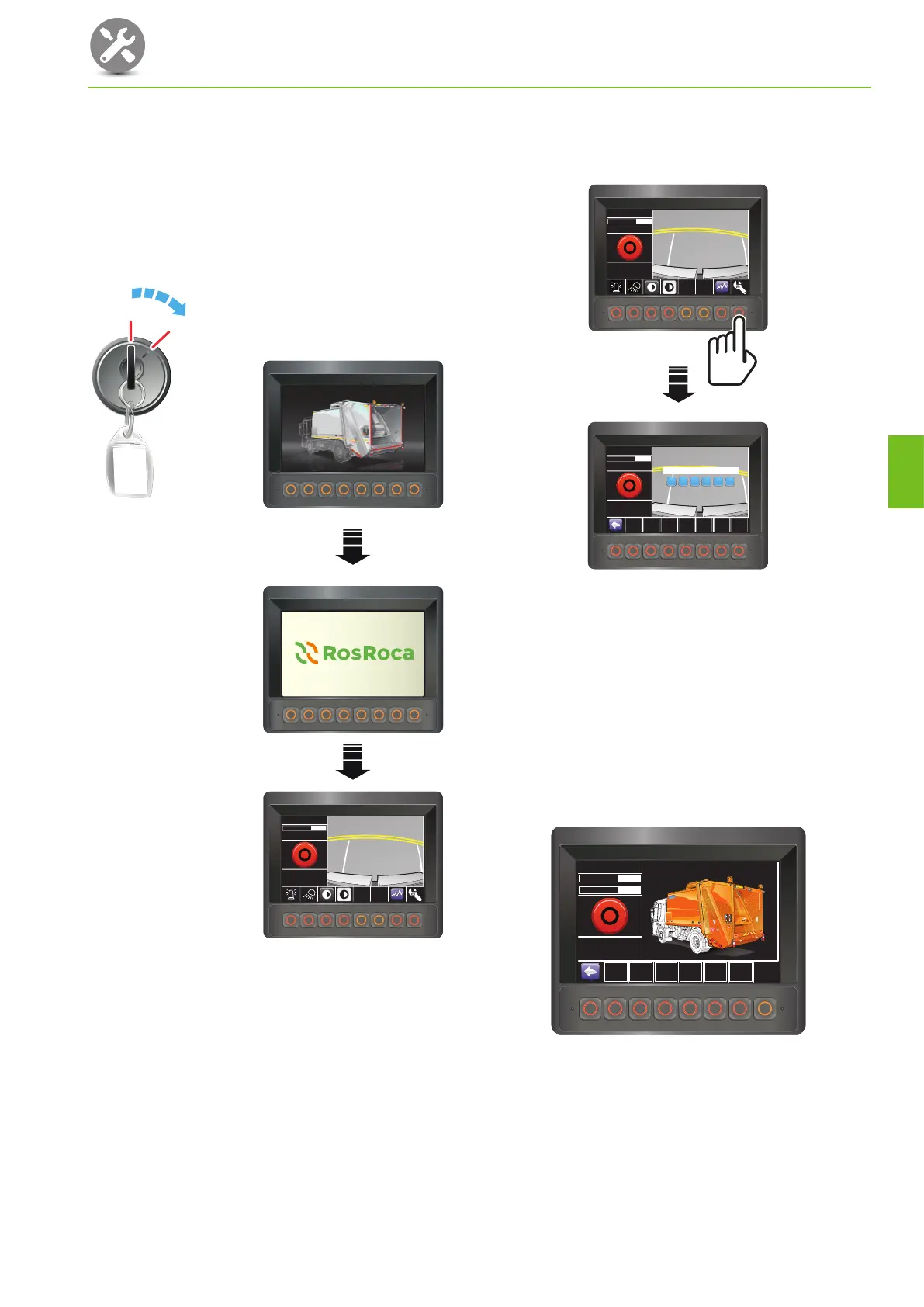
To enter a password to access ‘Maintenance’ screen.
1. Make sure the vehicle is stationary with the parking
brake applied, the ‘Body main’ switch ‘off’ and the
ignition switched ‘off’.
2. Switch the ignition ‘on’ and wait until the cab
control panel has initialised.
01.06.2013
Hyd Oil Temp
09:00:00
32
o
C
0 No errors
0 No errors
0 No errors
I
0
II
III
• The ‘Body system off’ screen should display.
3. Press the maintenance switch.
• The ‘Password’ screen should display.
2748-DS002-OL1-D-GB-G2
01.06.2013
Hyd Oil Temp
09:00:00
32
o
C
0 No errors
0 No errors
0 No errors
Hyd Oil Temp
09:00:00
0 No errors
0 No errors
0 No errors
Hyd Oil Temp 32
o
C
01.06.2013 09:00:00
F2 F3 F4 F5 F6 F7 F8
0 No errors
0 No errors
0 No errors
Password Level
4. Using the keys F2 to F8 as a numerical keypad,
enter the password.
• All passwords comprise 6 digits from 2 to 8.
• Example: For password 226534, press keys F2,
F2, F6, F5, F3, F4.
• As each number is entered the square changes
colour from blue to white.
• The screen will display the ‘Maintenance’
screen appropriate to the level of password
you have entered.
0 No errors
0 No errors
0 No errors
01.06.2013
Maintenance
09:00:00
Config.
Date/Time
Data Logger
Inform.
Monitoring
Inform.
Config
Inform.
Monitoring
In-Out
Config
RCV
R
I
D
E
O
N
R
E
A
R
E
N
TE
R
B
O
D
Y
W
ITH
E
N
G
IN
E
R
U
N
N
I
N
G
DO
N
O
T
W
A
LK
U
N
D
E
R
R
A
I
S
E
D
H
O
P
P
E
R
D
R
IV
E
W
ITH
B
IN
S
R
A
IS
E
D
R
E
A
C
H
IN
T
O
B
IN
S
R
E
A
C
H
I
N
T
O
H
O
P
P
E
R
W
A
LK
U
N
D
E
R
R
A
IS
E
D
B
IN
S
H
O
LD
O
B
JE
C
T
S
B
E
IN
G
PA
C
K
E
D
P
U
SH
T
O
STO
P
PU
SH
T
O
ST
O
P
Hyd Oil Temp 20
o
CHyd Oil Temp 32
o
C
Hyd_Oil_Pressure
1 BarHyd_Oil_Pressure 2 Bar
7



 To Next Page