6 x Parameter settings
BA ROTEX HPSU compact 4 - 09/2013
29
6 Parameter settings
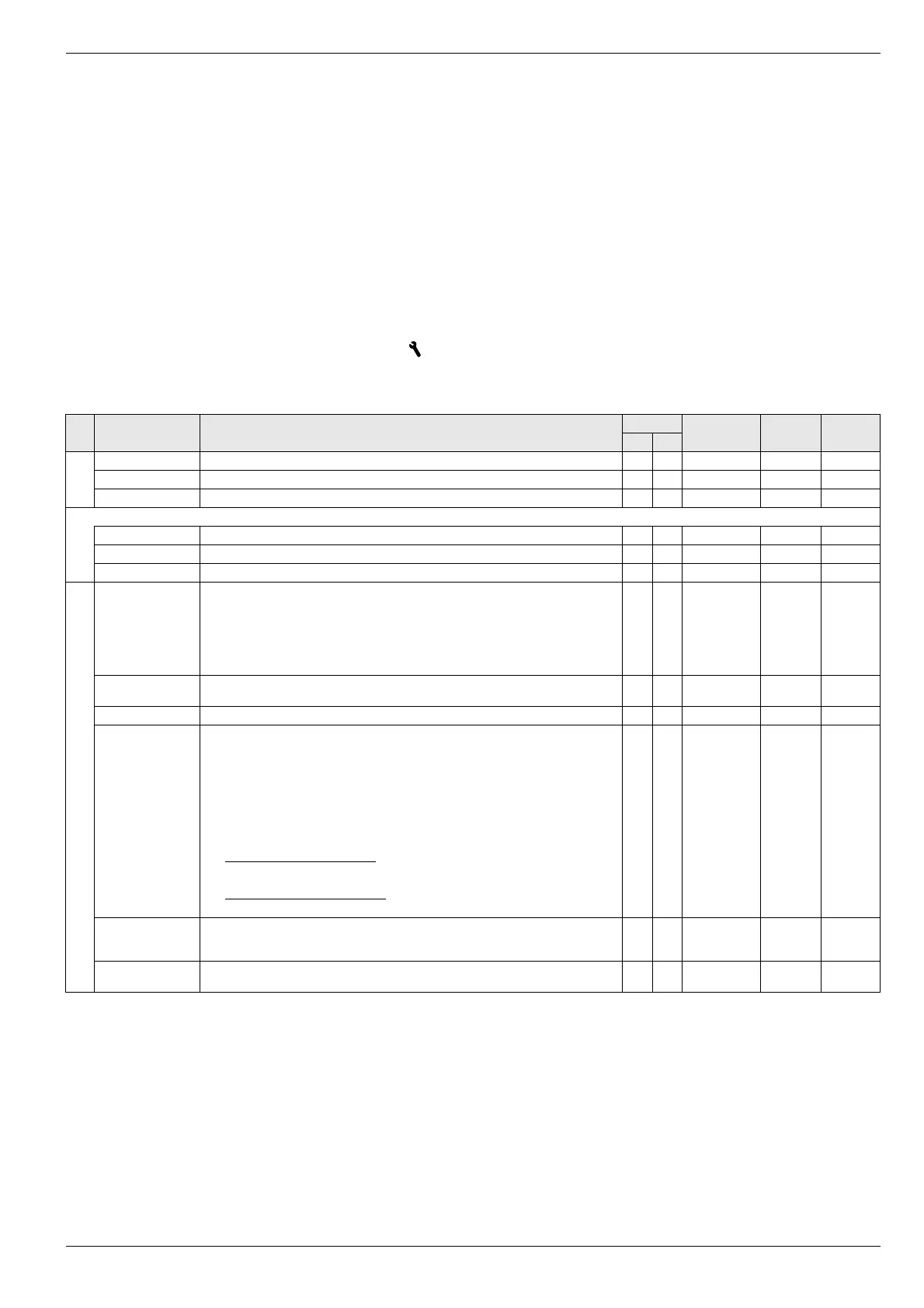
6.1 Explanation of the parameter tables
The parameter tables listed in the sections 6.2 to 6.11 contain im-
portant information concerning all parameters that are available
in the individual rotary switch setting on the controller (1st menu
l
evel, 2nd menu level).
In addition to the parameter designations, the tables contain de-
tails for the setting ranges, factory settings, setting options or
setting step distances and brief function explanations.
In addition, they provide explanation of the access rights for the
operation of the controller. The following abbreviations are
available for appropriate characterisation:
BE Access right for the operator
HF Access permission with Technician password
Status:
N Not visible
E Visible and configurable
S Visible
6.2 Rotary switch setting: Configuration
6.2.1 Level "Setup"
Sub-
level
Parameter Description Access Setting range
Min / Max
Factory
setting
Increment
BE HF
LCD Contrast Display contrast for the passive display operation. E E 1 - 10 4 1
LCD Brightness Display lighting strength for the passive display operation. E E 0 - 100 % 50% 10 %
LCD Illum Time Display lighting duration since last operation. E E 5 - 120 s 30 s 1 s
RGB Setup
R Red proportion of display colour. E E 0 - 100 % 100 % 5 %
G Green proportion of display colour. E E 0 - 100 % 80% 5 %
B Blue proportion of display colour. E E 0 - 100 % 80% 5 %
Language Language of the display text in the operating panel. E E Deutsch
English
French
Dutch
Italian
Spanish
Portuguese
Deutsch 1
Date Current date in format day / month / year. The curren
t day of the week is calculated
automatically from the date.
E E
Time Time in format hours / minutes. E E
Summertime Switching from summer to winter time.
Off: No internal changeover of time.
Automatic: The points for the changeover are set to the last Sunday in March and the
la
st Sunday in October. Changeover to summer time is carried out at 02:00 (+1 h) and
t
o winter time at 03:00 (-1 h).
On: Manual changeover to summer time. Effect depends on parameter status before
activation of this setting:
Changeover during winter time: If the previous setting was "Off" or "Automatic",
then the current time is advanced by +1 hour. It can take up to 2 minutes to show
t
he new time in the display.
Changeover during summer time: If the previous setting was "Automatic", then the
current time remains unchanged.
E E Off
Automatic
On
Automatic 1
Keylock Function Releasing the button block function:
Off: Button block cannot be activated.
On: The button block can be activated using the rotary switch (see chapter 3.1).
E E Off
On
Off -
Access Rights Entering access code. Setting character by ch
aracter like a combination lock
(see chapter 3.6.1).
E E 0 - 9 0000 1
Tab. 6-1 Parameter in rotary switch setting "Configuration", level "Setup"







 To Next Page