7.6
[en] 02/2014
Installation and operating manual - NK 31ROTORCOMP VERDICHTER
7.6 Intake air lter
7.6.1 Maintenance intervals
According to the specications of the system
manufacturer.
For the reference values for the screw compres-
sor compact module, see chapter 7.8 „Mainte-
nance intervals“.
In case of heavily soiled intake air, an earlier
replacement of the lter element is necessary
when the optical or electric maintenance indica-
tor (optional) indicates this (perm. vacuum up to
50 mbar).
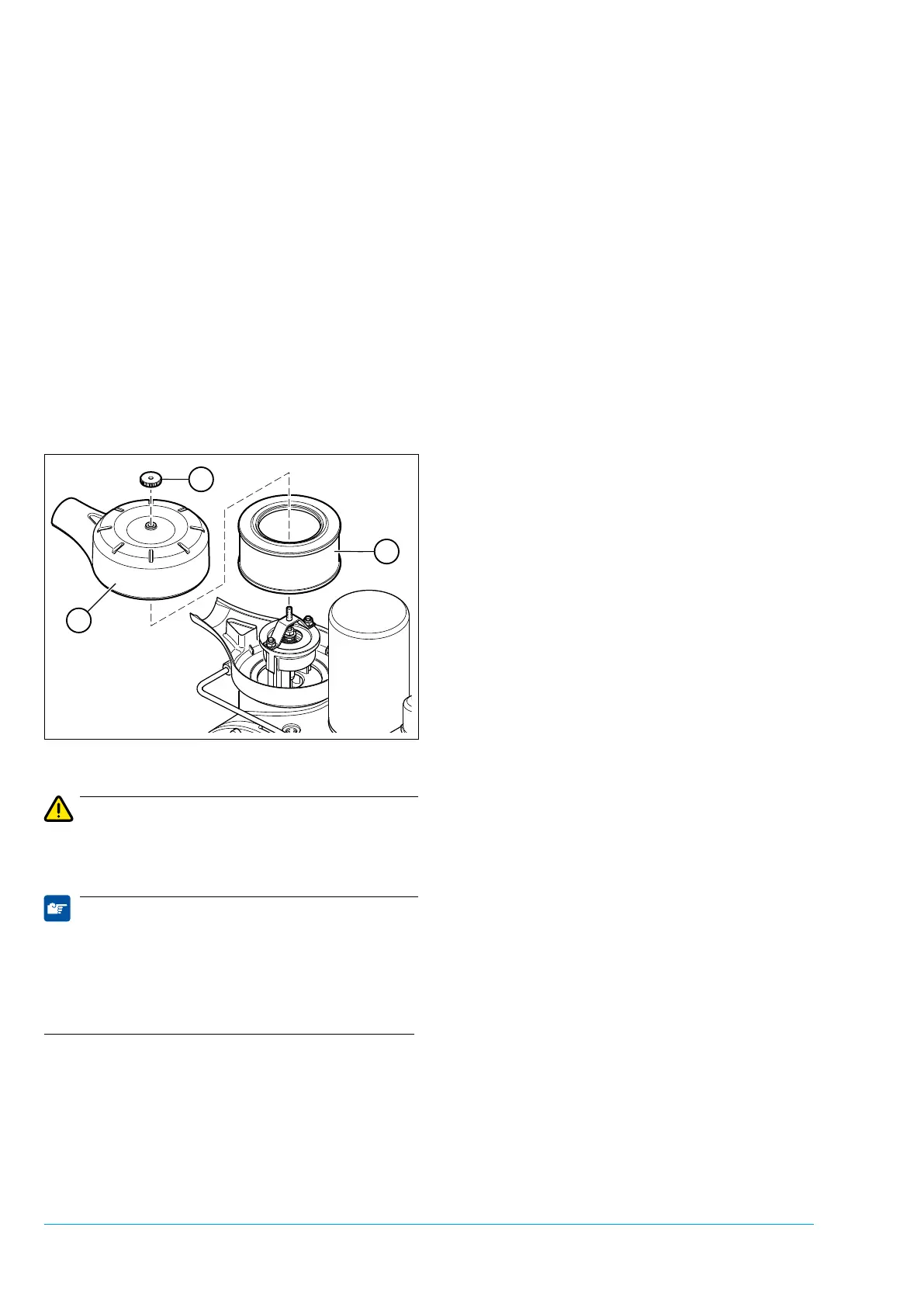
7.6.2 Replacing air lter element
Figure 7-5
Attention
No dirt or dust particles may get into the air inlet
of the screw compressor.
Note
It is not permissible to clean the lter element;
the lter element must always be replaced in
case of soiling!
Dispose of the old air lter element according to
the applicable regulations.
• Switch off the system and secure it against
unauthorized switch-on.
• Screw off the nut 1 and remove the lter
cover 2.
• Carefully remove dust from the lter housing.
• Remove the old lter element 3.
• Insert the new lter element in the lter hous-
ing.
• Lay on the lter cover, ensuring proper posi-
tioning during assembly.
• Tighten the wing nut.
• Switch on the screw compressor system.
• Conduct a test run and an operating test.


 To Next Page