IN-E-HyFlex-V4_10
Rotronic AG
Bassersdorf, Switzerland
Document code Unit
Instruction Manual
Document Type
HygroFlex transmitter version 4: instruction
manual
Document title
Page 21 of 61
© 2006; Rotronic AG IN-E-HyFlex-V2_10.doc
5.4 Re-attaching the ribbon cable (cover with optional display and
keypad)
Zero-insertion-force connectors are used for the ribbon cable that connects the cover and the main
printed circuit board.
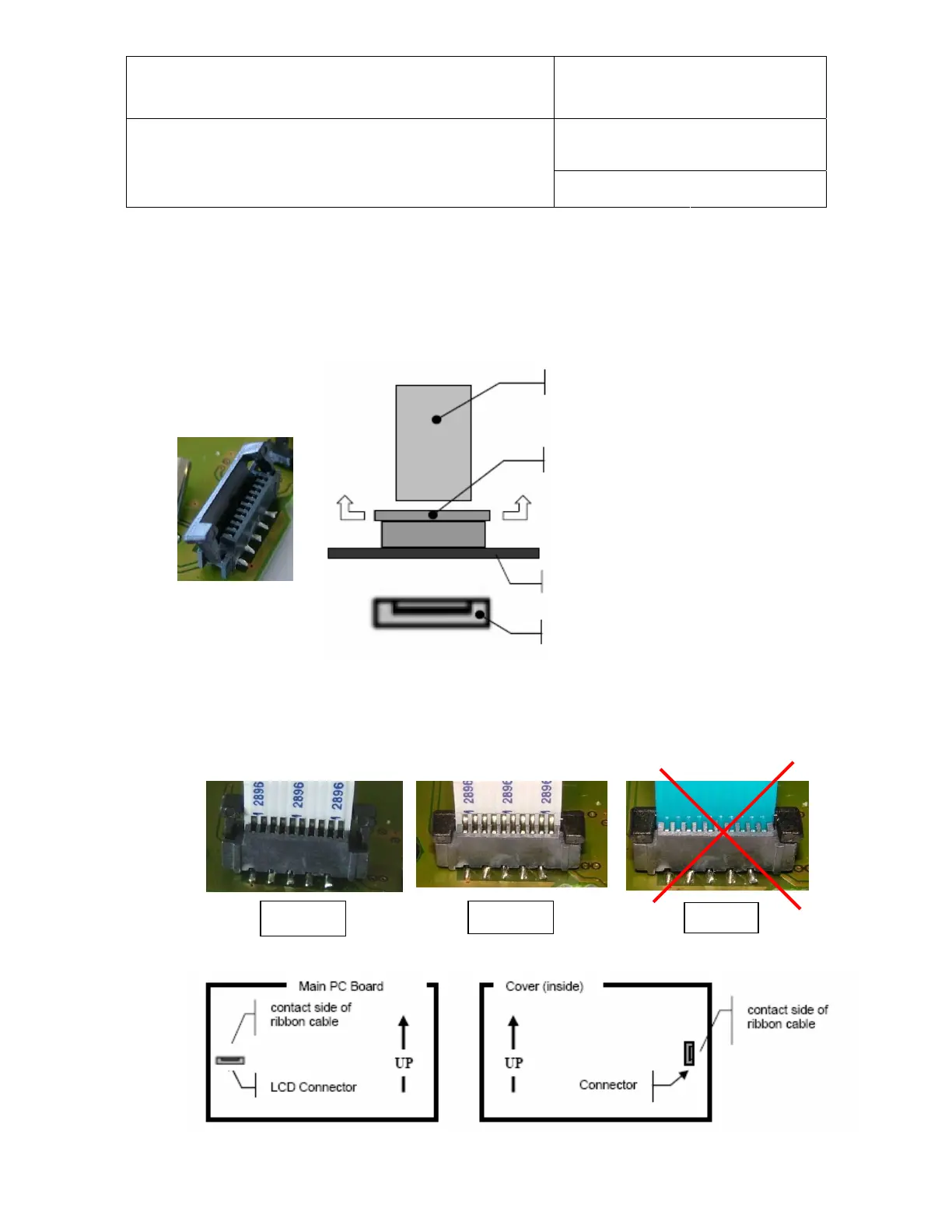
Ribbon cable (can be pulled out)
Zero-insertion-force connector
To unlock: grab both sides of
outer frame up and pull up
To lock:
ush down outer frame
printed circuit board
outer frame
To re-attach the ribbon cable, unlock the connector (see above). Each end of the ribbon cable has
a contact side and a blue insulated side. When inserting the cable in the connector, position the
contact side of the flat ribbon cable as indicated in picture 2. Slide the cable back into the
connector as indicated in picture 1. Lock the connector in place and verify the cable is firmly held in
place (picture 2).
Wrong!
Picture 1 Picture 2


 To Next Page