INITIAL SETUP AND PROGRAMMING
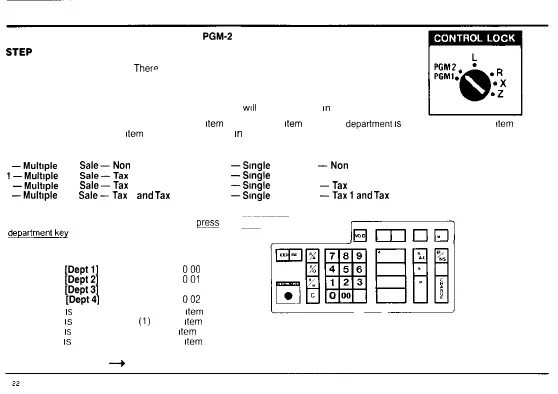
PROGRAM TWO: Turn the control lock key to
PGM-2
position us ng (MA) key
STEP ONE:
Department Function Options —
Ther°
are eight (8) options to choose from when programming your
four (4) departments You must program all four (4) departments before going on to step two
A department can be programmed as non tax or to automatically add either Tax 1 or Tax 2 to all
transactions A department can also be programmed to automatically add the combined tax rate of Tax
1 and Tax 2 to all transactions NOTE The actual tax rates
will
be programmed
in
Step 7
Each department can be programmed for multiple
item
sales or single
item
sales If a
department
is
programmed for single
item
sales a
cash sales transaction for one
item
only can be registered
in
a quick one step method (See Page 38 for Transaction Example)
The eight (8) department options are
0
—Multiple
Item
Sale—Non
Tax 4
—Single
Item Sale
—Non
Tax
1—Multiple
Item
Sale—Tax
1 5
—Single
Item Sale — Tax 1
2
—Multiple
Item
Sale—Tax
2 6
—Single
Item Sale
—Tax
2
3
—Multiple
Item
Sale—Tax
1
and
Tax
2 7
—Single
Item Sale
—Tax
land
Tax
2
Select the appropriate department option press the ass qned number
for the function desired on the keyboard then
pj^ess
the white
PROGRAM EXAMPLE
PRESS DISPLAY
0
[Depfl]
1
000
1 [Dept2] 2
001
5 [Dept3] 3 005
2 [Dept4] 4
002
Department 1
is
programmed for (0) Multiple
item
sale non tax
Department 2
is
programmed for
(1)
Multiple
item
sale Tax 1
Department 3
is
programmed for (5) Single
item
sale Tax 1
Department 4
is
programmed for (2) Multiple
item
sale Tax 2
GO ON TO STEP TWO
—>



 To Next Page