RTI INTELLIGENT MEETINGS
Technical Support: support@rticontrol.com - Customer Service: custserv@rticontrol.com 12
4. Microphone Cascading
Description:
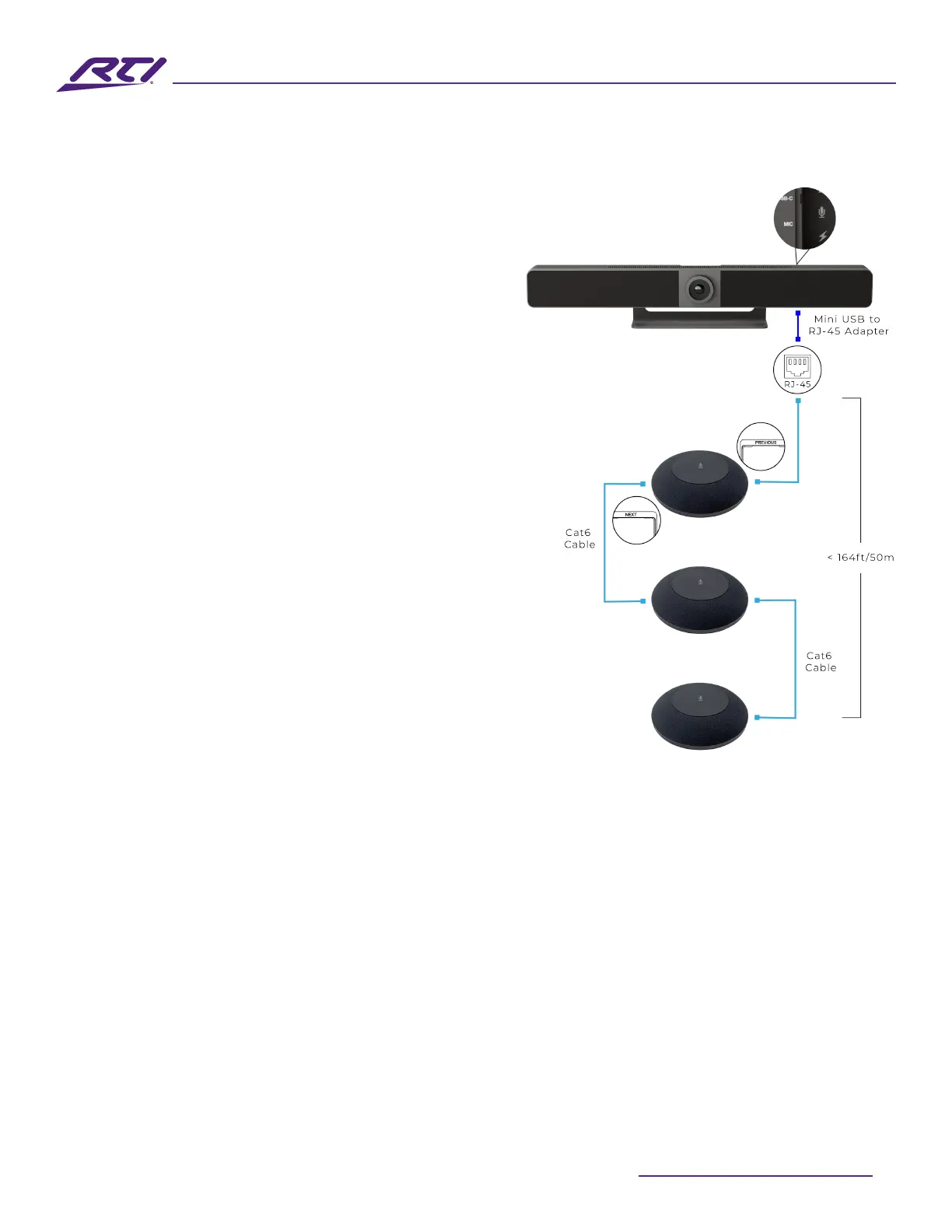
In spaces where users are situated beyond
the recommended range of the built-in MEMs
array microphones, the UC-IVB-50 can be
assisted by one or more UC-IVB-EXM Expansion
Microphones (optional accessory) for more direct
audio pickup. Each UC-IVB-EXM can be cascaded
to an additional UC-IVB-EXM to cover large areas
and/or multiple meeting participants.
Connection:
• Connect the supplied USB to RJ-45 adapter to
the MIC port of the UC-IVB-50.
• Connect a UC-IVB-EXM to the UC-IVB-50 using
a CAT6 cable from the PREVIOUS port of the
UC-IVB-50 to the RJ-45 port of the USB to
RJ-45 adapter.
• Additional UC-IVB-EXM Expansion
Microphones can be added by connecting a
CAT6 cable between the NEXT port of an
existing UC-IVB-EXM to the PREVIOUS port of
another downstream UC-IVB-EXM.
Note:
• Each UC-IVB-EXM Expansion Microphone has
an omnidirectional pickup pattern and a range
of 9.3ft (3m).
• For cascading of up to three microphones, the total length of all CAT6 cables in use shall not
exceed 164ft/50m.
• For cascading of up to ve microphones, the total length of all CAT6 cables in use shall not
exceed 82ft/25m.
Requirements:
• UC-IVB-50 4K Intelligent Video Bar
• USB to RJ-45 adapter (one is supplied)
• UC-IVB-EXM Expansion Microphone (one or more)
• CAT6 cable



 To Next Page