RTI INTELLIGENT MEETINGS
27
www.rticontrol.com
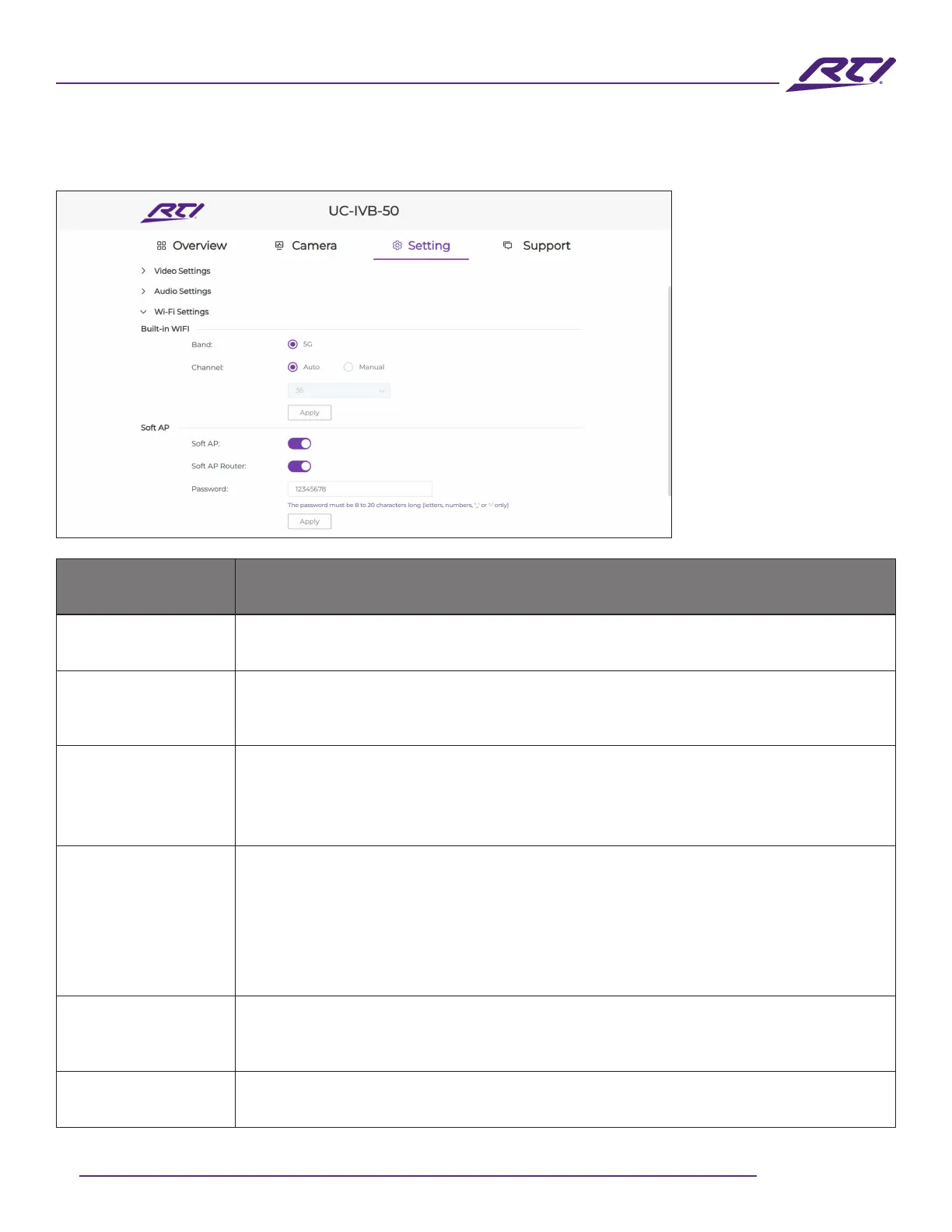
GUI Elements Description / Options
Band 5 GHz
Channel
• Auto (default setting): The UC-IVB-50 will select the best wireless channel
automatically based on the saturation of surrounding Wi-Fi networks.
• Manual: Manually assign a wireless channel for the UC-IVB-50.
Soft AP
• On (default setting): This enables the Soft AP (Access Point) which is a local
hotspot used to connect wireless devices for use with screen mirroring and
external network access.
• O: Disables the local Soft AP.
Soft AP Router
• On (default setting): This enables routing features for the Soft AP that will allow
wirelessly connected devices to have access to the LAN that the
UC-IVB-50 is connected to. The most common reason for enabling this option is
to grant internet access to wireless devices connected to the Soft AP, provided
internet access is available on the LAN that the UC-IVB-50 is connected to.
• O: Disables routing for the Soft AP.
Password
Congure the soft AP password. The password must contain between 8 and
20 alphanumeric characters, no spaces and can contain “_” and “-“ special
characters. By default, the password is set to “12345678”.
Apply Click to save and apply any setting changes.
6. WiFi Settings



 To Next Page