RTI INTELLIGENT MEETINGS
Technical Support: support@rticontrol.com - Customer Service: custserv@rticontrol.com 14
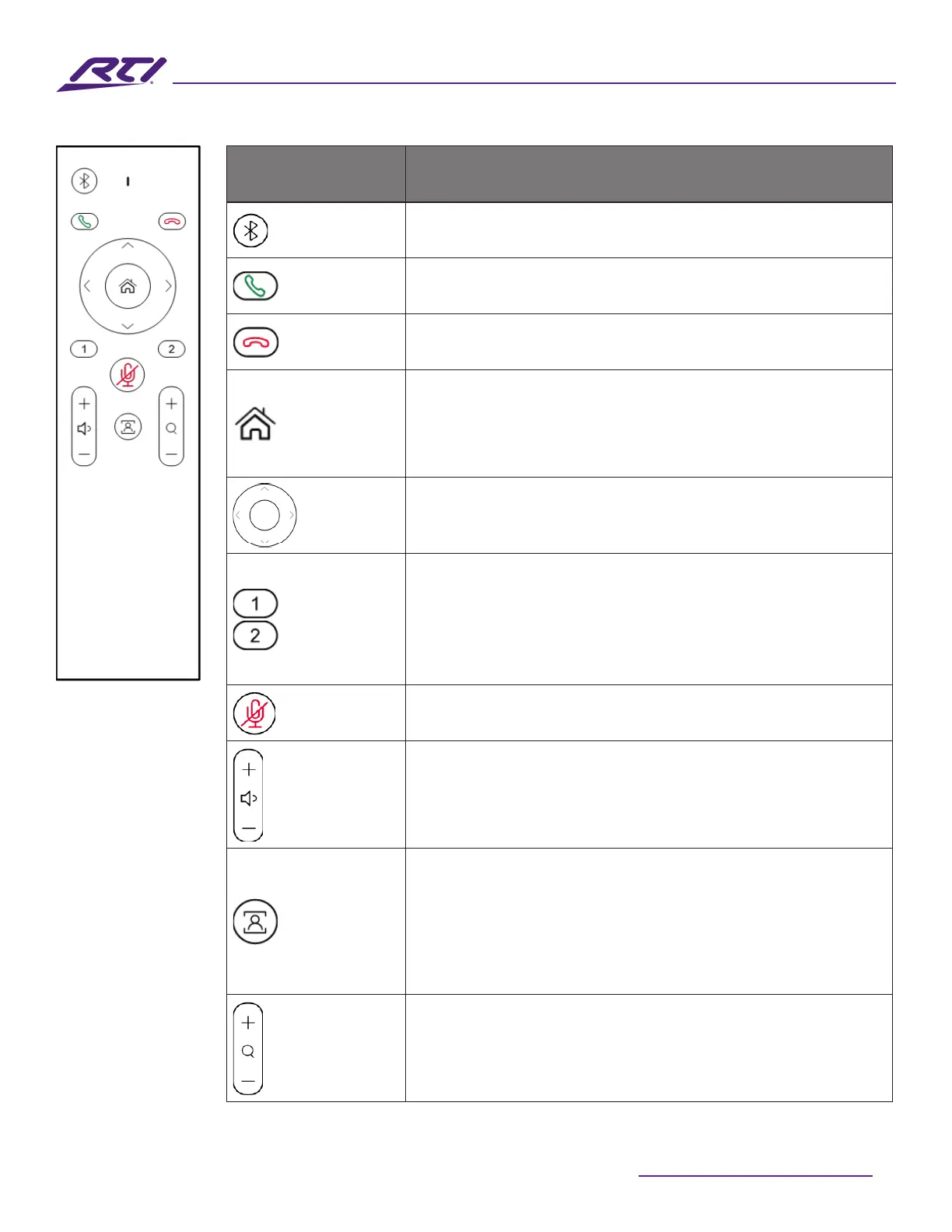
Buttons Description
Bluetooth
Reserved for future use
Answer
Reserved for future use
Hang Up
Reserved for future use
Home
• Press to return the camera to its default view (available
only when Tracking mode is o)
• Press and hold the button for ~2 seconds to display the
OSD that includes IP address, model name, etc.
Navigation
Press the directional buttons to reframe the camera using
the ePTZ function (only available when Tracking mode is
o)
Presets
• Press and hold either preset 1 or 2 for ~3 seconds to
save the current camera view to that preset
• Press either preset 1 or 2 to switch the camera view to
the saved preset position (Available only when Tracking
mode is o)
Mute/Unmute
Press to toggle all microphones between mute and un-
mute.
Volume
• Press the + or - buttons to adjust the volume up or
down
• Press and hold the + or – button to continuously adjust
the volume up or down
Tracking
Press to cycle between the available camera tracking
modes:
• Auto Framing
• Speaker Tracking
• O
Zoom
• Press the + or – button to zoom the camera view in or
out (Maximum 5x zoom)
• Press and hold the + or – button to zoom the camera
view continuously in or out



 To Next Page