EasyManua.ls Logo

RUKO F11PRO 2 - Optical Flow Positioning

RUKO F11PRO 2
72 pages
Print Icon
To Next Page IconTo Next Page
To Previous Page IconTo Previous Page
Loading...
F11PRO
2
User
Manual
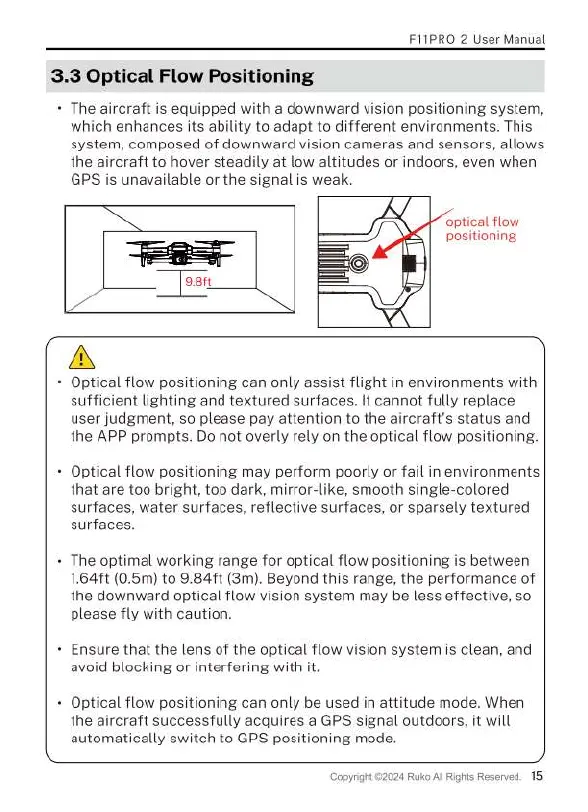
3.3
Optical
Flow
Positioning
+
The
aircraft
is
equipped
with
a
downward
vision
positioning
system,
which
enhances
its
ability
to
adapt
to
different
environments.
This
system,
composed
of
downward
vision
cameras
and
sensors,
allows
the
aircraft
to
hover
steadily
at
low
altitudes
or
indoors,
even
when
GPS
is
unavailable
or
the
signal
is
weak
optical
flow
positioning
E=—n
=
| |
B
A
«
Optical
flow
positioning
can
only
assist
flight
in
environments
with
sufficient
lighting
and
textured
surfaces.
It
cannot
fully
replace
user
judgment,
so
please
pay
attention
to
the
aircraft's
status
and
the
APP
prompts.
Do
not
overly
rely
on
the
optical
flow
positioning.
-
Optical
flow
positioning
may
perform
poorly
or
fail
in
environments
that
are
too bright,
too
dark,
mirror-like,
smooth
single-colored
surfaces,
water
surfaces,
reflective
surfaces,
or
sparsely textured
surfaces.
-
The
optimal
working
range
for
optical
flow
positioning
is
between
1641t
(0.5m)
to
9.84ft
(3m).
Beyond
this
range,
the
performance
of
the
downward
optical
flow
vision
system
may
be
less
effective,
so
please
fly
with
caution.
Ensure
that
the
lens
of
the
optical
flow
vision
system
is
clean,
and
avoid
blocking
or
interfering
with
it.
Optical
flow
positioning
can
only
be
used
in
attitude
mode.
When
the
aircraft
successfully
acquires
a
GPS
signal
outdoors,
it
will
automatically
switch
to
GPS
positioning
mode.
4
Ruko
Al
Rights
Reserved.
15

Related product manuals