EasyManua.ls Logo

RUKO F11PRO 2 - Communication Range

RUKO F11PRO 2
72 pages
Print Icon
To Next Page IconTo Next Page
To Previous Page IconTo Previous Page
Loading...
F11PRO
2
User
Manual
4.2.6
Smart
RTH
Button
+
Press
the
smart
RTH
button
&
on
the
remote
controller
to
activate
the
automatic
return-to-home
function.
Press
it
again
to
exit
RTH.
The
aircraft
will
hover
in
place
midway
through
the
return
journey
when
you
exit,
and you
can
then
use
the
stick
to
control
the
aircraft
4.3
Communication
Range
+
When
operating
the
aircraft,
adjust
the
position
and
distance
between
the
remote
controller
and
the
aircraft
as
needed.
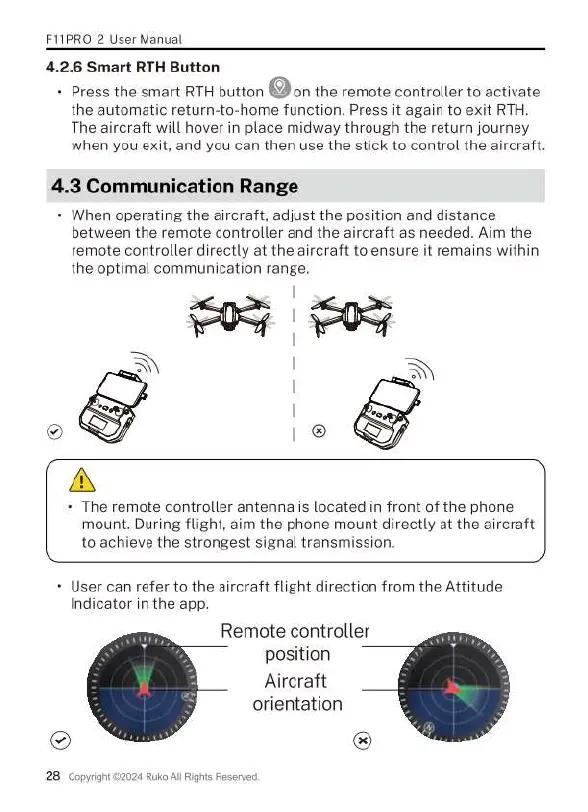
Aim
the
remote
controller
directly
at
the
aircraft
to
ensure
it
remains
within
the
optimal
communication
range.
-
The
remote
controller
antenna
is
located
in
front
of
the
phone
mount.
During
flight,
aim
the
phone
mount
directly
at
the
aircraft
to
achieve
the
strongest
signal
transmission.
+
User
can
refer
to
the
aircraft
flight
direction
from
the
Attitude
Indicator
in
the
app.
Remote
controller
position
Aircraft
orientation
®
28
Copyight
£2024
Ruko
All
Rights
Reserved

Related product manuals