EasyManua.ls Logo

RUKO F11PRO 2 - Smart Flight (Route Planning, GPS Follow, Fly Around, Cruise Control)

RUKO F11PRO 2
72 pages
Print Icon
To Next Page IconTo Next Page
To Previous Page IconTo Previous Page
Loading...
F11PRO
2
User
Manual
6.10
Smart
Flight
(Route
Planning,
GPS
Follow,
Fly
Around,
Cruise
Control
)
*+
F11PRO
2
has
four
types
of
smart
flight:
Route
Planning,
GPS
Follow,
Fly
Around,
and
Cruise
Control.
6.10.1
Route
Planning
Aircraft
flies
along
the
path
marked
on
the
App.
How
to
Start
(1)
Make
sure
that
the
Ruko
Mini
App
has
been
downloaded
and
installed
on
the
phone.
(2)
Connect
your
phone
to
the
remote
controller
with
the
data
cable,
and
enter
into
the
App
operation
interface.
(3)
Make
sure
the
map
is
loaded
on
the
Ruko
Mini
App
before taking
off
the
aircraft.
(4)
Take
off
the
aircraft
in
GPS
mode
and
ensure
flight
height
is
higher
than
the
nearby
obstructions.
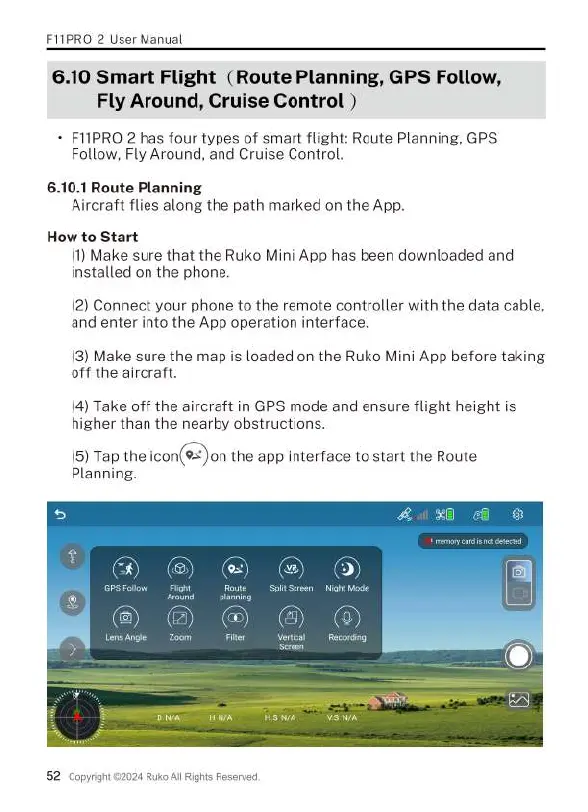
(5)
Tap
the
icon(9=)on
the
app
interface
to
start
the
Route
Planning.
(E)
52
Copyrig
Ruko
All
Rights
Reserved.

Related product manuals