EasyManua.ls Logo

RUKO F11PRO 2 - Compass Calibration

RUKO F11PRO 2
72 pages
Print Icon
To Next Page IconTo Next Page
To Previous Page IconTo Previous Page
Loading...
F11PRO
2
User
Manual
6.5
Compass
Calibration
+
If
the
aircraft
is
flying
in
an
environment
with
significant
interference
or
if
you
experience
unusual
behavior
indicating
possible
loss
of
control,
you
can
check
the
compass
interference
level
using
the
app.
Perform
a
compass
calibration
to
address
this
issue.
The
main
purpose
is
to
prevent
sensor
interference
from
causing
abnormalities,
which
could
lead
to
loss
of
control
and
potential
crashes.
Calibration
Steps:
(1)
Extend
the
aircraft's
four
arms
and place
it
on
a
flat,
open
surface.
(2)
Turn
on
the
aircraft
and
the
remote
controller,
and
ensure
they
are
paired
successfully.
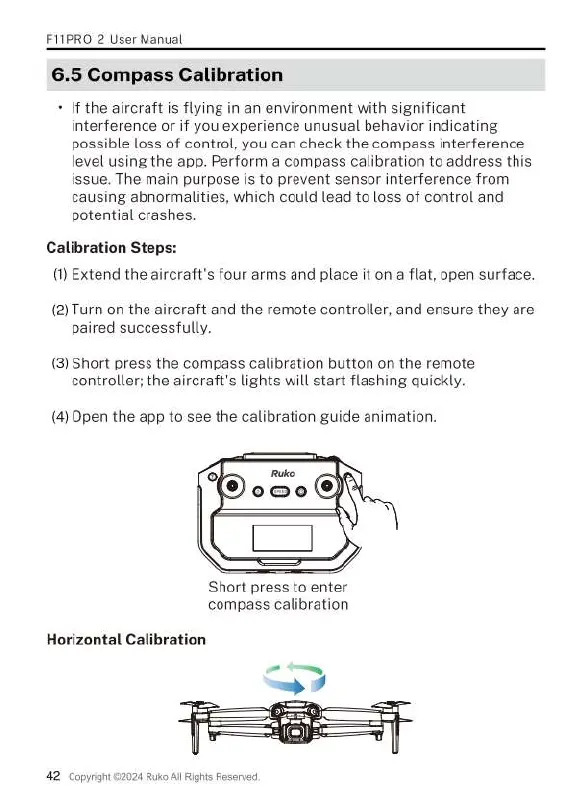
(3)
Short press
the
compass
calibration
button
on
the
remote
controller;
the
aircraft's
lights
will
start
flashing
quickly.
(4)
Open
the
app
to
see
the
calibration
guide
animation.
Short
press
to
enter
compass
calibration
Horizontal
Calibration
42 cop

Related product manuals