EasyManua.ls Logo

RUKO F11PRO 2 - Page 45

RUKO F11PRO 2
72 pages
Print Icon
To Next Page IconTo Next Page
To Previous Page IconTo Previous Page
Loading...
F11PRO
2
User
Manual
A
-
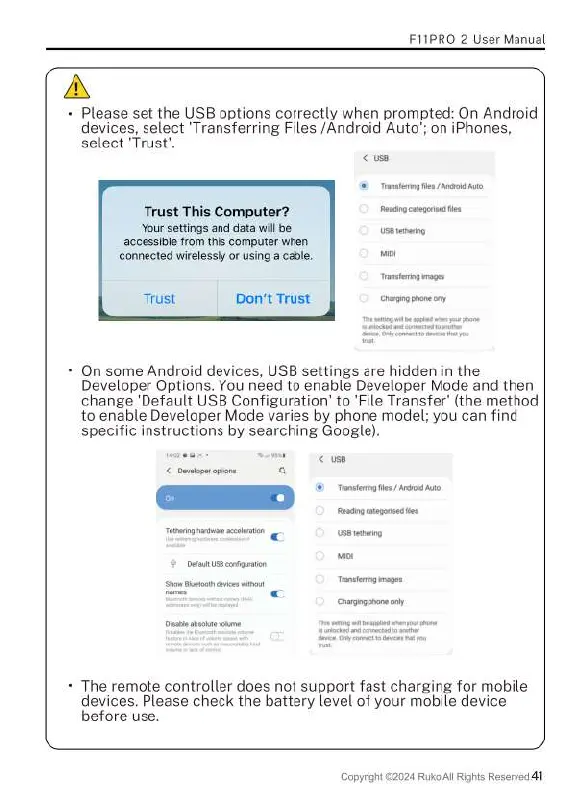
Please
set
the
USB
options
correctly
when
prompted:
On
Android
devices,
select
‘Transferring
Files
/Android
Auto';
on
iPhones,
select
‘Trust'.
Trust This
Computer?
e
Your
settings
and
data
i
[rep—
accessible
from
this
computer
when
connected
wirelessly
or
using
a
cable.
o,
Trust
Don't
Trust
Chargng
phanecry
*
On
some
Android
devices,
USB
settings
are
hidden
in
the
Developer
Options.
You
need
to
enable
Developer
Mode
and
then
change
'Default
USB
Configuration’
to
‘File
Transfer
(the
method
to
enable
Developer
Mode
varies
by
phone
model;
you can
find
specific
instructions
by
searching
Google).
Chagogporecny
*
The
remote
controller
does
not
support
fast
charging
for
mobile
devices.
Please
check
the
battery
level
of
your
mobile
device
before
use.
Copyright
©2024
Ruko
Al
Rights
Reserved
41

Related product manuals