EasyManua.ls Logo

RUKO F11PRO 2 - Attitude Indicator; More Features

RUKO F11PRO 2
72 pages
Print Icon
To Next Page IconTo Next Page
To Previous Page IconTo Previous Page
Loading...
F11PRO
2
User
Manual
@
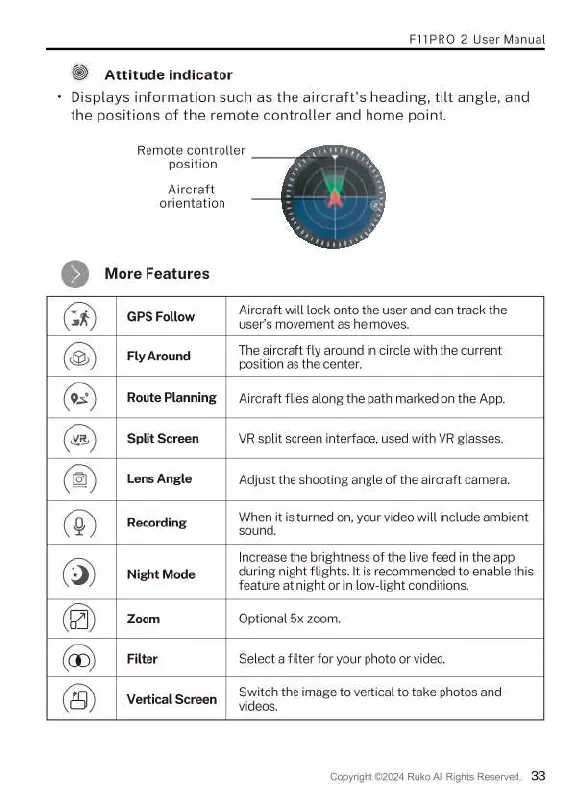
Attitude
indicator
+
Displays
information
such
as
the
aircraft's
heading,
tilt
angle,
and
the
positions
of
the
remote
controller
and
home
point.
Remote
controller
position
Aircraft
orientation
©
MoreFeatures
=
Aircraft
will
lock
onto
the
user
and
can track
the
(G
|
ersrato
|
Bt
e
@
Fly
Around
The
aircraft
fly
around
in
circle
with
the
current
position
as
the
center.
@
Route Planning
|
Aircraft
flies
along
the
path
marked
on
the
App.
@
SplitScreen
|
VR
split
screen
interface,
used
with
VR
glasses.
@
Lens
Angle
Adjust
the
shooting
angle
of
the
aircraft
camera.
Recording
Whenitis
turned
on,
your
video
will
include
ambient
9
sound.
Increase
the
brightness
of
the
live
feed
in
the
app.
)
|
NightMode
during
night
flights.
It
is
recommended
to
enable
this
feature
at
night
or
in
low-light
conditions.
(@)
|
zoom
Optional
5x
zoom.
@
Filter Select
afilter
for
your
photo
or
video.
s
.
Switch
the
image
to
vertical
to
take
photos
and
@
Vertical
Screen
|
411"
Copyright
©2024
Ruko
Al
Rights
Reserved.
33

Related product manuals