EasyManua.ls Logo

RUKO F11PRO 2 - Other

RUKO F11PRO 2
72 pages
Print Icon
To Next Page IconTo Next Page
To Previous Page IconTo Previous Page
Loading...
F11PRO
2
User
Manual
5.5
Other
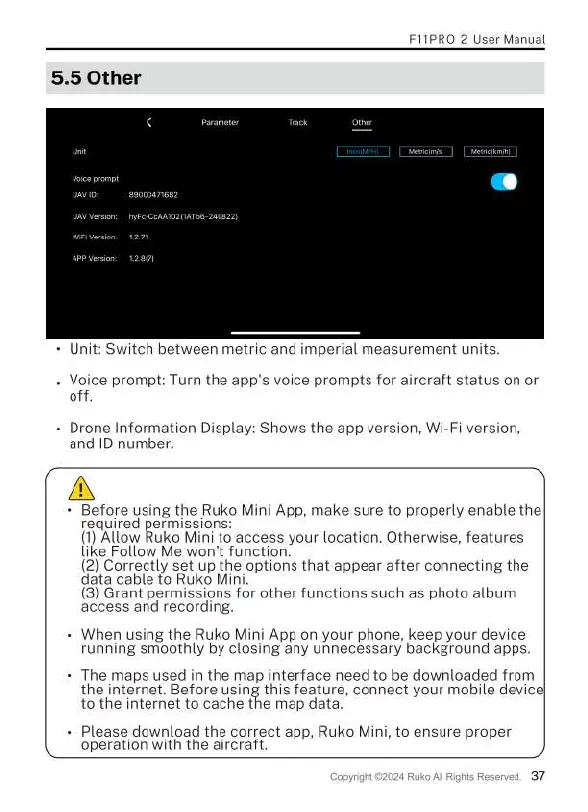
Unit:
Switch
between
metric
and
imperial
measurement
units
Voice
prompt:
Turn
the
app's
voice
prompts
for
aircraft
status
on
or
off.
Drone
Information
Display:
Shows
the
app
version,
Wi-Fi
version,
and
ID
number.
A
+
Before
using
the
Ruko
Mini
App,
make
sure
to
properly
enable
the
required
permissions
(1)
Allow
Ruko
Mini
to
access
your
location.
Otherwise,
features
like
Follow
Me
won't
function.
(2)
Correctly
set
up
the
options
that
appear
after
connecting
the
data
cable
to
Ruko
Mini
(3)
Grant
permissions
for
other
functions
such
as
photo
album
access
and
recording.
When
using
the
Ruko
Mini
App
on
your
phone,
keep
your
device
running
smoothly
by
closing
any
unnecessary
background
apps.
The
maps
used
in
the
map
interface
need
to
be
downloaded
from
the
internet.
Before
using
this
feature,
connect
your
mobile
devicel
to
the
internet
to
cache
the
map
da
Please
download
the
correct
app,
Ruko
Mini,
to
ensure
proper
operation
with
the
aircraft

Related product manuals