EasyManua.ls Logo

RUKO F11PRO 2 - Gyroscope Calibration

RUKO F11PRO 2
72 pages
Print Icon
To Next Page IconTo Next Page
To Previous Page IconTo Previous Page
Loading...
F11PRO
2
User
Manual
6.6
Gyroscope
Calibration
Gyroscope
Calibration
Steps:
*
Ensure
the
aircraft
is
placed
on
a
level
surface
with
enough
space
below
the
camera.
*
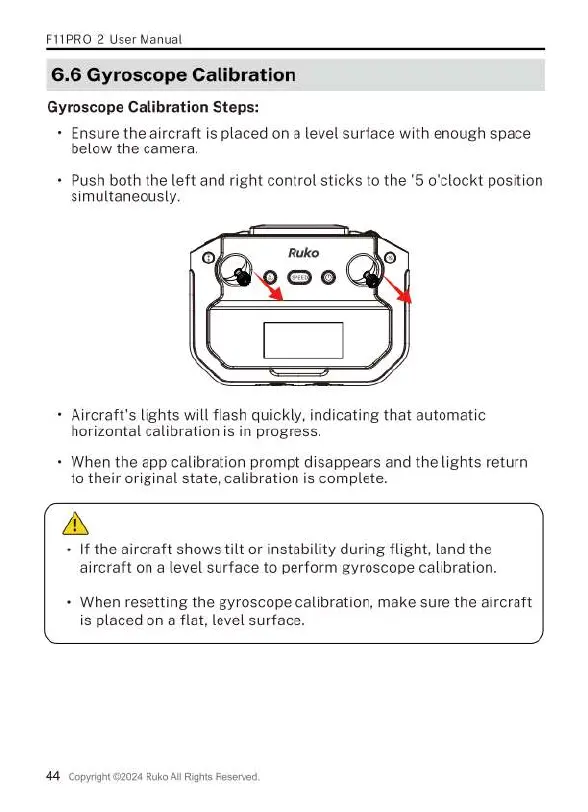
Push
both
the
left
and
right
control
sticks
to
the
'5
o'clockt position
simultaneously.
*
Aircraft's
lights
will
flash
quickly,
indicating
that
automatic
horizontal
calibration
is
in
progress.
+
When
the
app
calibration
prompt
disappears
and
the
lights
return
to
their
original
state,
calibration
is
complete.
A
+
If
the
aircraft
shows
tilt
or
instability
during
flight,
land
the
aircraft
on
a
level
surface
to
perform
gyroscope
calibration.
+
When
resetting
the
gyroscope
calibration,
make
sure
the
aircraft
is
placed
on
a
flat,
level
surface.
44
copyrign
24
Ruko
Al
Rights
Reserved

Related product manuals