EasyManua.ls Logo

RUKO F11PRO 2 - Propellers

RUKO F11PRO 2
72 pages
Print Icon
To Next Page IconTo Next Page
To Previous Page IconTo Previous Page
Loading...
F11PRO
2
User
Manual
3.4
Propellers
«
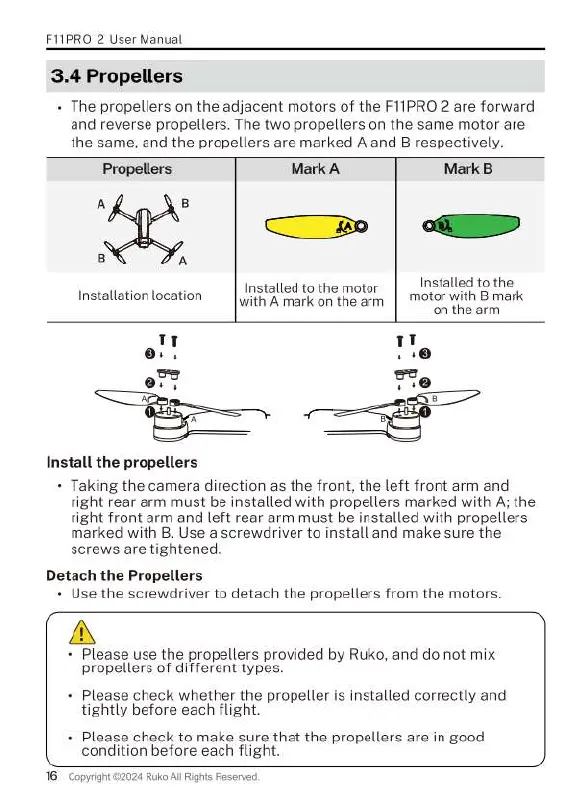
The
propellers
on
the
adjacent
motors
of
the
F11PRO
2
are
forward
and
reverse
propellers.
The
two
propellers
on
the
same
motor
are
the
same,
and
the
propellers
are
marked
A
and
B
respectively.
Propellers
Mark
A
Mark
B
A
B
B
A
Installed
to
the.
motor
with
B
mark
on the
arm
Installed
to
the
motor
Installation
location
[
it?
A
mark
on
the
avm
Tr
o,
077
Install
the
propellers
+
Taking
the
camera
direction
as
the
front,
the
left
front
arm
and
right
rear
arm
must
be
installed
with
propellers
marked
with
A;
the
right
front
arm
and
left
rear
arm
must
be
installed
with
propellers
marked
with
B.
Use
a
screwdriver
to
install
and
make
sure
the
screws
are
tightened.
Detach
the
Propellers
«
Use
the
screwdriver
to
detach
the
propellers
from
the
motors.
A
+
Please
use
the
propellers
provided
by
Ruko, and
do
not
mix
propellers
of
different
types.
-
Please
check
whether
the
propeller
is
installed
correctly and
tightly
before
each
flight
-
Please
check
to
make
sure
that
the
propellers
are
in
good
condition
before
each
flight.
16
Copyign
24
Ruko
Al
Righs
Reserved

Related product manuals