EasyManua.ls Logo

RUKO F11PRO 2 - Page 69

RUKO F11PRO 2
72 pages
Print Icon
To Next Page IconTo Next Page
To Previous Page IconTo Previous Page
Loading...
F11PRO
2
User
Manual
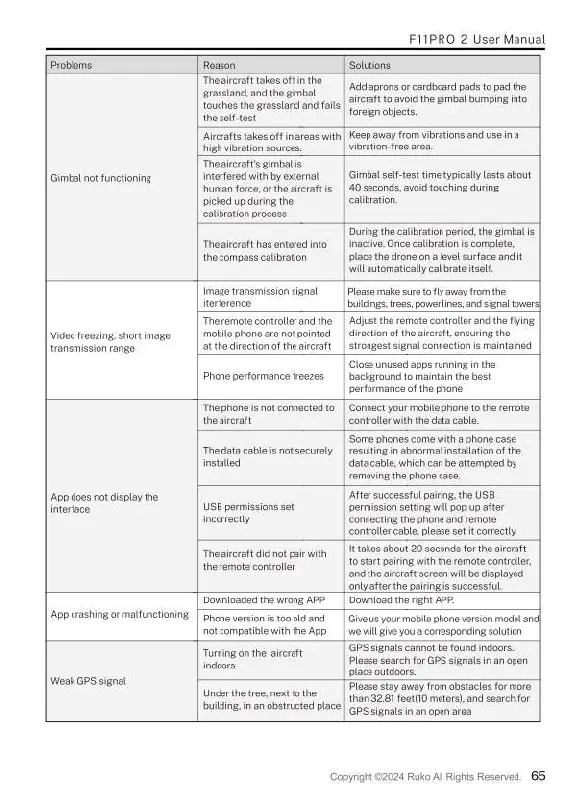
Problems.
Reasan
Solutions
Gimbal
not
functioning.
The
arcraft
takes
off
i
the
grassland,
and
the
gimbal
touchos
the
grassland
and
falls
the
sl
tast
Add
aprons
orcardboard
pads
o
pad
the
aicraft
o avoid
the
gimbal
bumping
ino
forsign objoct.
‘Aicrafts takes
o
in
areas
with
|
Keep
away
rom
vibrations
and use
na
high
vibration
sourcos
vibration-free
area
The
arcrafts
gimbal
s
interfored
with
by
external
human
force,or
the
aicrafts
|
40
seconds,
avoidtouching
dur
picked
up
during
the
callbration
process.
Gimbal
seif-tost
time
typically
asts
about
The
ircraft
has
entered
nto
the
compass
callbation
During
the
calbration
period.
he
gimbal
s
inactive.Onca
caibration
s
complate,
place
the
dron
on
a
level
surface
and
i
willautomaticalycalibrate
tsel.
Videofreczing,
short
image.
wansmission
ange.
Image
transmission
sgnal
iterference.
Ploase
make
surao
ly
avay
fromthe
bulings
treos,pawerlines,and
ignal
tower
The
remote
contraler
and the
|
Adjust
the
remote
contraler
and
the
fling
mabile
phone
are
ot
pointed
atthe
direction
of
the
arcraft
_|
strongest
signal
connection
s
maintained
direction
of
the
airraf
ensuring
the
Phone
performance
freezes.
Close
unused
apps
running
i the
background
to
maintain
the
best
performanca
of
the
phone.
App
does
not
display
the.
intorface.
T
phona
i
not
connected
to_|
Connct
your
mobile
phone
o
the
remata
theairraft
Gontaller
withthe
data
cable.
‘The
data
cable
s
not
securely
|
resulting
in
sbrormal
nstallsion
f
the
instaled
Some
phones
come
with
a
phona
case
data
cable,
which
can
be
attempted
by
removing
the
phone
case
USB
permissions
set
incorrectly
After
successfulpairng
the
USB
permission
setting
will
pop
up after
connecting
the
phone
and
remote.
controller
cable,
please
set
i
correcly
The
sircraft
dic
notpair
with
the
remote
controler
ttakes
about
20
seconds
for the
aircraft.
t05tartpairng
with
the
remate
controler
and
the
aircrat
screen
will
be
displayed
only
afterthe
pairing
is
successful.
App
crashing
or
malfunctioning
Dovnloaded
the
wrong
AP
Downlosd
therght
APP.
Phone
version
s {00
ld
and
ot
compatible
with
the
App
Give
usyour
mobil
phone
version
madet
and|
we
il
give
youa
cortesponding
soluton
Weak
GPS
signal
Turning
on
the
aircraft
indoors
'GPS signals
cannot
be
found
indoore.
Plaase search
for
GPS
signals
in
an
open
place
outdoors.
Under
thetree
et
to
the
buiging,in
an
obstructed
place
Plaaso
stay
away
from
obstaclas
formore
than
3281
foot(10
meters),
and
search
for
(GPS signals
nan
opon
arca
Copyright
©2024
Ruko
Al
Rights
Reserved.
65

Related product manuals