
 Need help?
Do you have a question about the S.& A.S. MicroZed V3.5 and is the answer not in the manual?
Lists key features of the MicroZed v3.5 elevator controller module.
Details technical specifications like supply voltages, inputs, outputs, and norms.
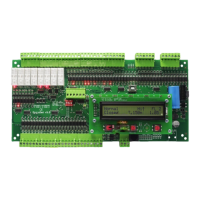
Illustrates the physical arrangement of terminals on the controller board.
Lists and describes the function of each input terminal on the controller.
Details the output terminals for different drive types (AC, VVVF, Hydraulic).
Describes terminals for indicator outputs like Up/Down arrows and floor information.
Details the terminals for connecting an incremental encoder for floor information.
Introduces the terminals used for elevator calls.
Lists call terminal allocations on the main board for various modes.
Details call terminal allocations on extension boards (Board #1).
Explains how to connect communication terminals for group operation.
Provides translations for elevator status terms in multiple languages.
Provides translations for swinging door status terms in multiple languages.
Provides translations for automatic door status terms in multiple languages.
Explains how to access and view error logs and fault information on the LCD.
Details the procedure for clearing error logs and resetting error counts.
Lists error messages, their descriptions, severity levels, and recommended actions.
Provides translations for fault messages in multiple languages.
Explains the password system for accessing the menu and its types.
Describes the procedure to enter the menu using push buttons and password entry.
Details various menu parameters, their settings, and default values.
Provides French and Arabic translations for menu items.
Explains how to simulate and register elevator calls using the onboard interface.
Details how to perform inspection operations using the onboard interface.
Describes how to cancel car calls and the available methods.
Explains how to configure door mapping for cabins with two doors.
Lists prerequisites for direct approach installation using an encoder.
Describes necessary settings in the main menu for direct approach.
Outlines the steps for performing a learning trip for direct approach.
Explains how to calculate distances for direct approach implementation.
Details how to set up floor access control and passcodes.
Explains how car calls are registered when access control is enabled.
Guides through installing the firmware upgrade software.
Explains the process of installing the USB driver for the SAS device.
Details driver setup for Windows Vista and Windows 7.
Details driver setup for Windows XP.
Guides through the actual firmware upgrade process using SAS_PTool.
Explains firmware upgrade via a smartphone app.
Details installing the SASPTool app from the Google Play Store.
 General
| Brand | S.& A.S. |
|---|---|
| Model | MicroZed V3.5 |
| Category | Control Unit |
| Language | English |

 To Next Page