Chapter 15
Advanced Features
Revision C, August 2013
15-1
Manual E-Resp
TM
thresholds
Respiration waveform gates are generated automatically for E-Resp
TM
, P-Resp
TM
and
User Resp. However, in the case of the E-Resp
TM
waveform, the option also exists to
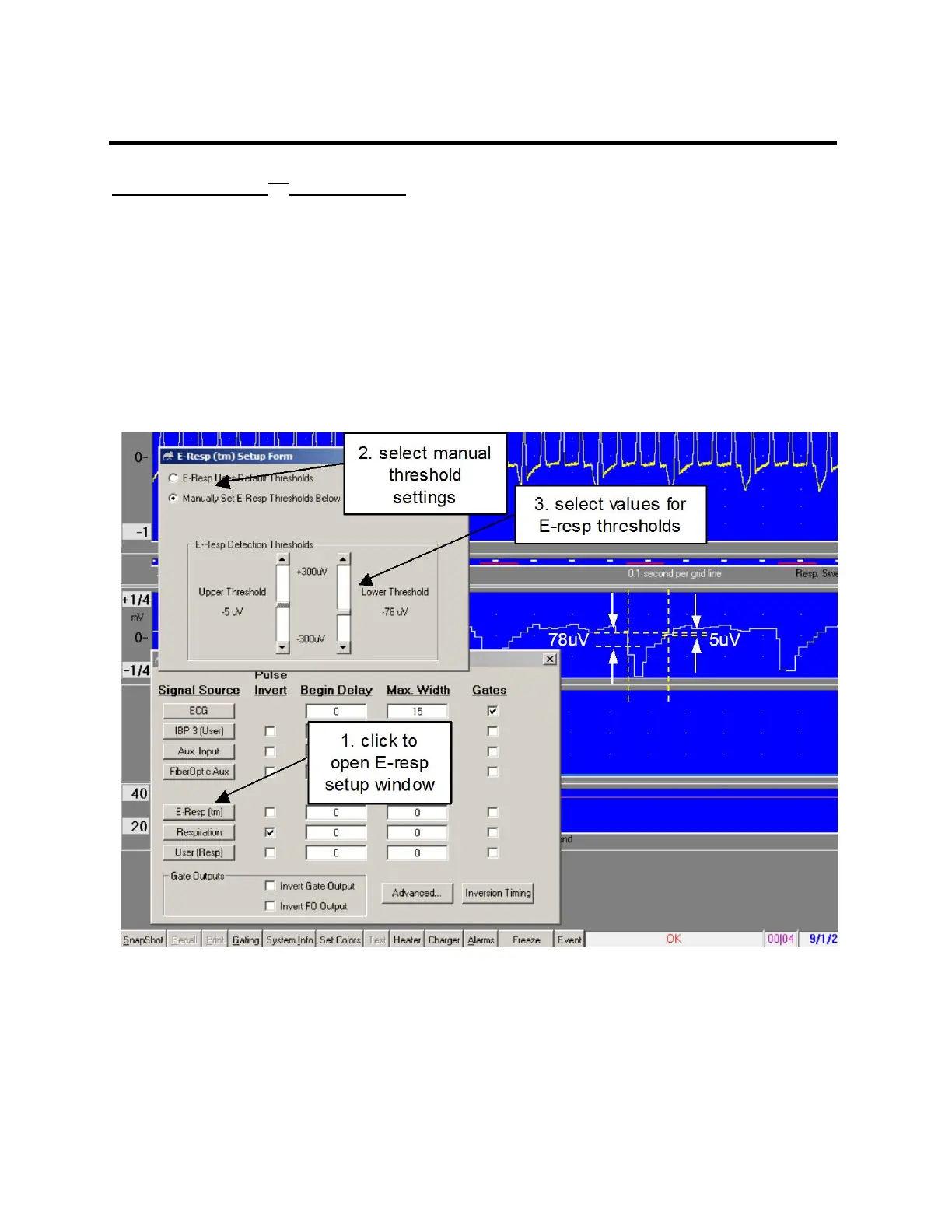
manually set the thresholds for gate generation. The E-RESP SETUP window can be
opened by clicking on the E-Resp button in the GATING SETUP window.
For the example shown, the pulse invert check has been removed in the gating setup
menu. This allows detection of the dip with manual thresholds. The gate starts when
the waveform fall below the lower threshold of -78µV and ends when the waveform rises
above the upper threshold of -5µV.
Once the manual thresholds are set to detect inspiration, the pulse invert box can be
selected to switch the gate to expiration. Gate position can also be adjusted using
Begin Delay and Max Width settings.



 To Next Page