10 Fan Coil FC600 Instruction Manual
M
M
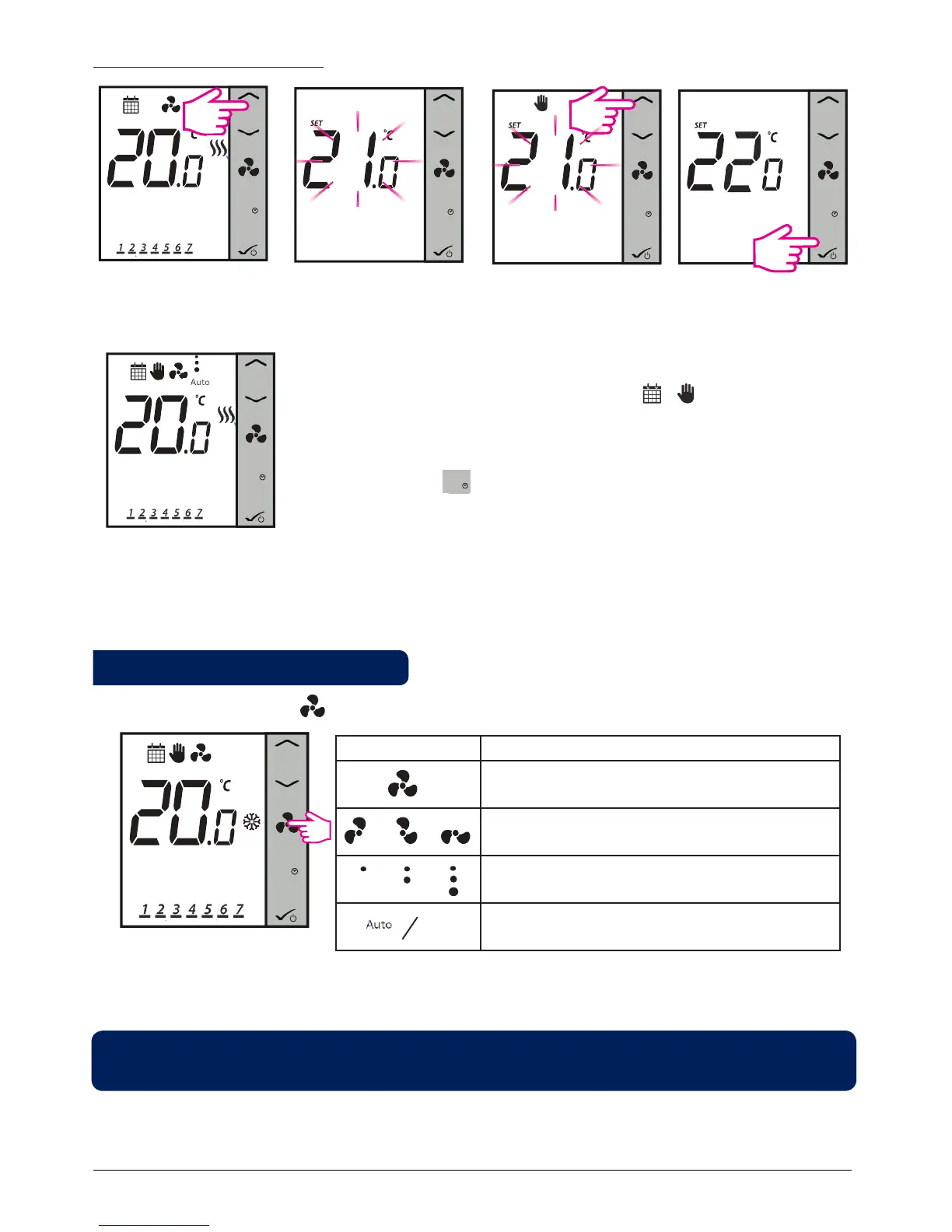
Press arrows to check setpoint
After 1 sec Set point will ash
M
Press Up/Down to increase/
decrease setpoint
M
Press OK to save and exit
For programmable thermostat
M
The thermostat will now return to home screen and it will follow new setpoint.
It now operates in Temporary Override mode. Once the mode is activated,
the LCD will display the calendar and hand icons After entering
this mode, the thermostat will use this temporary override setpoint to control
room temperature until next Program start time. Then it goes backs from
Temporary Override to Program mode.
If press Mode Button during Temporary Override, it will get canceled and
the thermostat will enter previous mode.
Note: If you are using the Mode Button, please make sure that thermostat is following the appropriate Heating
or Cooling mode (if both are available).
You can use the Fan Button to adjust the fan speed.
M
Press to select fan speed
Animation Meaning
Fan is not active
When the fan is running, the fan icon is animated
Fan speed: Low, Medium, High
Fan speed on Auto / Off. When fan is Off all dots
and Auto icon disappears
By default, the fan is on only when the Fan Coil calls for heating or cooling.
Note: In program mode, the default fan mode is automatic. The fan mode can be changed to Manual by
pressing the Fan Button. The fan will not return to the auto mode until the next program time.
2.6 Fan control
00:00
00:00
.
00:00



 To Next Page