35 Fan Coil FC600 Instruction Manual
3.14 Using/Adding OneTouch
OneTouch is a set of rules that can be applied to your thermostat. You can choose to enable or disable them
any time. OneTouch tells your thermostat exactly how to behave depending on your input. There are 3
predefined OneTouch rules in the App.
• Party mode - sets the thermostat on 21 C for 2 hours
• Run comfort temperature - Set thermostat to 21 C
• Run frost mode - Set thermostat to frost mode
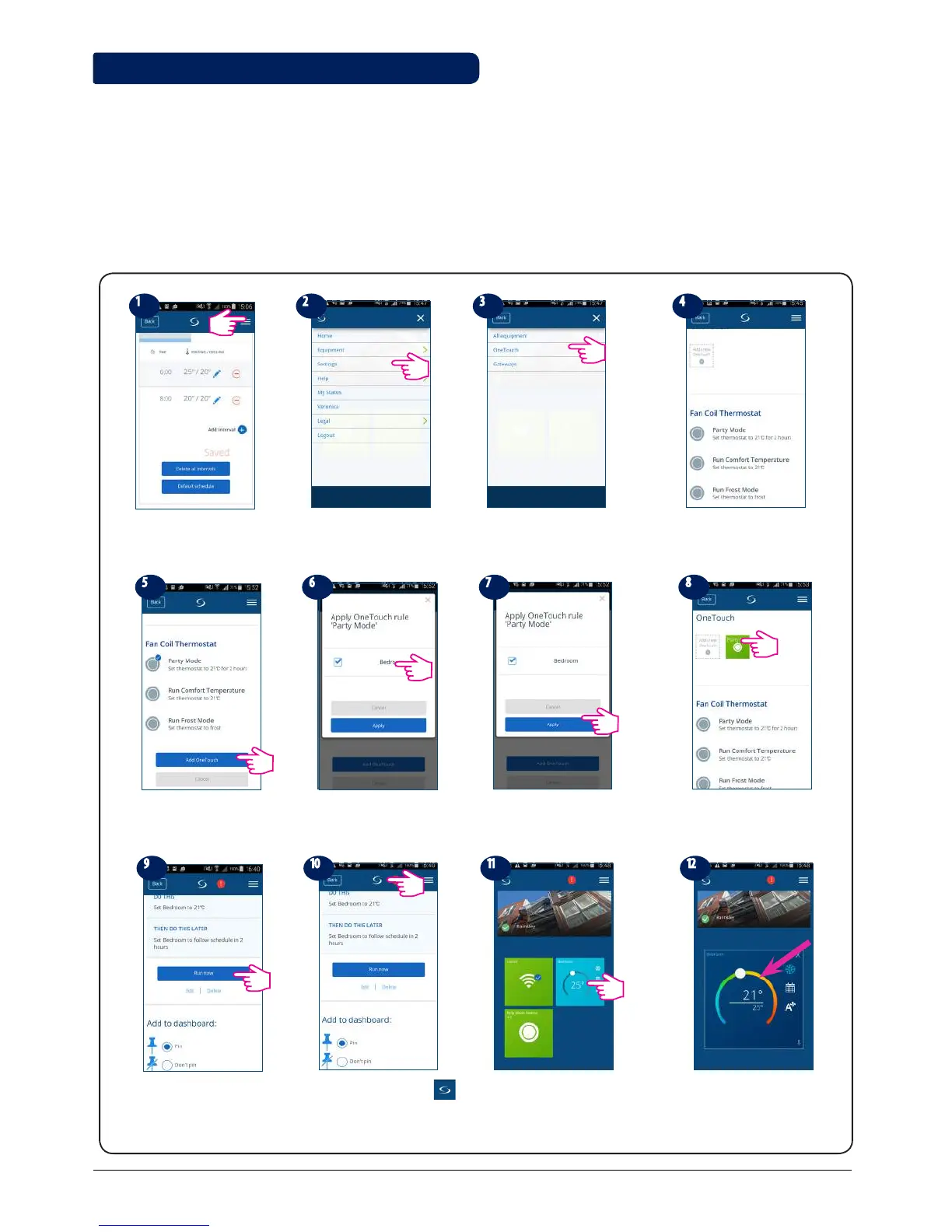
To activate a pre-existing OneTouch, please follow the steps below. For example, you want to set the Party
Mode OneTouch
Tap the menu icon
Choose settings
Select OneTouch Tap on Party Mode
Tap Add OneTouch Choose devices you want to
apply the rule to
The OneTouch is added!
Press the button to get
the OneTouch running.
OneTouch tile appears on your home
screen and thermostat went blue
meaning it is cooling down.
Your thermostat is set to
21 ⁰C
Go to home screen by
tapping
Tap Apply



 To Next Page