9 Fan Coil FC600 Instruction Manual
After the Fan Coil (FC600) has been installed accordingly to your system (for the installation and different
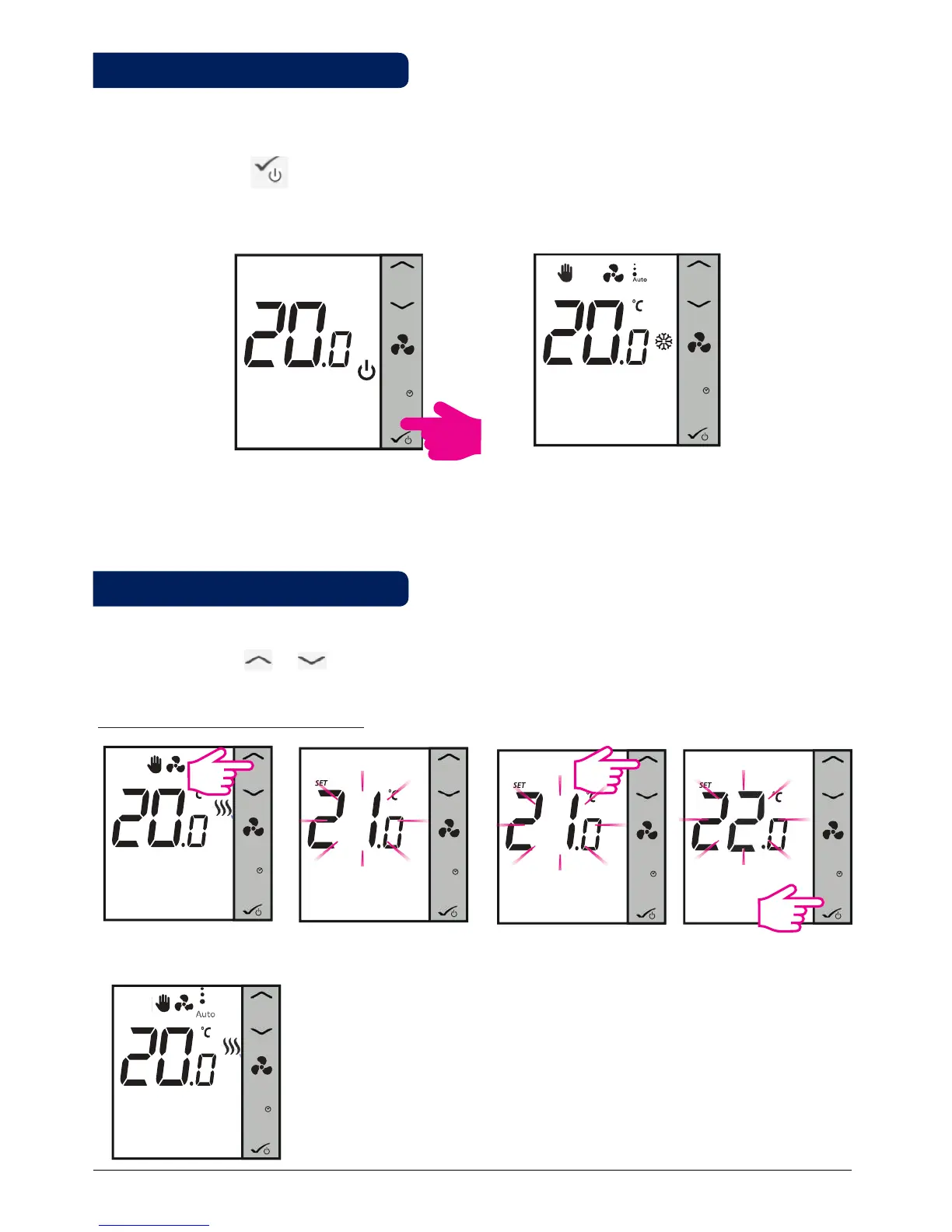
systems description please refer to the Installer Section in chapter 4) it will go into STANDBY Mode. To start
using your FC600 and adjust room temperature, create schedules and operate the fan you will need to wake
it up. Simply press the button for 3 seconds. The icons on your screen will show up depending on your
settings. The time should be 12 AM. Note: Press any button to activate the LCD first!
M
M
M
M
Press arrows to check setpoint
The current setpoint temperature
will start ashing
Setpoint temperature is the temperature you want to set or the temperature set by the program. Under your
home display, press or to view the set point temperature. When the program is running, after the
short press of the Up/Down arrows, the LCD will show the current program setpoint, with the Set icon.
M
Press Up/Down to increase/
decrease setpoint
M
Press OK to save and exit
Note: By default, if you are using the thermostat without the Internet, it will be non-programmable, meaning
that you cannot set programs. The thermostat can be switched to programmable mode by changing the d00
parameter from 0 to 1 in Installer Mode. Find more information in the Installer Section.
For non-programmable thermostat
M
The thermostat will now return to home screen and it will follow new setpoint.
2.5 Temperature Setpoint
2.4 Power Up
3 sec
00:00
00:00
00:00
.



 To Next Page