15 Fan Coil FC600 Instruction Manual
M
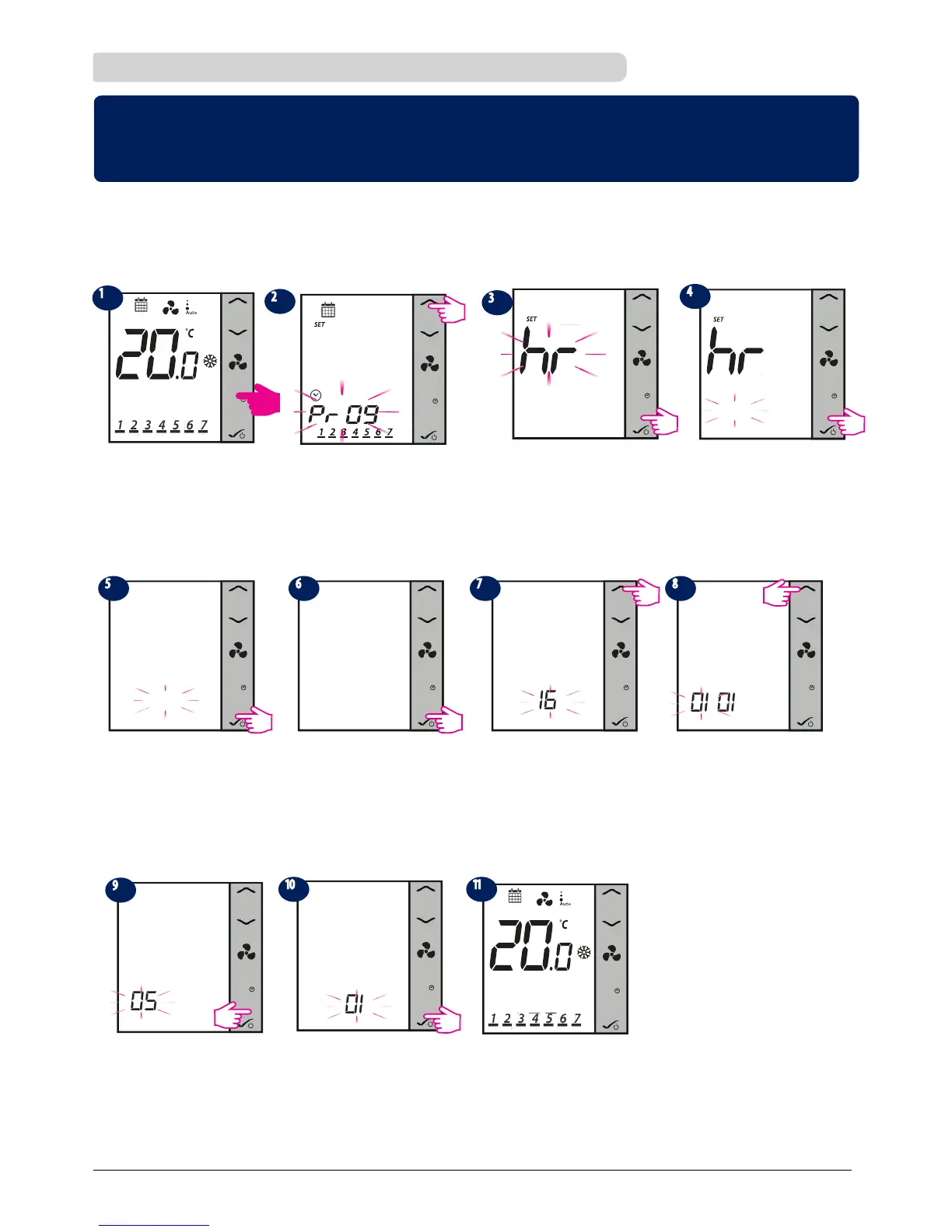
Press Mode Button for 3 seconds.
Press OK button to enter
hour setup.
M
Using UP/DOWN arrow
enter hours value.
Press UP arrow 1 time.
M
2.8.1 Setting date and time
M
09:00
Press OK. Enter minutes value.
M
09:00
Press OK.
M M
20 16
Select year. Press OK.
01 01
Using the arrows, select month.
M
05 01
Select date. Press OK
M
After date and time are set, thermostat
will go to home screen.
After you have completed
time and date setup, you
can start setting up your
schedules and programs.
M
05 01
Press OK.
Note: If your thermostat is non-programmable, it will jump step nr. 2 from below and will do directly
to step 3! Also, after step 6 it will exist to home screen. You cannot set the date on non-programmable
thermostats.
* if programmable only
* if programmable only * if programmable only
* if programmable only
* if programmable only * if programmable only
09:00
Note: Press any button to turn on the LCD first!
3sec
00:00
M
00:00



 To Next Page