Troubleshooting
Samsung Electronics 4-39
t%FUFSNJOFTXIFUIFSPSOPUUIFPVUEPPSVOJUJOTUBMMFECFGPSFUIFDPNQSFTTPSPQFSBUJPOJTNBMGVODUJPOJOH
t*GJUJTEFUFSNJOFEUIBUBOJOTQFDUJPOPGUIFQSFTTVSFTFOTPSJTSFRVJSFEQMFBTFQFSGPSNUIFJOTQFDUJPOJOUIFGPMMPXJOHPSEFS
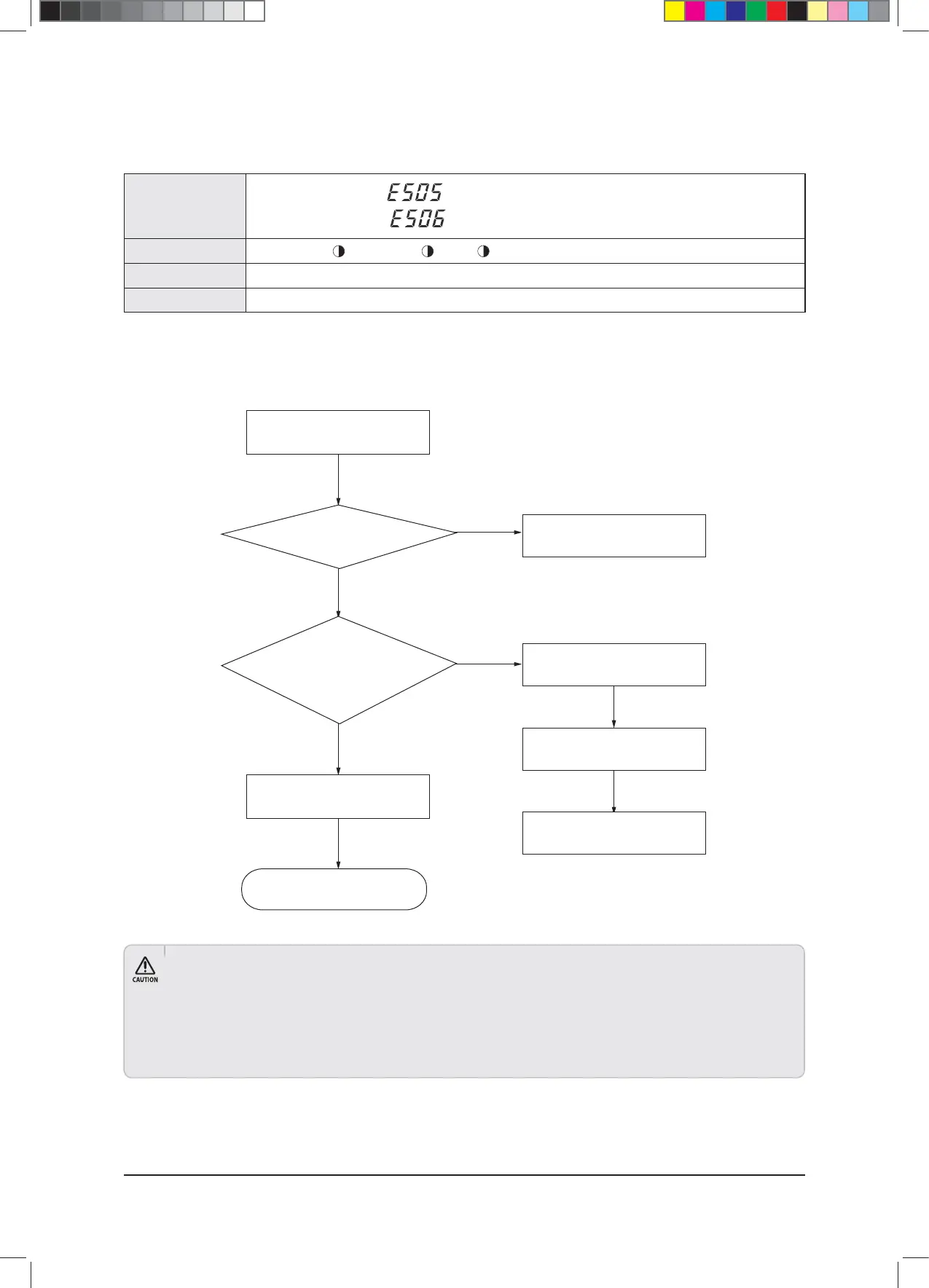
■ Pressure sensor auto inspect
×(Operation) (Reservation) (Blast) (Filter) ×(Defrost)
Low pressure sensor error:
(Print S-net pro result report “Inspection required”)
High pressure sensor error:
(Print S-net pro result report “Inspection required”)
t)JHIMPXQSFTTVSFTFOTPSNBMGVODUJPO
t1MFBTFSFGFSUPEFUFSNJOJOHNFUIPECFMPX
Indoor Unit Display
Judgment Method
Special Cause
Outdoor Unit Display
Yes
Yes
Entire outdoor unit vacuum mode
Is the service valve
of the installed outdoor unit
open?
Clear entire outdoor unit
vacuum mode
End
Open outdoor unit service valve
Reset outdoor unit
Perform test-run
Analyze cycle data & check/replace
faulty pressure sensor
Does the
pressure sensor value of the installed
outdoor unit satisfy: “Maximum/minimum range
of high pressure , “Maximum/minimum
range of low pressure
under 2”
No
No
● Pressure sensor auto inspect will not run if outdoor unit is installed by itself.
● When running pressure sensor auto inspect, an error may occur even in normal conditions if pressures in the outdoor units are uneven.
● When “Inspection required” is determined for pressure sensor, all outdoor units will display an error.
● When “Inspection required” is determined for pressure sensor, auto inspect will end.
● When checking the problematic pressure sensor, please differentiate by analyzing the S-net pro Data after performing a test-run for at
least 1 hour. (DVM Plus IV test-run manual: please refer to check cycle problem and measures to take)
$9;&6+B$BaLQGG



 To Next Page