32
Connecting to a TV Viewing Card slot
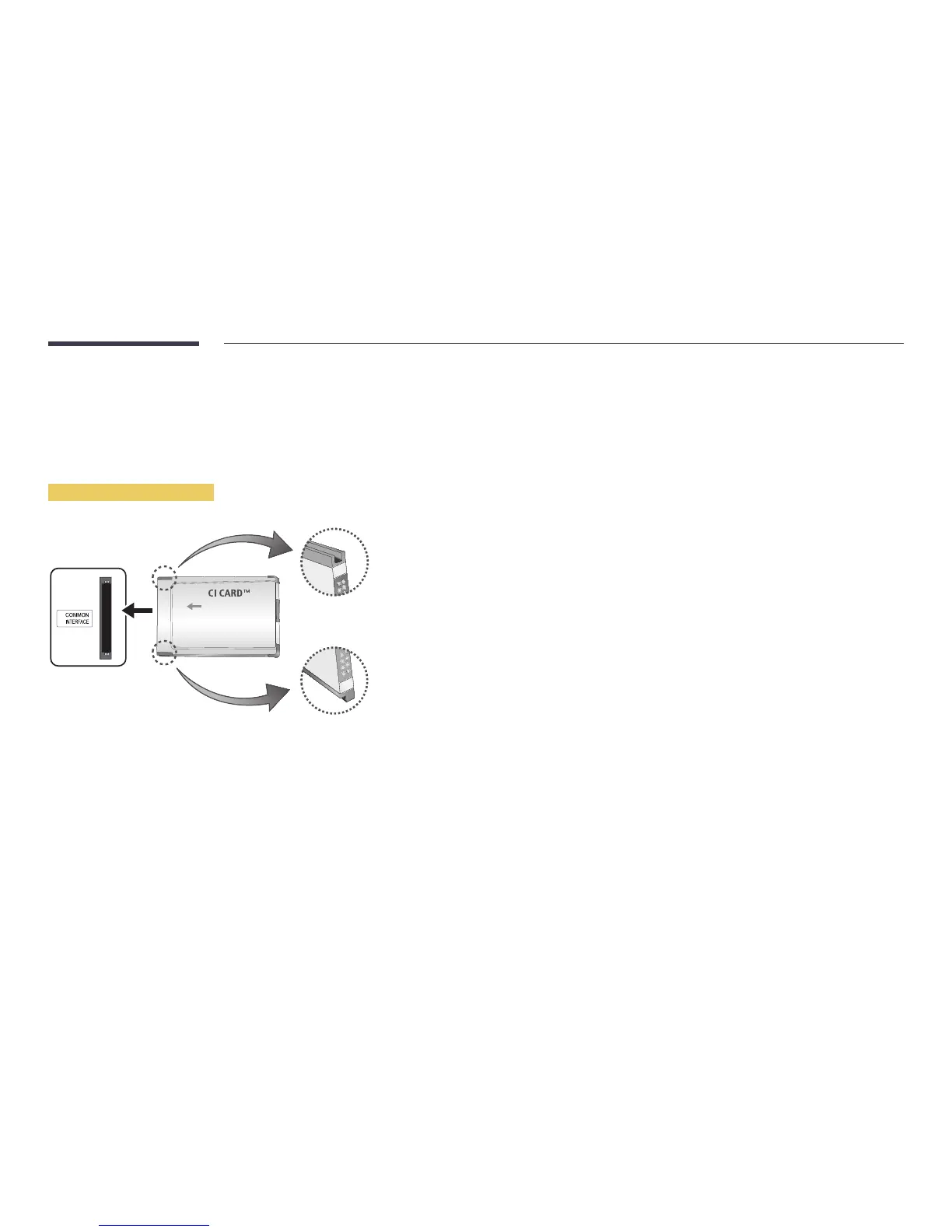
To connect the CI CARD, follow these steps:
―
CI card slots are available, depending on the model.
Using the “CI or CI+ CARD”
To watch paid channels, the “CI or CI+ CARD” must be inserted.
―
Turn the TV off to connect or disconnect a CI card.
•
If you don’t insert the “CI or CI+ CARD”, some channels will display the message “Scrambled Signal”.
•
The pairing information containing a telephone number, the “CI or CI+ CARD” ID the Host ID and
other information will be displayed in about 2~3 minutes. If an error message is displayed, please
contact your service provider.
•
When the configuration of channel information has finished, the message “Updating Completed” is
displayed, indicating the channel list is updated.
―
You must obtain a “CI or CI+ CARD” from a local cable service provider.
―
When removing the “CI or CI+ CARD”, carefully pull it out with your hands since dropping the “CI
or CI+ CARD” may cause damage to it.
―
Insert the “CI or CI+ CARD” in the direction marked on the card.
―
The location of the COMMON INTERFACE slot may be different depending on the model.
―
“CI or CI+ CARD” is not supported in some countries and regions; check with your authorized
dealer.
―
If you have any problems, please contact a service provider.
―
Insert the “CI or CI+ CARD” that supports the current aerial settings. The screen will be distorted
or will not be seen.



 To Next Page