18_ assembling
■
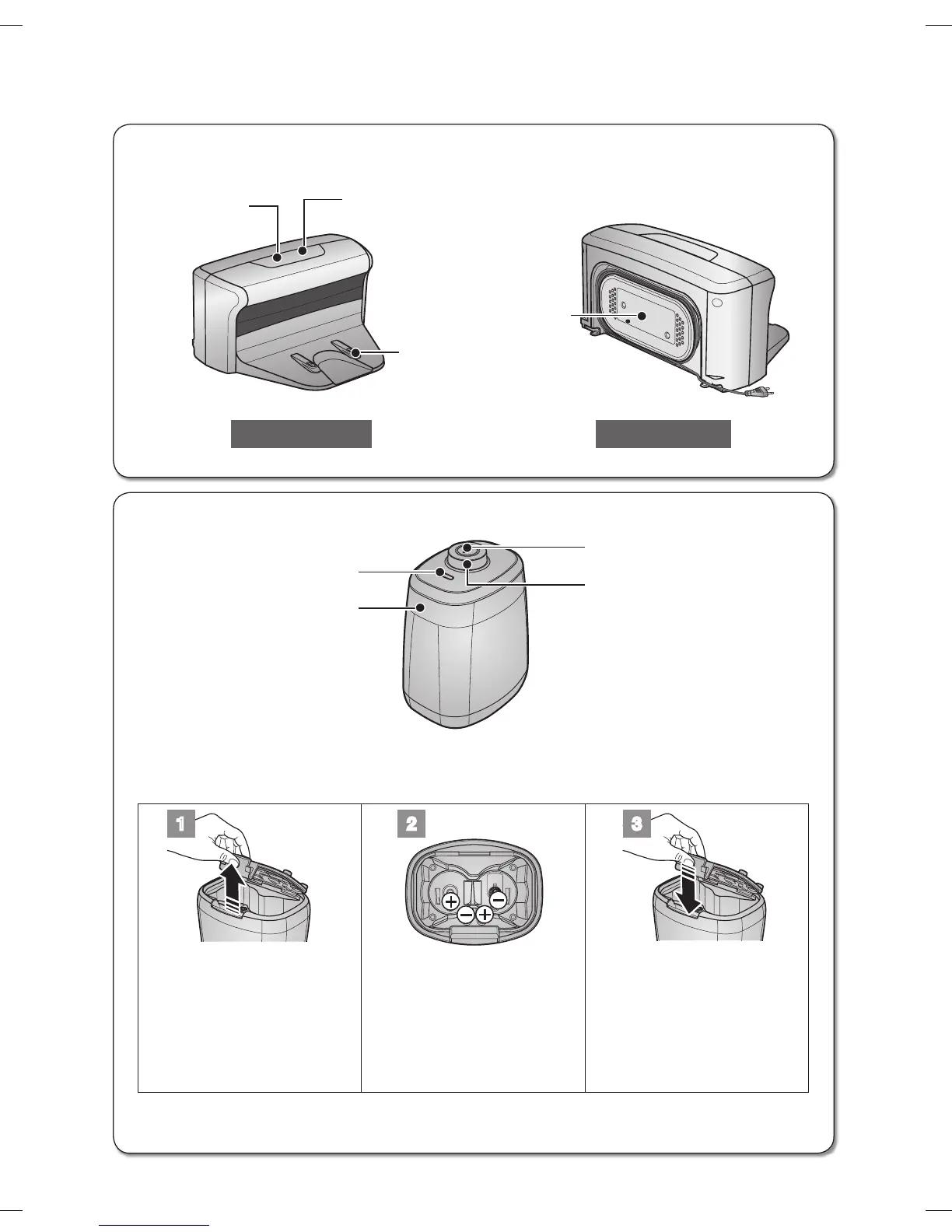
Charger (Station)
■
VIRTUAL GUARD
Distance Detection Sensor
Lamp
Power Button
Main Body Detection Sensor
■
Installing the batteries
Batteries are not supplied with the product. You have to purchase the batteries separately.
Install the batteries (type D) before use.
1 2 3
Lift the cover of the VIRTUAL
GUARD while pressing the
locking tab.
Install the batteries into the
VIRTUAL GUARD as shown
by the figure below. (If the
batteries are installed with
the incorrect polarity, the
VIRTUAL GUARD will not
work.)
After inserting the tip of the
cover into the slot, push the
other end to close it until it
clicks into place.
❈
Specification: Type D (LR20) batteries
Cord winder
Front Back
Charging lamp (green)
Charging terminals
Power lamp
(red)
DJ68-00630D (EN)-00.indd 18 2014. 7. 23. �� 6:14



 To Next Page