maintain _43
04 MAINTAIN
Cleaning the Edge-Cleaning Side rotating Brush
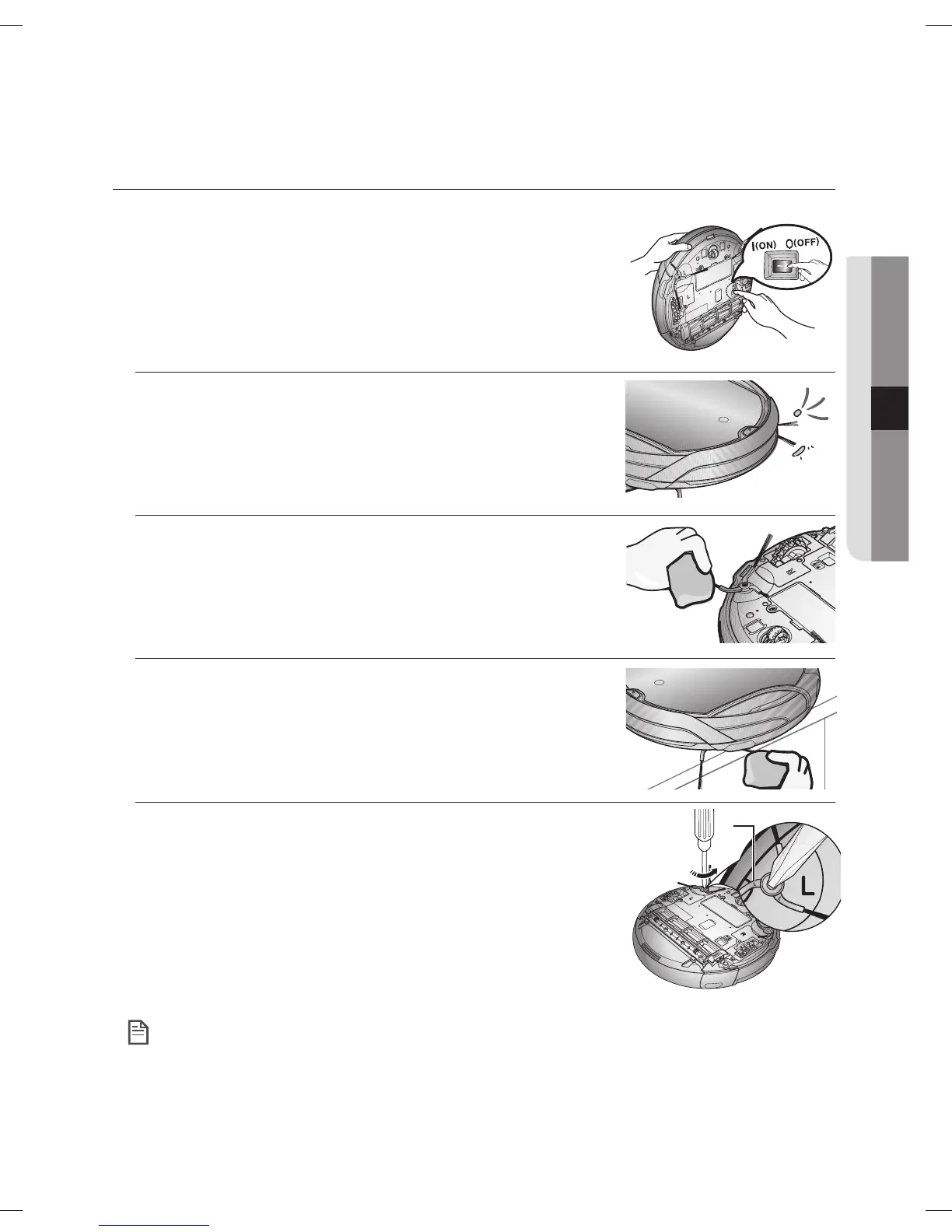
You must turn off the Power Switch at the bottom of the
main unit before cleaning the Robot vacuum.
1. Check whether the side rotating brush is bent or whether there
are any foreign substances stuck on the brush.
2. Wearing rubber gloves, wrap the side rotating brush with a cloth
using hot water for about 10 seconds and wipe it on the cloth.
3. Turning the side rotating brush, repeat the procedures in Step 2.
4. If hair or string is wrapped between the main unit and the side
rotating brush, undo the screw of the side rotating brush using
a (+) driver to remove it. When reassembling the brush, check
the “L” mark on the edge-cleaning side rotating brush and the
“L” mark on the main unit and then reassemble the side rotating
brush. (Letter “R” is carved at the right side rotating brush.)
Because the side rotating brush easily attracts hair and other foreign substances, make sure to
clean it frequently.
Excessive foreign substances on the side rotating brush can damage the brush.
L
NOTE
DJ68-00630D (EN)-00.indd 43 2014. 7. 23. �� 6:14



 To Next Page