20_ assembling
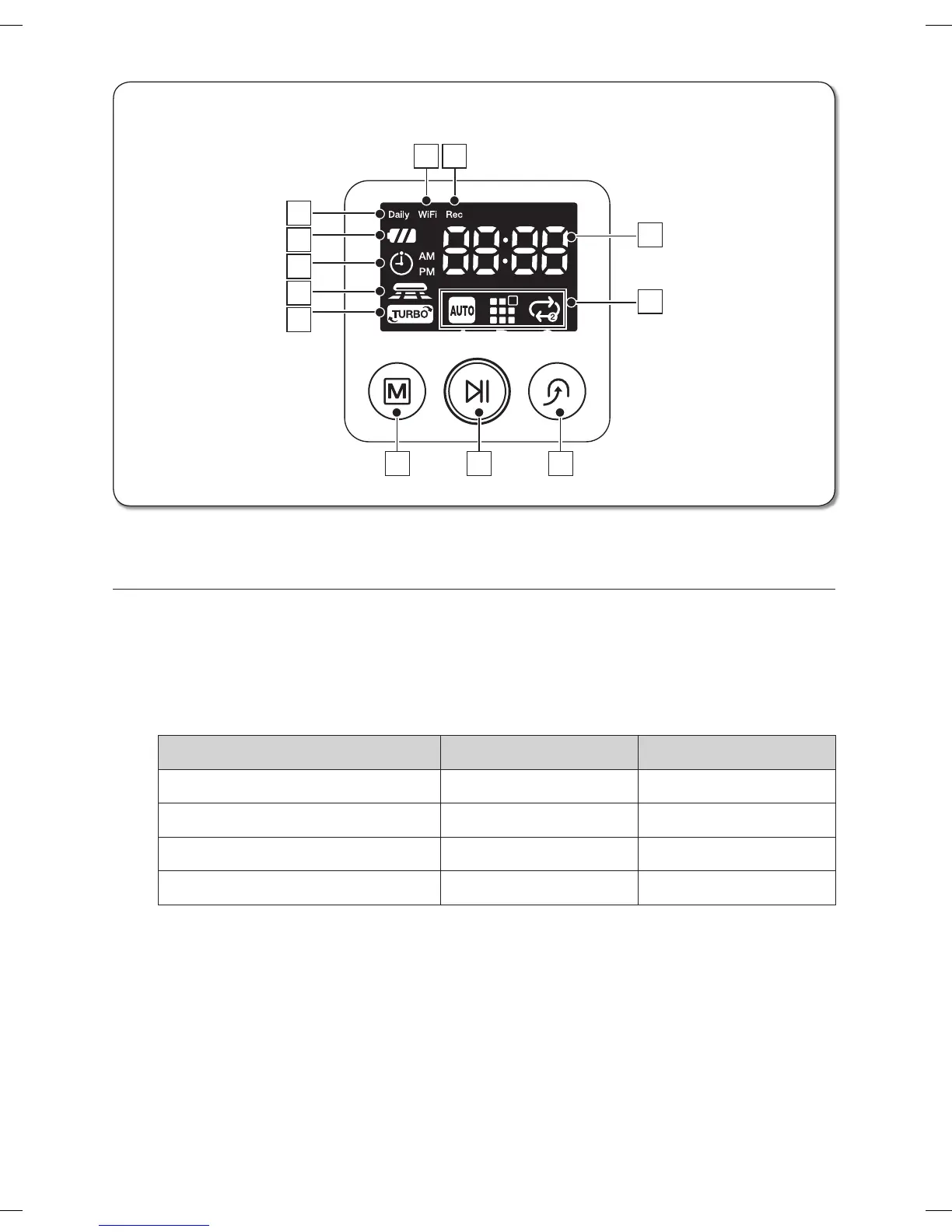
DISPLAY PART
1. Number Display : Shows the timer display, progress status, and error codes using numbers,
letters and graphics.
2. Daily : When daily cleaning is scheduled, the Daily icon is lit.
3. Wi-Fi : Each time you press the Remote Control button of the remote control, the setting gets
done in the order of release of remote control and execution of remote control.
4. Rec : This is a signal notifying that image is in use.
Display Icon Wi-Fi Rec
Block off access Off Off
Permission access On Off
Connection to Wireless router Flicker slowly Off
Connection to Home View Flicker fast On
5. Battery Level Indicator
- Charging : Shows the charging progress in 3 steps.
- In Use : Shows the battery charge level.
The battery charge level is reduced by each level from FULL while operating.
(When the battery is fully discharged, one level will flash to display “Lo”.)
6. Timer : When cleaning is scheduled, the Timer icon is lit.
7. Dust Sensor Mode : This icon turns on when Dust Sensor mode is enabled.
8. Turbo Mode : This icon turns on when Turbo mode is enabled.
■
Display panel
2
1
9
5
6
7
8
10 11 12
A B C
3 4
DJ68-00630D (EN)-00.indd 20 2014. 7. 23. �� 6:14



 To Next Page