26 ETHM-1 Plus SATEL
The IP address assigned to the module can be read in the LCD keypad using the
MODULE VER. user function available in the TESTS submenu. For a detailed description
of the function please refer to the user manual for the control panel.
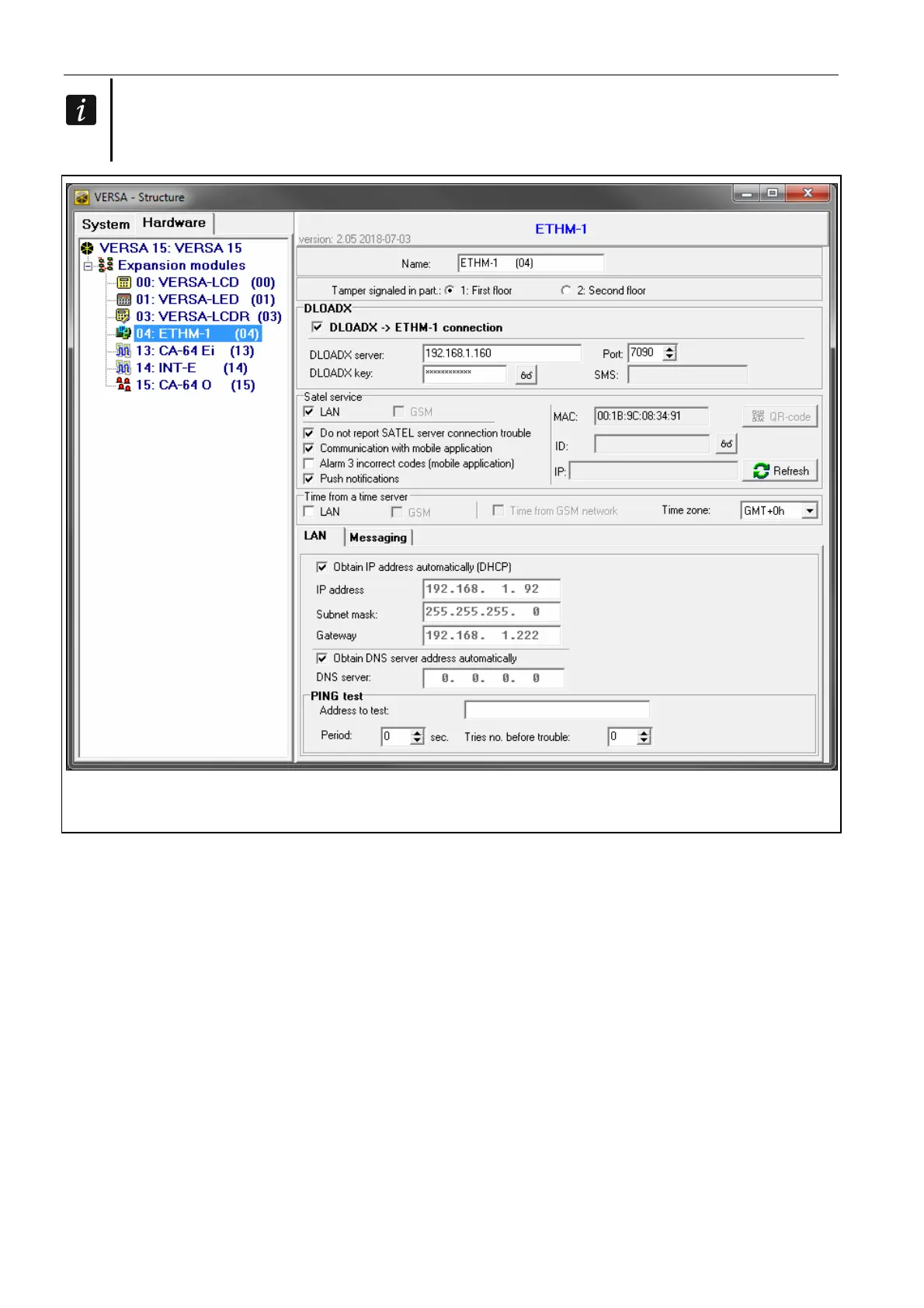
Fig. 12. DLOADX program: parameters and options of the module connected to VERSA
control panel.
IP address – module IP address.
Subnet mask [Netmask] – the mask of the subnet in which the module is working.
Gateway – IP address of the network device through which the other devices in the local
network can communicate with devices in other networks.
Obtain DNS server address automatically [DHCP-DNS] – if this option is enabled, the
DNS server IP address is downloaded automatically from the DHCP server. The option is
available, when the O
BTAIN IP ADDRESS AUTOMATICALLY (DHCP) option is enabled.
DNS server – IP address of the DNS server which is to be used by the module. It can be
programmed, if the OBTAIN DNS SERVER ADDRESS AUTOMATICALLY option is disabled.
PING test
Address to test [PING] – address of the device to which a ping command to test
communication is to be sent by the module. You can enter IP address or domain name.
Period [PING period] – the time interval between successive communication tests using the
ping command. If value 0 is programmed, the communication test is disabled.



 To Next Page