EasyManua.ls Logo

SATO SA408 - Page 37

SATO SA408
56 pages
Print Icon
To Next Page IconTo Next Page
To Previous Page IconTo Previous Page
Loading...
37
SA408 - Users Manual
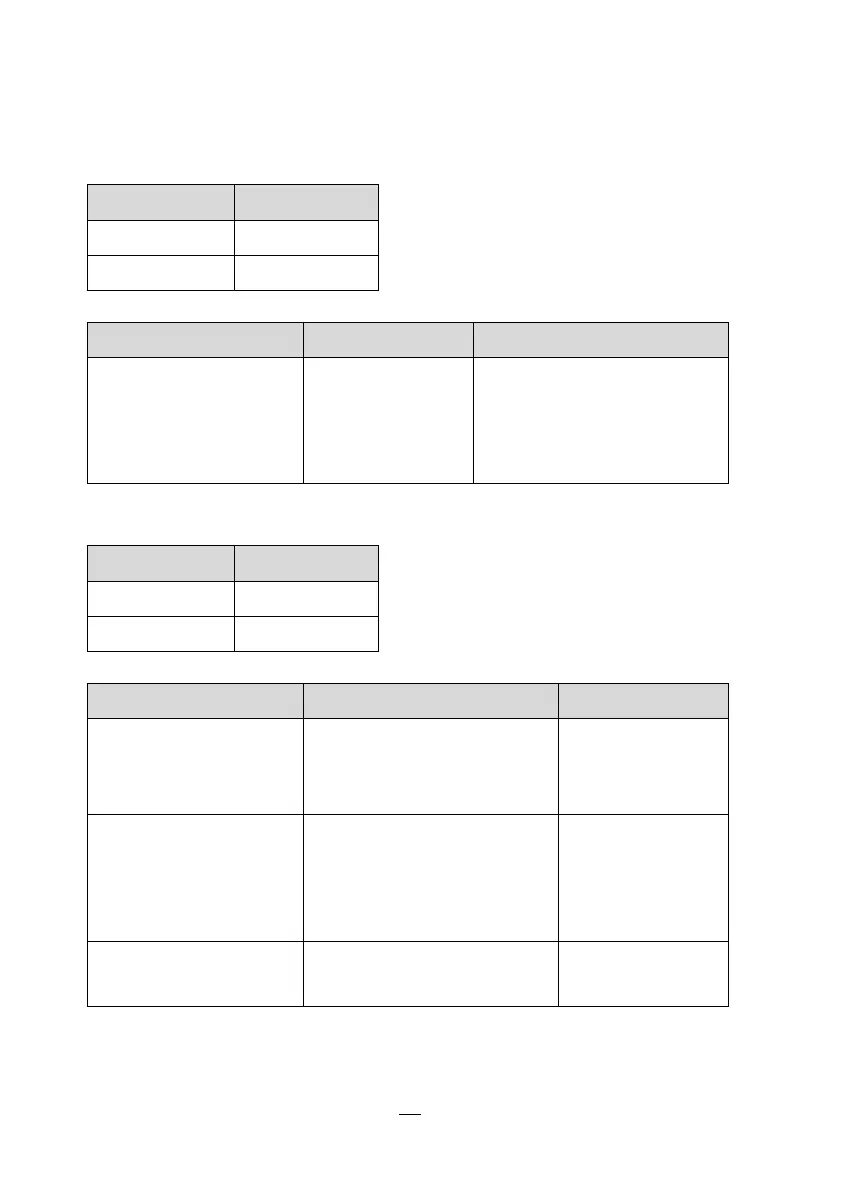
LED Indicators: Power and Ready LEDs blink alternately
Power LED
Ready LED
ON
OFF
OFF
ON
Possible Problems
Solutions
Remarks
Ribbon out
Install a new
ribbon roll
Set “Direct Thermal”
printing by driver or
commands if no ribbon is
required.
LED Indicators: Only the Power LED blinks
Power LED
Ready LED
ON
ON
OFF
ON
Possible Problems
Solutions
Remarks
Serial IO error
Check serial baud rate at
both of your system and
the printer.
For serial
interface only
Cutter has failed, or
there is paper jam
inside the cutter.
Check the cutter or
recover paper jam.
Only applicable
when cutter
mode to cutter
mode.
Other possible
hardware errors.
Contact the reseller for
further service.

Related product manuals