30 © Scania Industrial & Marine Engines 2003-10:1
3. Every 400 hours:
CLEANING THE OIL CLEANER
(at same time as an oil change)
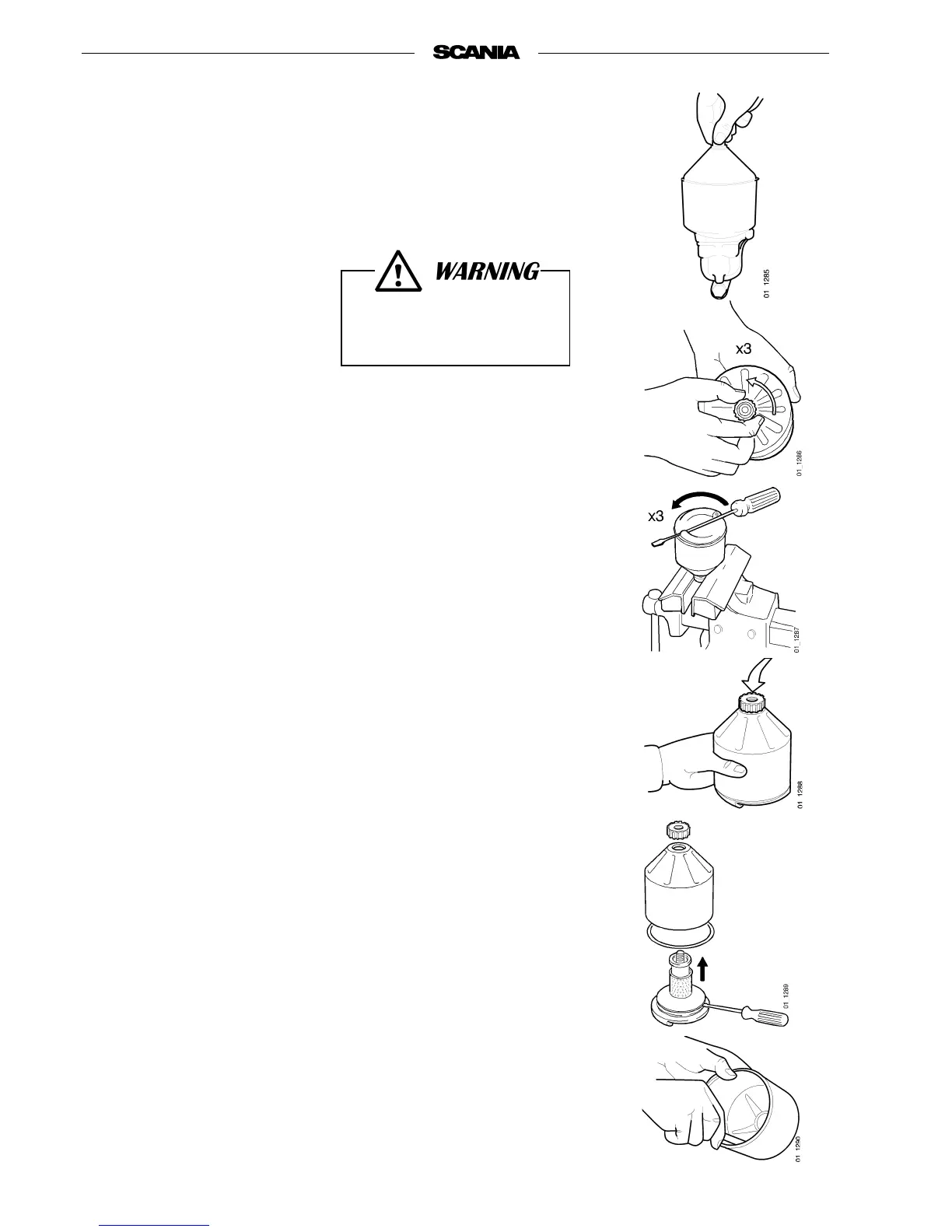
- Unscrew the nut and remove the cover.
- Lift out the rotor and loosen the nut on the rotor bowl three turns.
- If the nut is jammed:
Clamp the nut, absolutely not the rotor, in a vice and turn the rotor three
turns by hand or with a screwdriver.
- Tap the nut lightly with your hand or a plastic hammer, to detach the
rotor bowl from the bottom plate.
- Unscrew the nut and remove the rotor bowl.
- Prize carefully to detach the strainer from the bottom plate.
- Scrape off the deposits from the inside of the rotor bowl. If there are no
deposits, this indicates that the cleaner is not working properly.
- If the deposits are thicker than 20 mm: clean more often.
Open the cap carefully. The
oil may be hot.



 To Next Page