OPM 250 en-GB 55
© Scania CV AB 2022, Sweden
Cooling system
Cleaning the heat exchanger
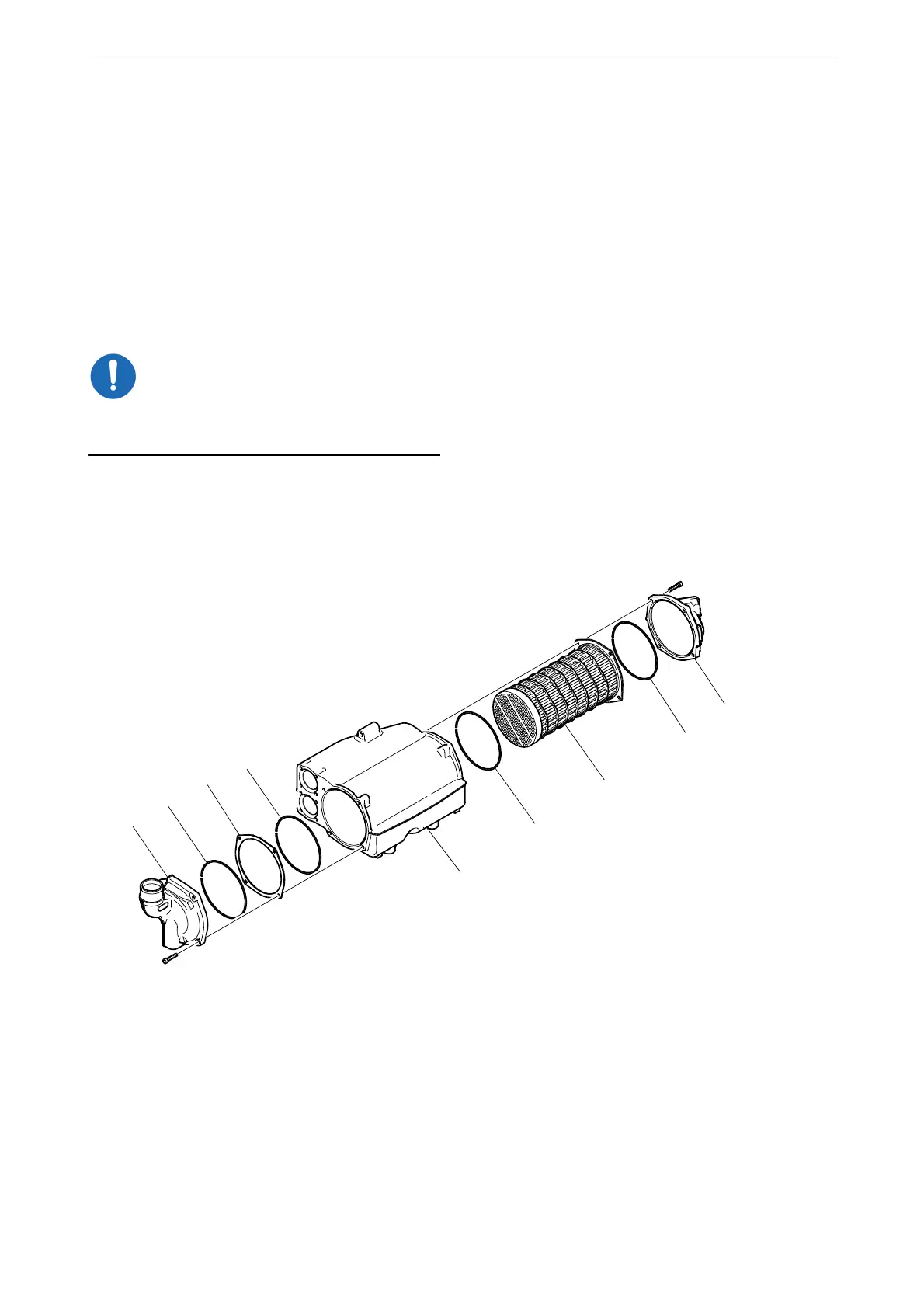
1. Remove the screws on the heat exchanger
covers (1) and remove the covers. Mark the
covers so that you can put them back on the
correct side.
2. Press in the cooler core (5) slightly on one
side and pull it out from the other side.
3. Clean the cooler core on the outside with a
slightly acidic detergent, e.g. 2 479 017. Re-
move any internal deposits using a round
rod. Renew the cooler core if it is damaged.
Do not use caustic soda as this could damage the
aluminium.
4. Renew the O-rings (2) and assemble the heat
exchanger.
5. Tighten the M8 screws on the covers to
15 Nm (11 lb-ft).
1
3
2
1
2
2
2
5
4
364 555
1. Cover.
2. O-rings.
3. Spacer.
4. Heat exchanger housing.
5. Cooler core.



 To Next Page