- 23 -
www.SCEPTRE.com
SCEPTRE E20 Display User Manual
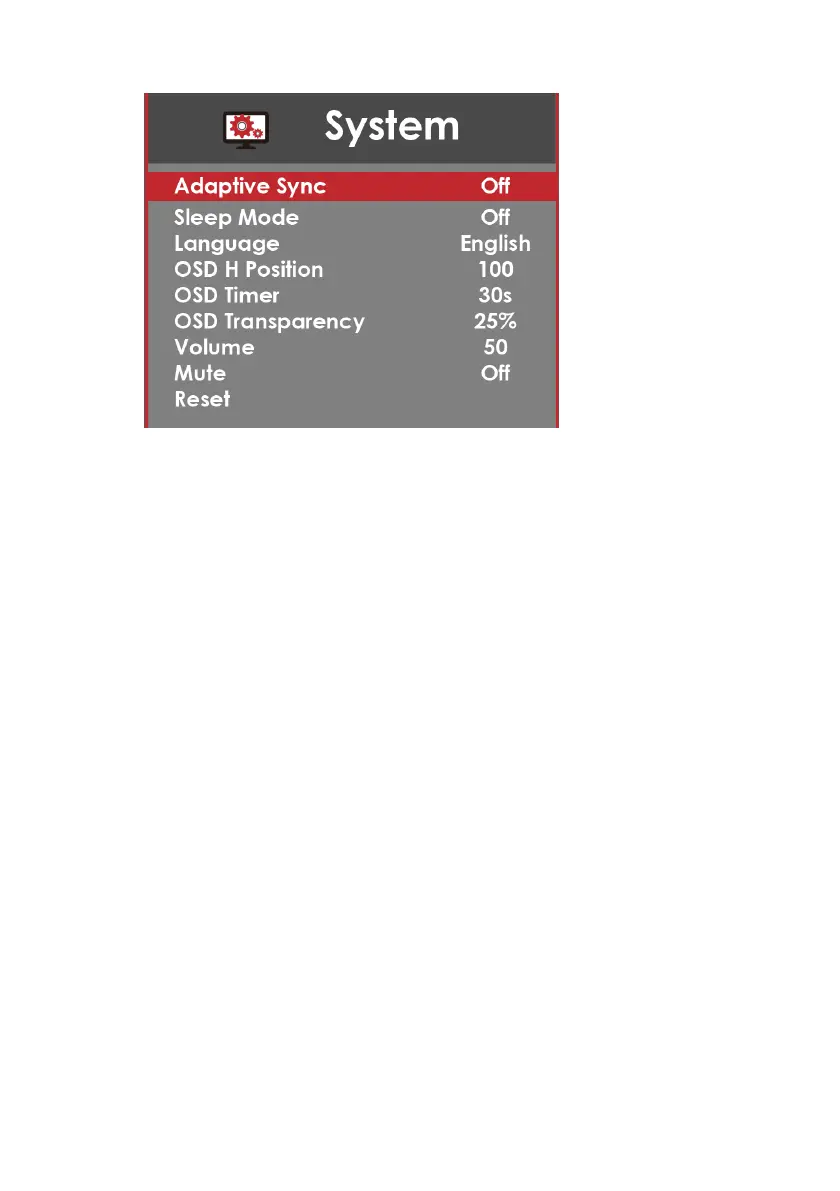
SYSTEM
1. ADAPTIVE SYNC – This option enables the monitor to dynamically adjust the
vertical refresh rate to the frame rate of the graphics card.
2. SLEEP MODE – With the monitor given no video signal, enabling this option will
make the monitor automatically shut off after 30 minutes, 60 minutes, or 2 hours.
3. LANGUAGE – This option allows users to change the menu language of the
monitor.
4. OSD H POSITION – This option adjusts the placement of the OSD menu
horizontally.
5. OSD TIMER – This option adjusts the time it takes for the OSD menu to
automatically shut off.
6. OSD TRANSPARENCY – This option adjusts the opacity of the OSD menu.
7. VOLUME – This option allows users to change the output level of the audio out
port.
8. MUTE – This option allows users to silence the monitor's speakers.
9. RESET – This option resets all values of the menu back to factory default.



 To Next Page