6 Control Unit
Operating Manual Linear ACTUSAFE CMFS(L)
OM-ENGLISH-Failsafe-Linear-16xx-V2.00-2022.03.03
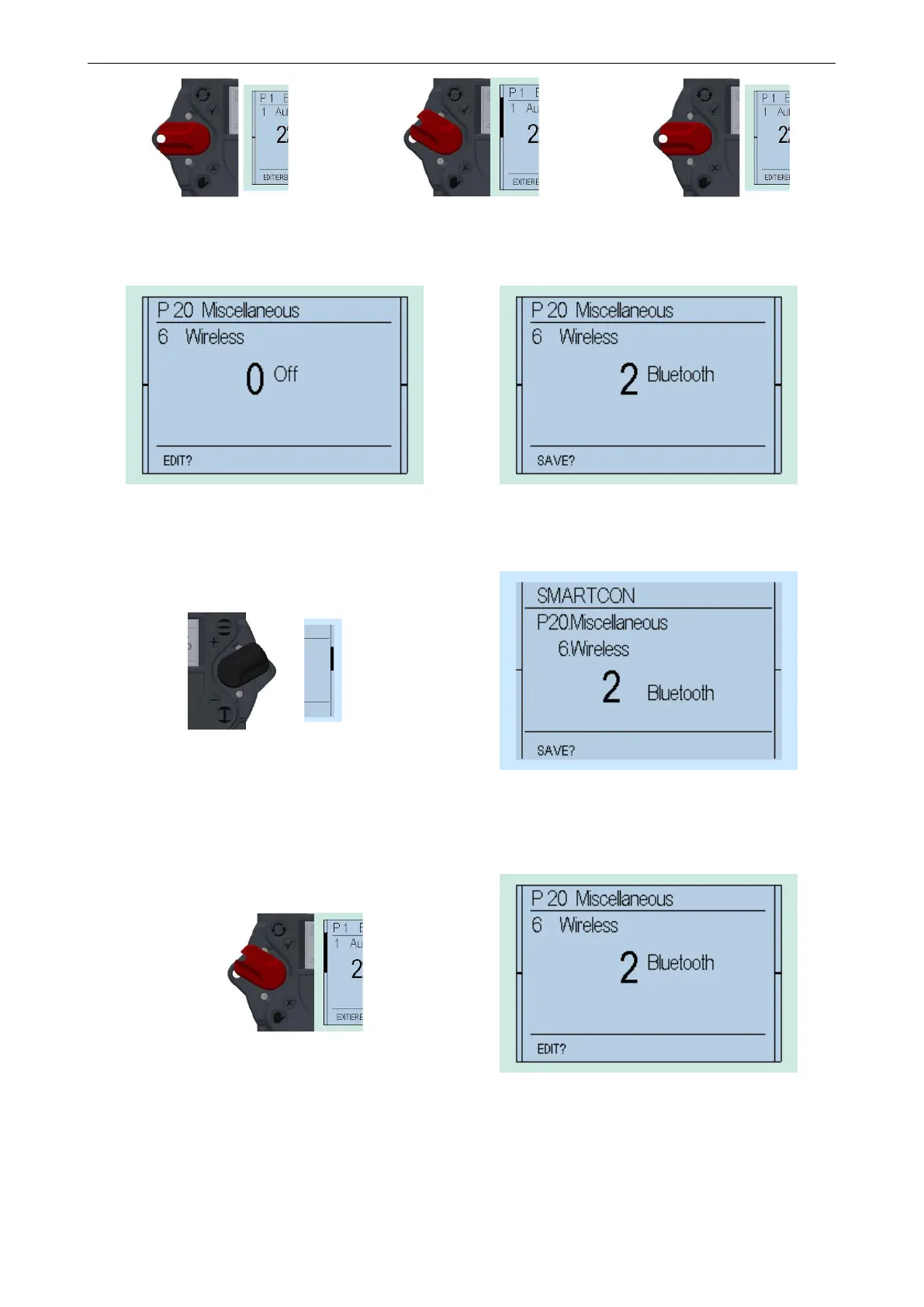
Figure 55
⇒
Figure 56
⇒
Figure 57
This changes the bottom line of the display from "EDIT?" to "SAVE?"
Figure 58 Figure 59
Thereafter, flip up the control switch (toward ) to change the value from 0 (off) to 2 (Bluetooth)
Figure 60
Figure 61
If the value changes to 1, confirm the selection by flipping halfway up the selector switch (towards) and letting it snap back
to its neutral position (see Figure 55 til Figure 57).
Figure 62
Figure 63
This changes the bottom line of the display from "SAVE?" to "EDIT?" and the parameter is stored.
6.4.4 „TEACHIN“
Furthermore, certain parameters (end positions, intermediate positions).can be set using "TEACHIN". Thus, their configu-
ration is greatly simplified.
42



 To Next Page