12 • Schlage • AD-400 user guide
Batteries
Installing or replacing batteries
Approximately one month prior to the end of the battery life, a Low Battery Trouble signal is
indicated at the PIM400 and a Trouble signal will be sent to the access control panel.
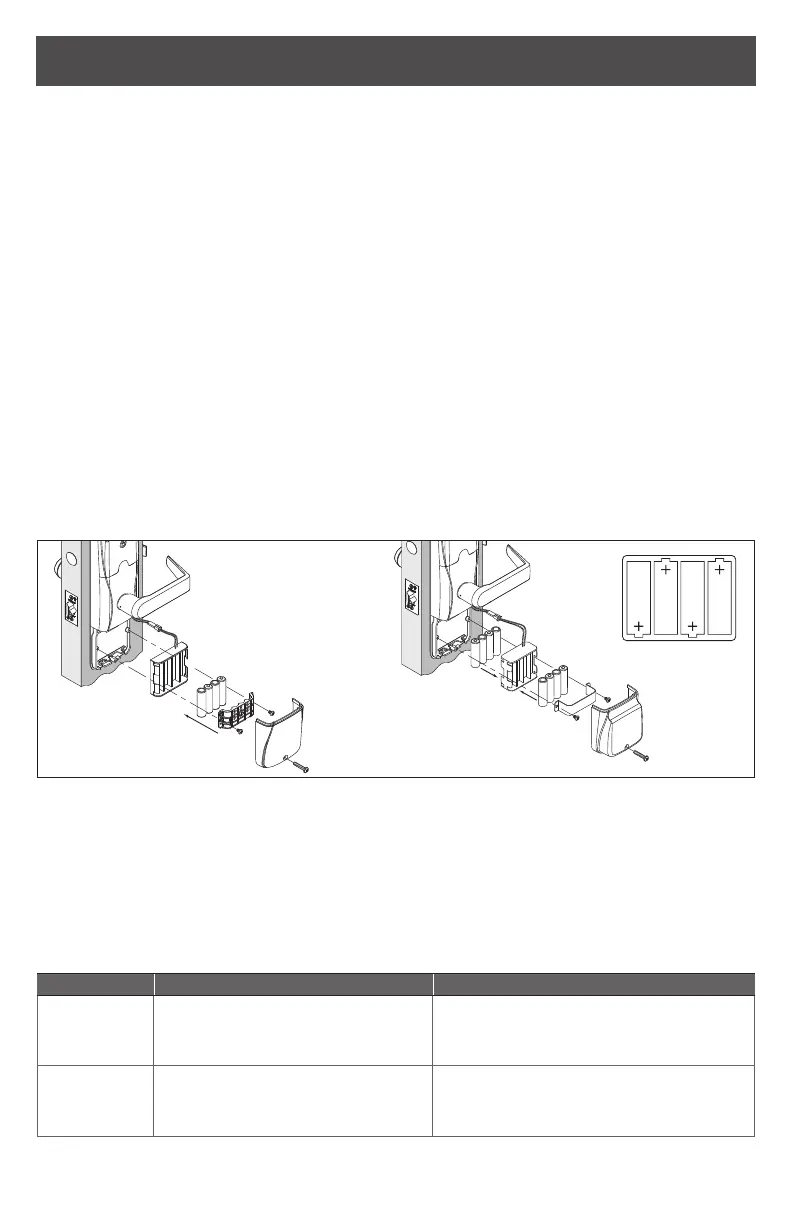
1. Remove the battery cover.
2. Remove the battery bracket. Do not allow the battery pack to hang from the wires.
3. Install the new batteries (install only new AA Alkaline batteries). Make sure the batteries
are installed in the correct orientation.
4. Reinstall the battery pack and battery bracket.
5. Reinstall the battery cover, making sure the connector is above the battery pack.
CAUTION! Danger of explosion if battery is incorrectly replaced! Replace only
with the same or equivalent type. Dispose of used batteries according to the
manufacturer’s instructions.
This product has been evaluated for ULC-S319 compliance with AA and coin cell batteries
listed below. For installations requiring ULC-S319, these battery models should be used.
AA batteries: Duracell PC1500, MN1500; Energizer E91, EN91, AX91, XR91;
RayoVac 815, 815-HE
Coin cell batteries: Energizer CR2025, CR2032; Maxell CR2025, CR2032,
Panasonic CR2025, CR2032; RayoVac KECR2025, KECR2032
Four Battery Configuration Eight-Battery Configuration
Low battery indications
L Replacement of batteries does not aect any programmed data. Battery voltage
can be checked with the SUS.
L When in a low battery condition the lock may operate but not have sucient
power to communicate with the SUS. When intitiating SUS communication,
the Schlage button will light solid red for one second to indicate power is not
sucient. If this should occur, change the batteries immediately.
Condition Indicator Solution
Low battery No beeps
Low battery condition is reported
to the Access Control Panel.
Replace batteries immediately to avoid
failure.
Battery failure
(congured
by SUS)
No LED or beeps
Valid credentials do not grant
access
Replace batteries immediately.
Mechanical override key must be used
to unlock the lock.


 To Next Page