Assembly
05.00 | PGN-plus-P | Assembly- and Operating Manual | en | 0389753
27
5.4.4 Mounting inductive proximity switch IN
NOTE
The sensor cannot be used for sizes smaller than size 64.
Position "Gripper open" or "Gripper closed"
Ø Variant dust-protection (SD): Remove the sealing bolts from
the brackets.
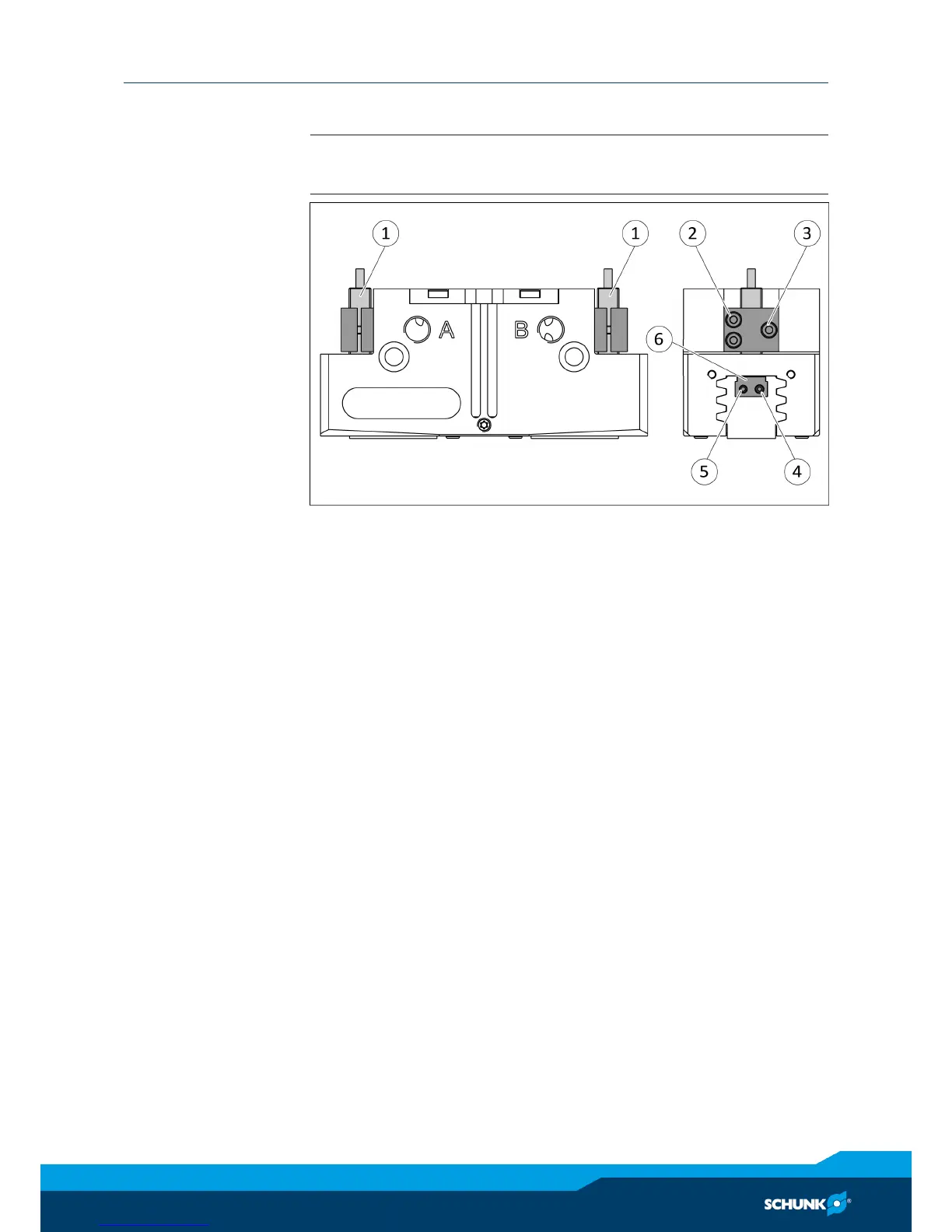
Ø Slide the sensor 1 (1) through the bracket (2) and into the hous-
ing until it stops.
Ø Tighten the screw (3) on the bracket (2).
Tightening torque: 0.2 Nm
Ø Bring product into the "open" or "closed" position and test the
function.
Position "Part gripped (O.D. gripping)" or "Part gripped (I.D.
gripping)"
Ø Variant dust-protection (SD): remove the sealing bolts from the
bracket and unscrew the set-screw from the side cover.
Ø Slide the sensor 1 (1) through the bracket (2) and into the hous-
ing until it stops.
Ø Tighten the screw (3) on the bracket (2).
Tightening torque: 0.2 Nm
Ø Clamp the part to be gripped.
Ø Loosen expander bolt (4) by unscrewing it from the control cam
(6).


 To Next Page