Distance: (KM or MILES)
The infor-
mation center approximately calcu-
lates the distance based on the oper-
ation time and the watercraft speed
and displays the result in kilometers
(KM) or miles (MILES).
Hourmeter:
Displays the time in
hours of the watercraft usage (HOUR).
Water Temperature:
Displays the
water temperature of the water sur-
face (L TEMP) in degrees Celsius (°C)
or Fahrenheit (°F).
Exterior Temperature
(if so
equipped): Displays the exterior air
temperature (E TEMP) in degrees Cel-
sius (°C) or Fahrenheit (°F).
Trip Hour Meter:
(TRIPMTR) Allows
to measure an interval of time in hours
and minutes (hh:mm).
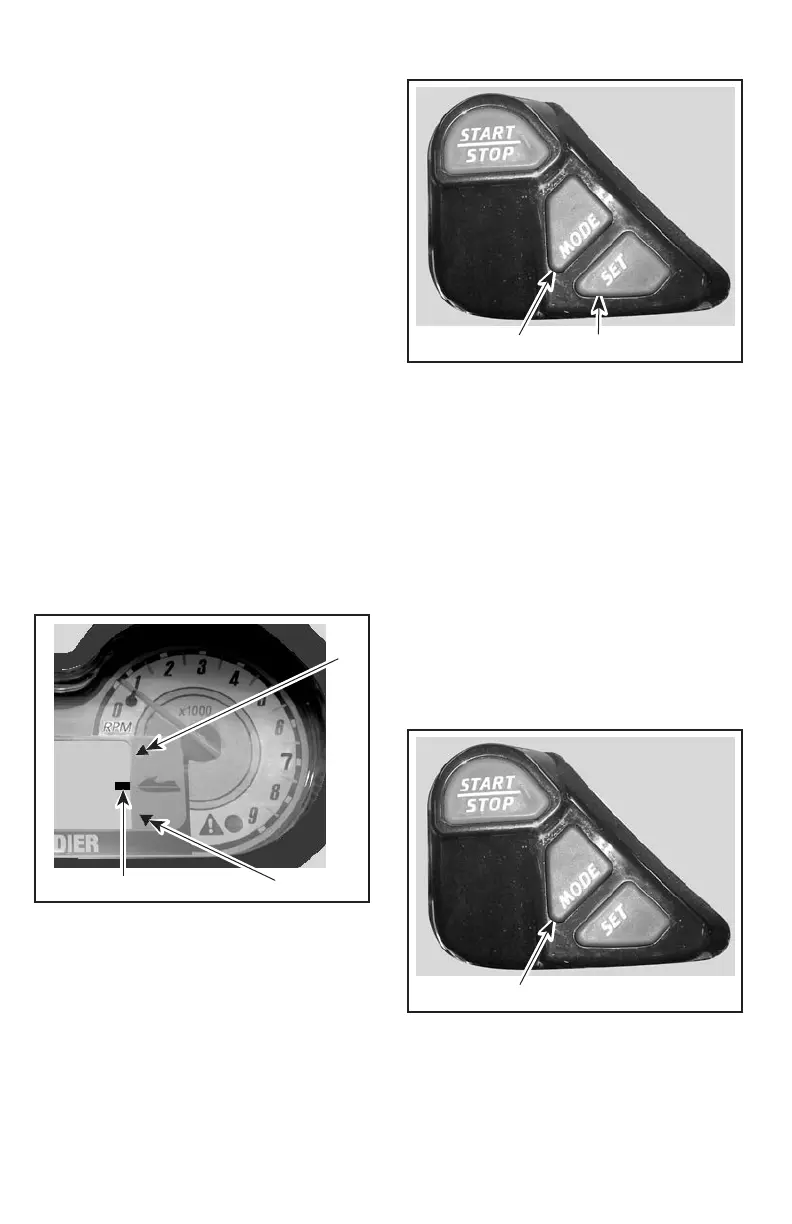
VTS Position Indicator
(if so equipped)
The VTS position indicator shows the
riding attitude of the watercraft.
2
31
F19L0AY
1. Position indicator
2. Bow up
3. Bow down
Function Buttons
Different displays and functions can
be activated using 2 buttons — MODE
and SET — following specific se-
quences as described below.
1
F18L09Z
2
1. To change display mode
2. To set or reset a function
Resetting a Function
To reset a function (such as the trip
hour meter, distance, etc.) press and
hold the SET button for 2 seconds
while in the appropriate mode.
Display Selection
Repeatedly pressing the MODE but-
ton scrolls the following displays:
Compass, tachometer, speedometer,
average speed, distance, hourmeter,
water temperature, exterior tempera-
ture (if so equipped), depth gauge (if
so equipped), and trip hour meter.
1
F18L091
1. Press to change display mode
38
______________________
Print Preview Version 8.0 PubTeX output 2003.11.07:1153 File: C:\TEMP\.aptcache\smo2004-003en/tfa00394.dvi User: CASS2 Page: 40


 To Next Page