31
3.1 Adjust The CLOSE force sensitivity
Note: It is important to ensure that the forces generated by the garage door operator are
adjusted to the minimum level necessary to operate the door reliably, not to maximum
forces.
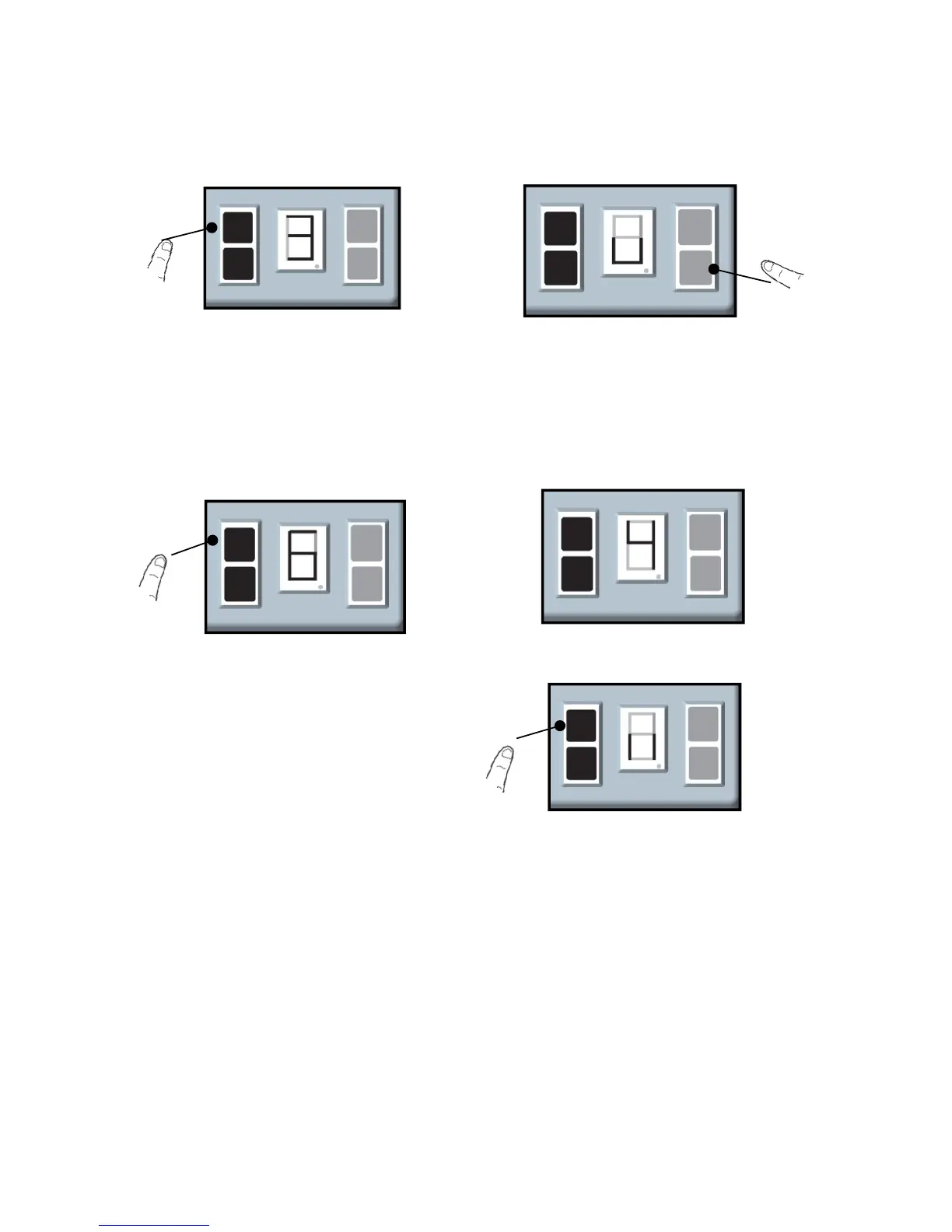
a. Press and hold the SETTING Button
until the screen show the number from
“1” to “3”.
b. Press and release the DOWN
Button and the screen show the “ ∪”.
d. Use the UP Button to increase
the levels(9 indicates ‘Maximum
force’ ), press the DOWN Button
decrease the levels(1 indicates
‘Minimum force’) .
c. Press and release the SETTING
Button and the screen show the levels of
the force sensitivity (from 1 to 9 )
e. After the desired level is selected, press
and release the SETTING Button and the
screen is flashing “||”. Adjustments is
complete.


 To Next Page