9
Note:
Once the filter timer has been reset the
Reset Filter Timer page is removed until the
filter is full again.
The timer calculates % usage of the filter
based on the fan speed. A Smart-Vent
system operating on low speed will take
approx 1
1
/
2
years before reaching 100%
filter usage. Personal fan speed preferences
will affect the % filter usage rate.
Heater Option
This option allows the householder to
enable or disable the heater (if installed).
Note: For the heater to work the heater must
first be enabled. The reset default setting is
for the heater to be turned OFF.
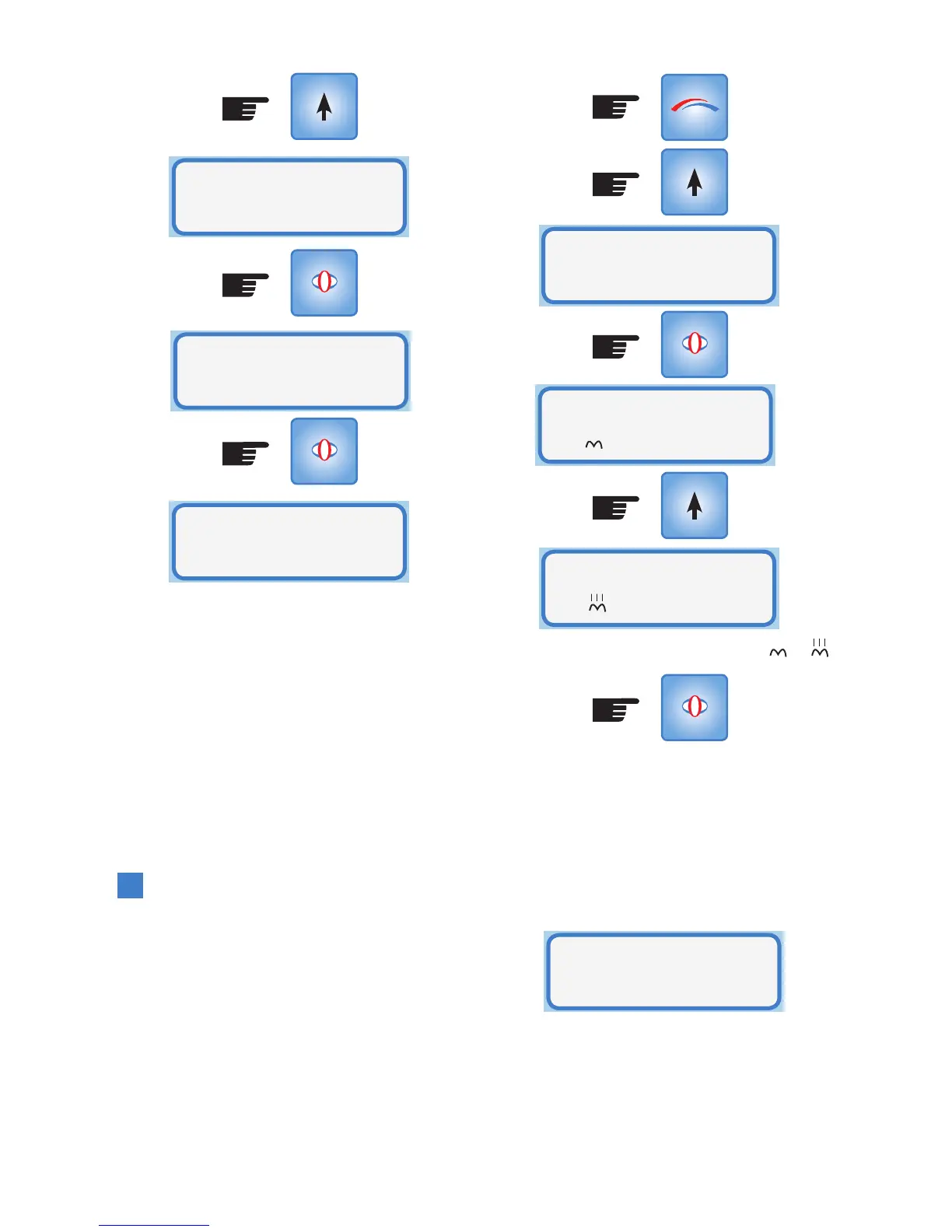
To enable the heater enter Setup Mode:
SELECT
SELECT
Reset Filter
Timer? Yes
Filter
Status
Filter
0% Used
(Press x5)
Note: The heater icon changes from to
Heater is now enabled in Normal Mode.
Return to Operational Mode by pressing
MODE or 15 second timeout
If a heater is not installed the following
screen will be displayed when you press
SELECT:
This informs the householder that they will
need to phone customer service to purchase
the heater option.
SELECT
SELECT
Heater
Option
MODE
Heater
Disabled
Heater
Enabled
Heater
...no heater ph (09)259-1662



 To Next Page