15
Set Real Time Clock
The Smart-Vent controller has a real time
clock, one to display the time but essentially
to allow the householder to set the times the
heater is active.
When the Smart-Vent is first installed it
will be necessary to set the correct time,
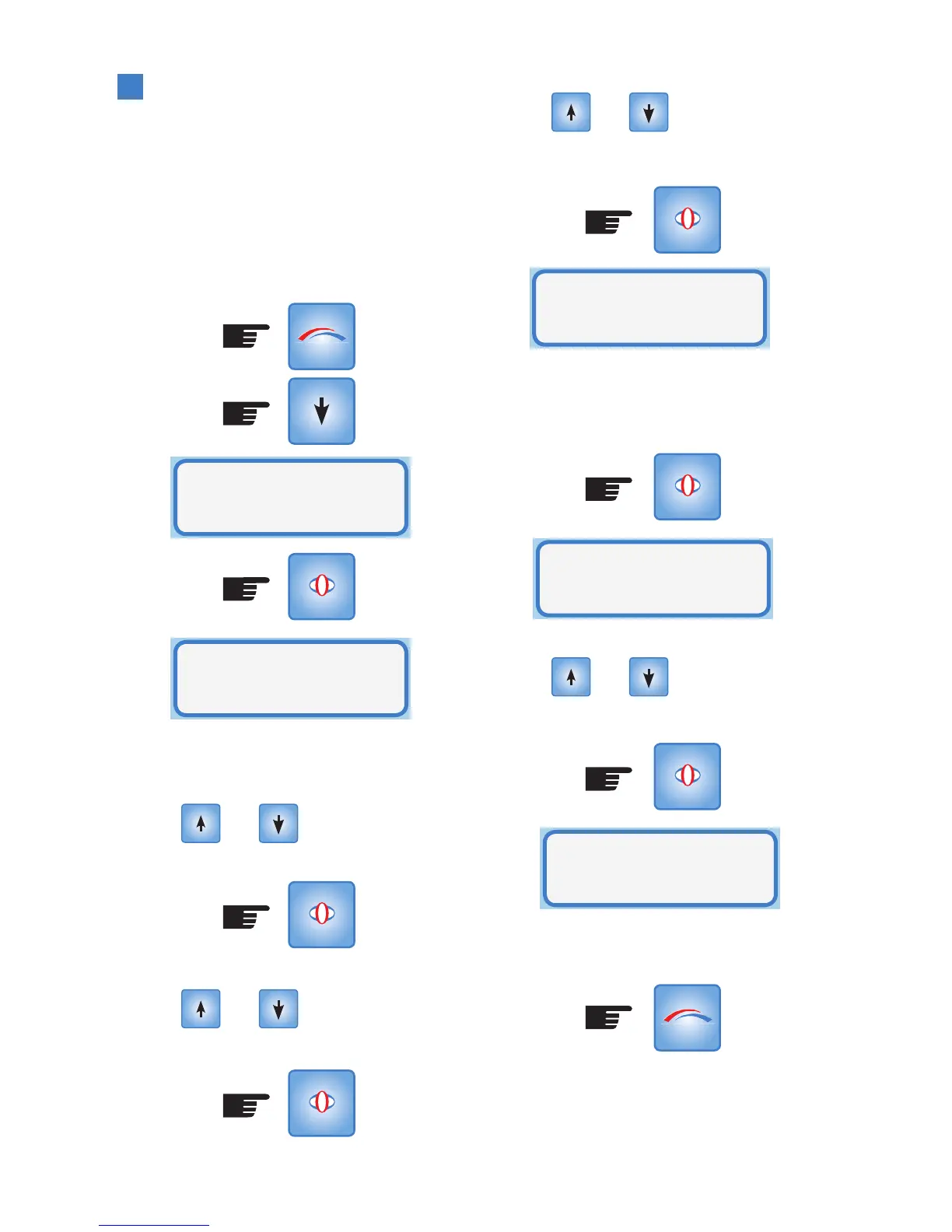
date and day in Setup Mode. Press MODE
button:
The clock appears in 24 hour format of
hours, minutes and seconds. The hours will
blink.
Use the and buttons to set the
correct hours, then press SELECT:
Then the minutes will blink.
Use the and buttons to set the
correct minutes, then press SELECT:
MODE
SELECT
SELECT
SELECT
Then the seconds will blink.
Use the and buttons to set the
correct seconds, then press SELECT:
The date page appears in DD/MM/YY
format. Repeat the procedure as per the
time page to set the correct date and press
SELECT:
Use the and buttons to set the
day, then press SELECT:
The real time clock has been set. Return to
Operational Mode by pressing MODE or wait
for timeout:
Set
Clock
Adjust time
14:42:33
SELECT
SELECT
SELECT
MODE
Adjust date
30/01/07
Adjust day
Tue
Set Clock
Press x2 for Eco Smart-Vent models
*
*



 To Next Page