81
K600000000SE 030804 011018
CONTEXT KEY FUNCTION
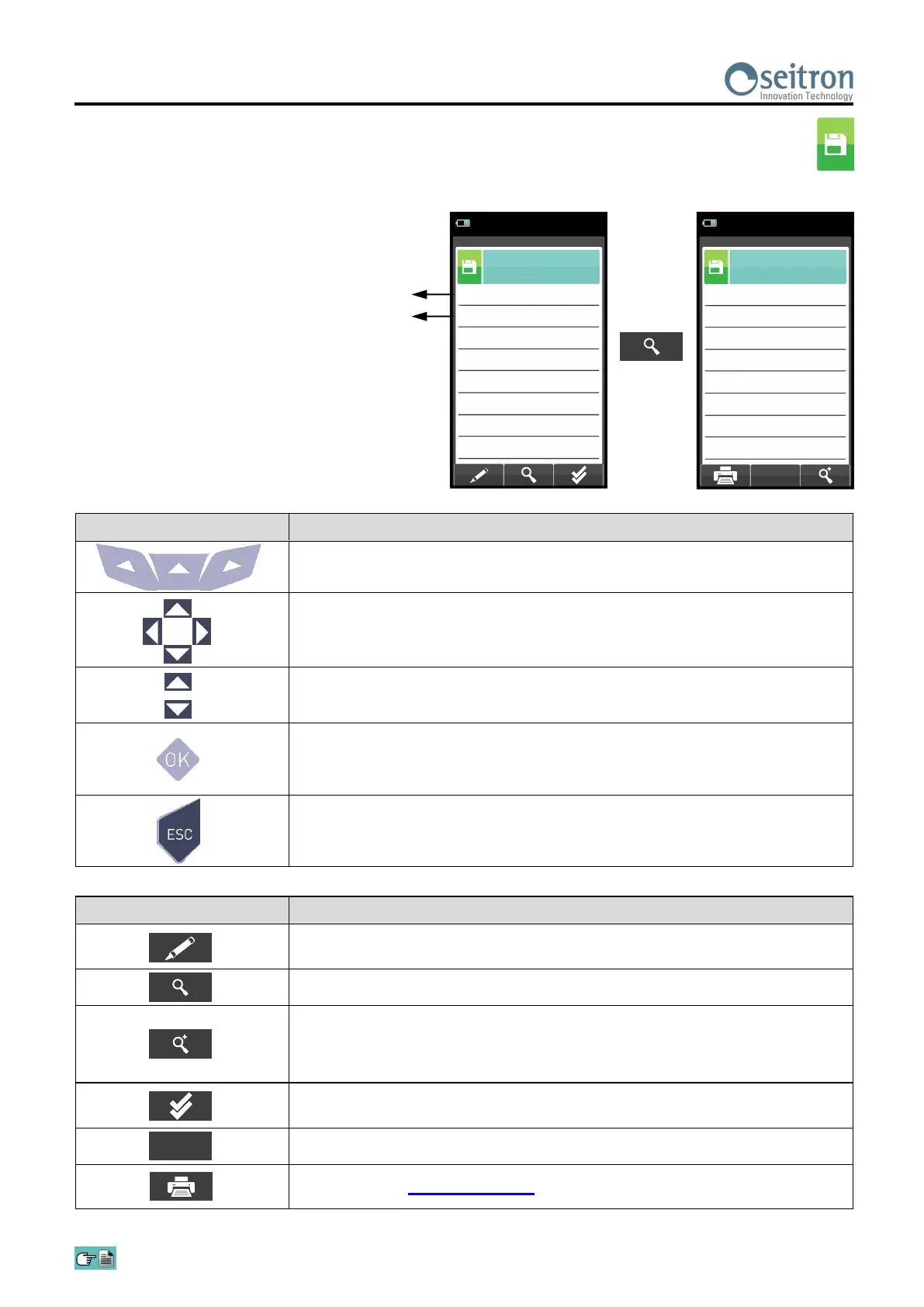
Enters edit mode: it is possible to select the number of the sample to use
to have the average of the analysis carried out.
Shows the average analysis in the interval set.
Zoom. By pressing this interactive key repeatedly, the device displays the
following sequence:
AAA → AAA → AAA → AAA
Sets all the samples of the analyses carried out: From 1 (first sample) To
xxx (last sample).
Confirms the settings.
Starts printing. SEE SECTION 12.
OK
Defines the starting sample to define the analysis
average.
Defines the end sample to define the analysis
average.
Memory
Average
15/01/14
10:00
A
3
Da
1
Memory
Average analysis
15/01/14
10:00
ηs
%
91.4
Qs
%
8.6
ΔT
°C
74.7
T air
°C
15.4
T flue
°C
190.1
λ,n
1.25
CO
2
%
9.3
O
2
%
4.2
KEY FUNCTION
Activate the context keys shown on the display.
In edit mode, it sets the number of the desired sample; the number to
change is red.
Selects line; the selected line is displayed in red.
Activates the context key located in the left side of the display.
Returns to the previous screen without saving the changes made.
3. Average interval details


 To Next Page