82
K600000000SE 030804 011018
CONTEXT KEY FUNCTION
Enters the modification mode for the selected parameter.
Confirms the settings.
11.5 Memory Menu→Data logger
OK
KEY FUNCTION
Activate the context keys shown on the display.
Selects line; the selected line is displayed in red.
Activates the context key located in the left side of the display.
Returns to the previous screen.
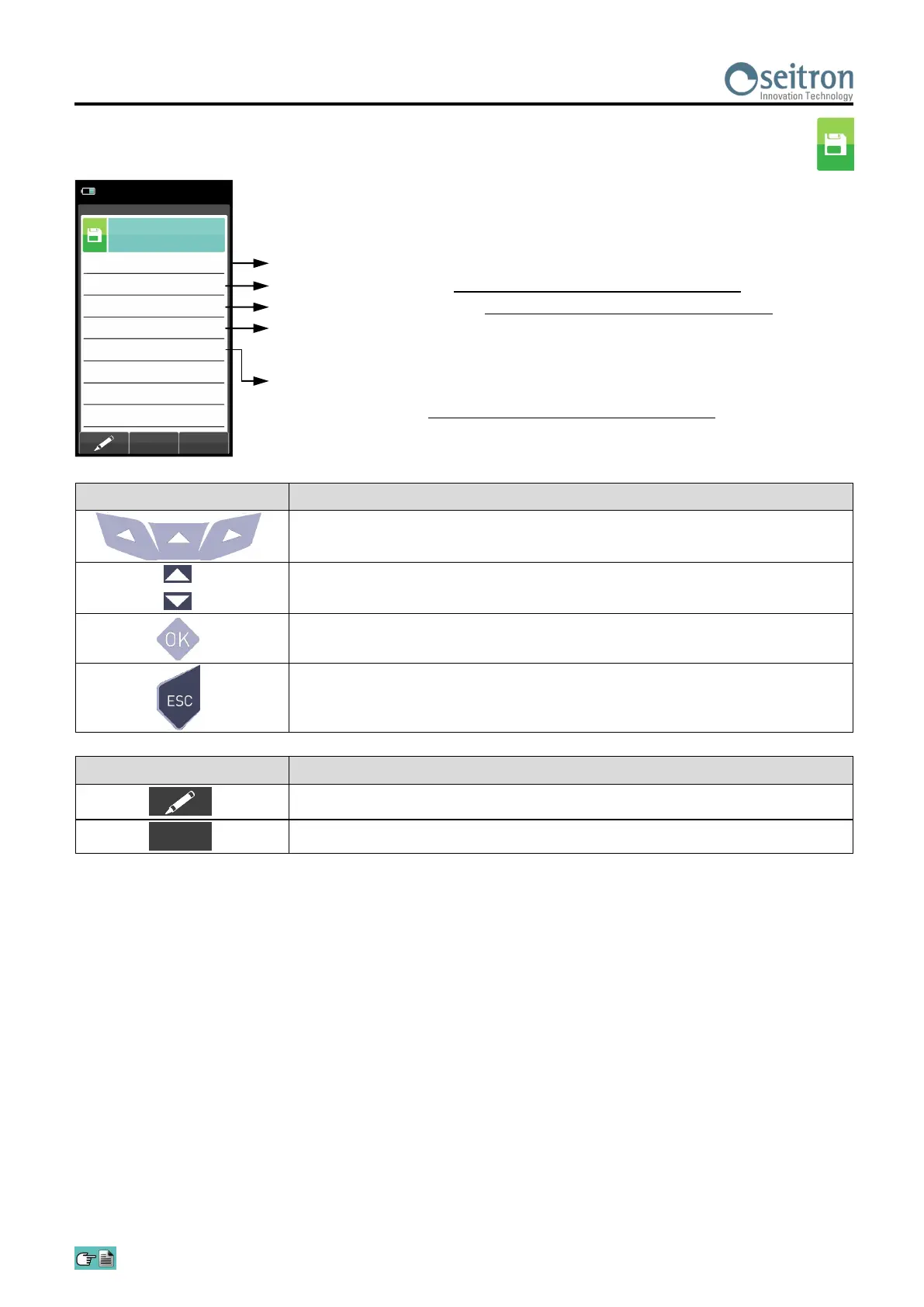
Memory
Data logger
15/01/14
10:00
Samples
3
Mode
UNI 10389
Interval
ppm
120
Memory
auto
Print
manual
The selectable analysis modes are: manual - UNI 10389 - BImSchV - data logger
The memory selection modes are: manual or auto.
If "auto" mode has been selected, the research of the available memory will be performed
automatically when the device is turned on).
Number of samples to make (parameter not visible in manual analysis mode).
Period of acquisition of each sample (parameter not visible in manual analysis mode).
The selectable printing modes are: manual or auto.
If "auto" mode has been selected, the printing will be performed automatically at the end of
the combustion analysis (parameter not visible in manual analysis mode).


 To Next Page