28
GB
Setting of the end positions
4.5.1. Semi-automatic setup-mode, deletion and semi-automatic setting of the
end positions
¨ in operation bottom position, top stop/release
When the movement is interrupted twice during operation, the system is in semi-
automatic setup-mode. The drive will only find the upper end limit automatically.
Important: A limit stop for the upper end limit is necessary!
First the lower end limit has to be run-up to. From there move against the upper limit
stop without interruption, until the motor is automatically switched off.
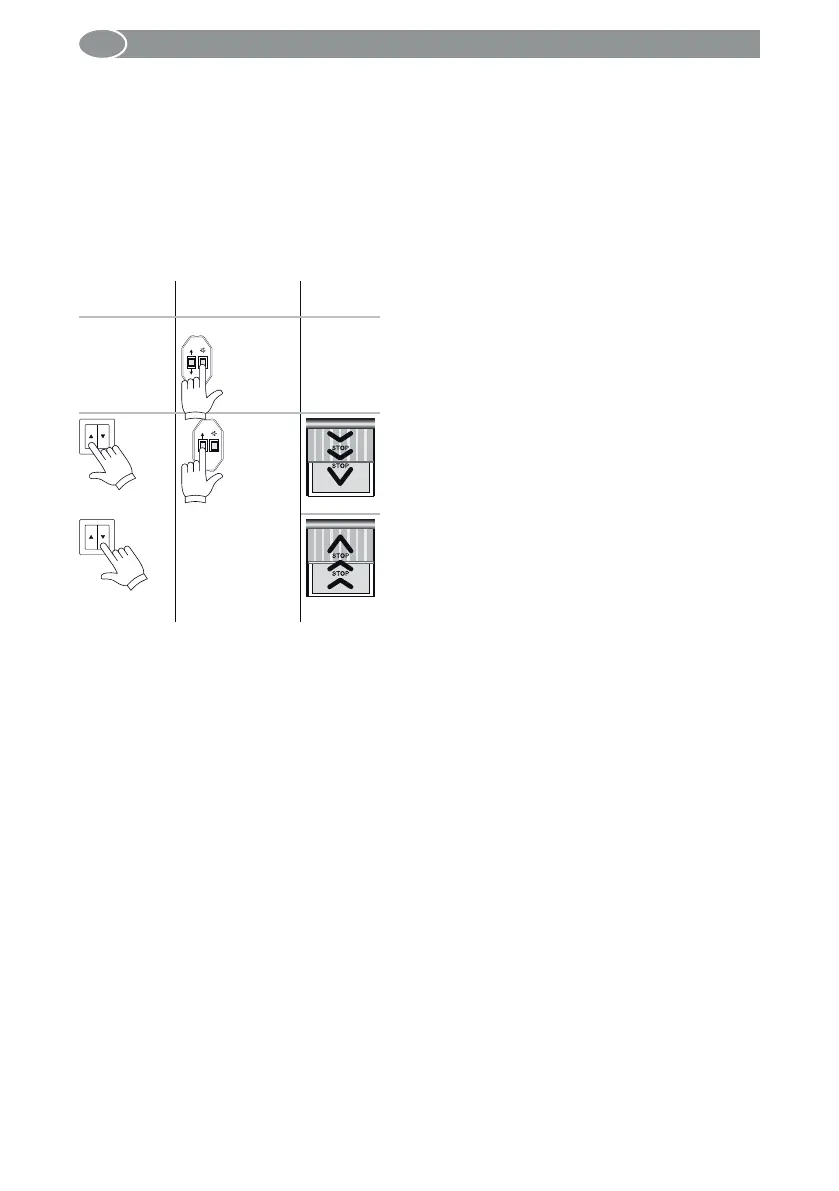
Operation
with switch
Operation with
setting switch
Drive
E
1 s Press the E button of the setting switch for
1 second. Both limit positions already set will be
deleted.
Note: Not required for the initial installation or after
resetting to factory defaults.
or
E
Move the motor with the UP or DOWN button
downwards to the requested lower end limit.
Run against the limit stop at the top without stop-
ping; the motor stops automatically. The correct
direction of rotation assignment has been made.
Perform a test run: The drive moves up against the
limit stop and relieves shortly.



 To Next Page