Putting the conference system into operation
54 | ADN Digital Conference System
Switching off the ADN-W L 10/ADN-W CASE UNITS charger
To switch off the ADN-W L 10/ADN-W CASE UNITS charger after use:
왘 Set the on/off switch of the charger to position “0”.
The charger switches off. The operation indicator
goes off.
To disconnect the ADN-W L 10/ADN-W CASE UNITS charger from the mains power
supply:
왘 Pull out the mains plug from the wall socket.
The status display of the ADN-W L 10/ADN
-W CASE UNITS charger during
charging
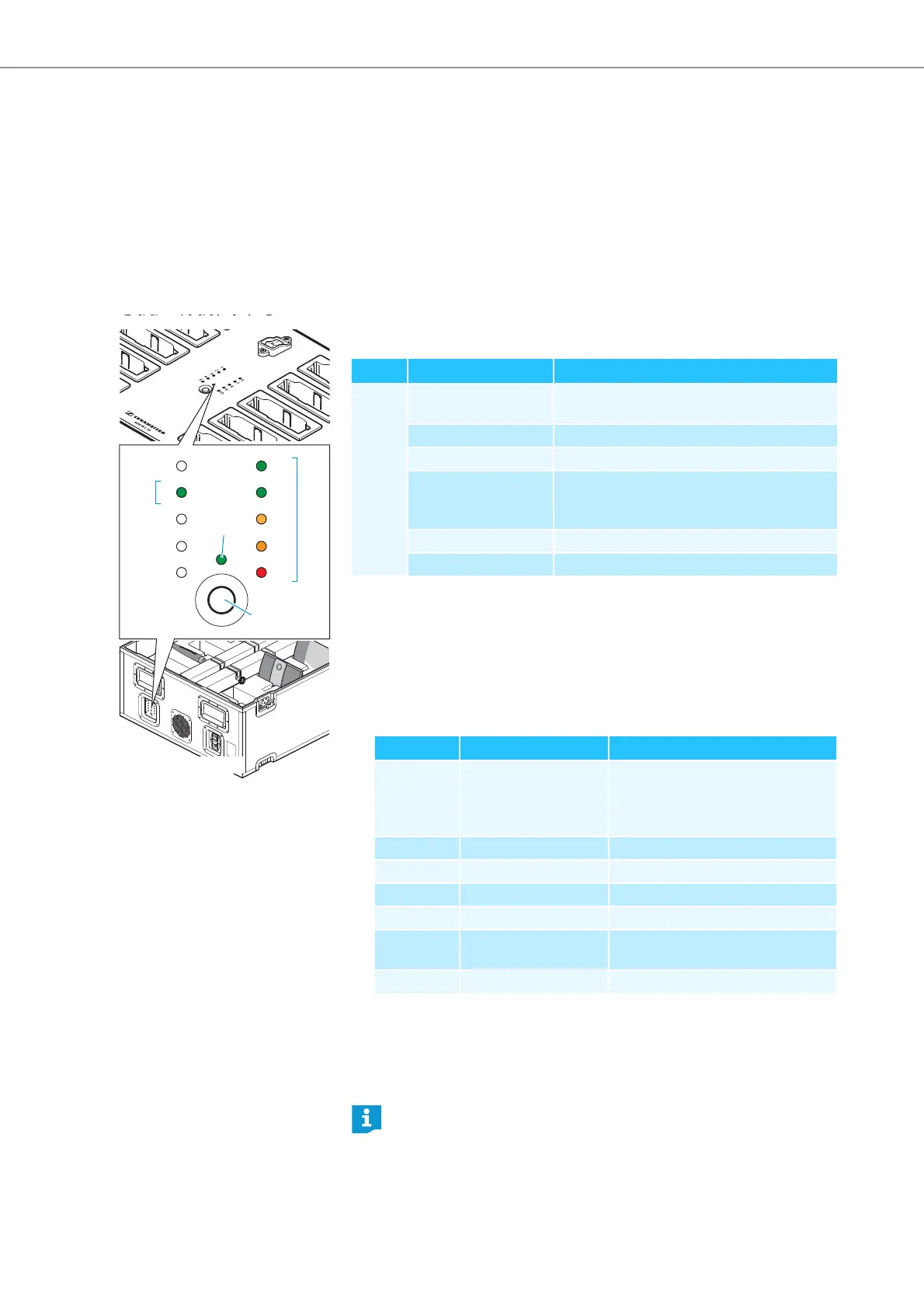
The status display on the charger shows the overall monitoring of all charging
compartments (each LED is assigned to a charging compartment):
To call up the individual compartment monitoring:
왘 Press the button for charge status indication .
The status di
spl
ay switches from overall monitoring to individual compartment
monitoring. The LED (1-10) of the selected charging compartment (1-10)
lights up green (see diagram as an example for charging compartment 2 ).
The adjacent LED strip comprising 5 LEDs displays the charge status in detail
(see diagram as an example for a fully charged battery pack ).
To select the charging compartments 1 to 10 one after the other:
왘 Press the button .
5
sec
onds after the last button press, the status display switches back from indi-
vidual compartment monitoring to overall monitoring.
4
A
B
1
2
3
4
5
6
7
8
9
10
2
3
ADN-W L 10
ADN-W CASE UNITS
LED
Color Capacity obtained
1-10 – Standby operation; no battery pack inserted
or no connection to the mains power supply
red approx. 0-19%
orange approx. 20-94%
green approx. 95-100%
Typical charging time is 4 hours with subse-
quent continuous capacity monitoring
red, flashing rapidly Battery pack’s temperature is too high
red, flashing slowly Battery pack is defective
LED
Color Capacity obtained
1 or 6 green approx. 80-100%
Typical charging time is 4 hours with
subsequent continuous capacity
monitoring
2 or 7 green approx. 60-79%
3 or 8 orange approx. 40-59%
4 or 9 orange approx. 20-39%
5 or 10 red approx. 0-19%
5 or 10 red, flashing rapidly Battery pack’s temperature is too
high
5 or 10 red, flashing slowly Battery pack is defective
The labeling of the LEDs is only available on the ADN-W L 10 charger.



 To Next Page