PXC 550 | 17
Getting started
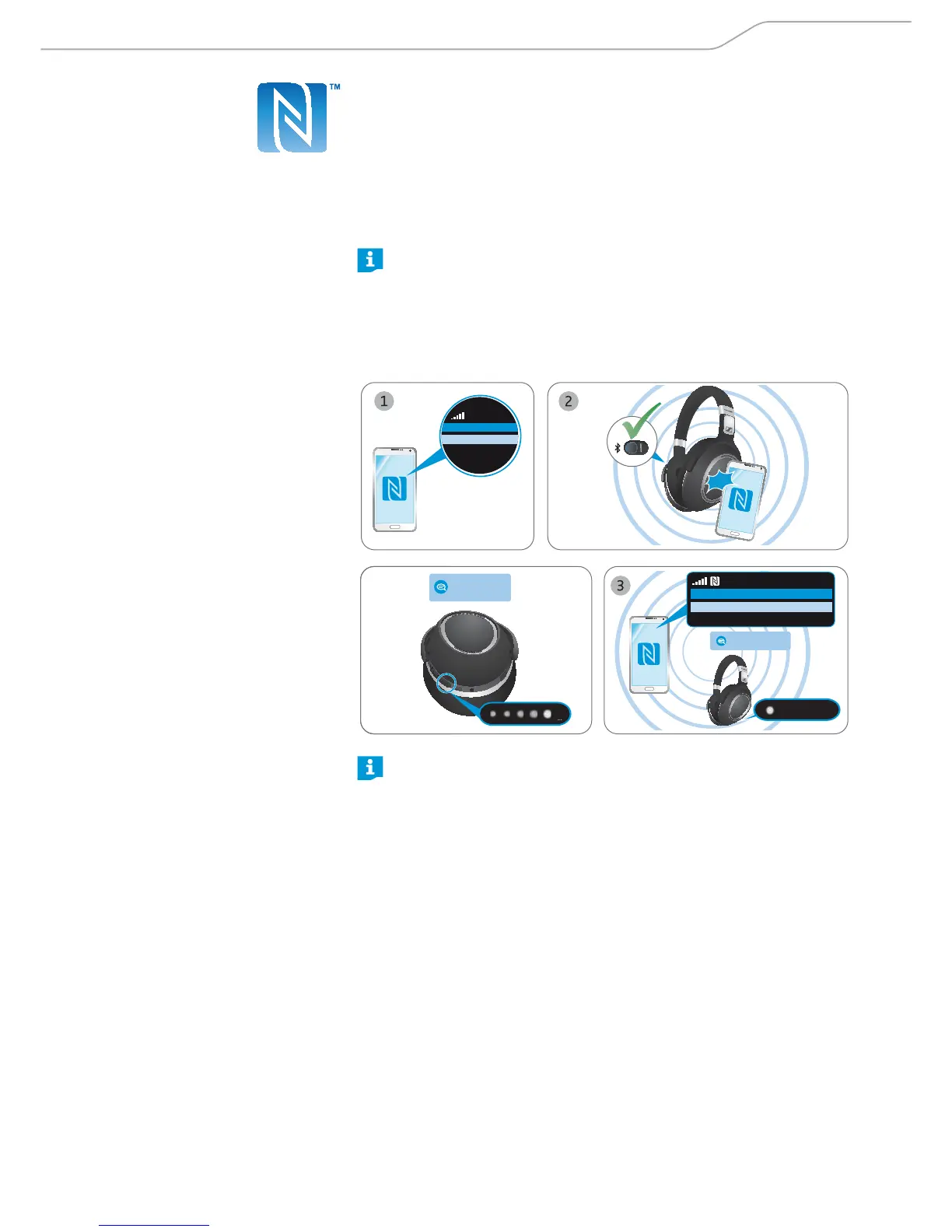
Pairing the headphones with a Bluetooth device using NFC
Ensure that the headphones and the Bluetooth switch are in the “on” position
when performing this procedure.
1. Activate the NFC function on your smartphone.
2. Lightly tap the smartphone to the panel on the left ear cup of the headphones.
Once the connection is established, you hear the voice prompts “ pairing” ,
and the 5-LED-array repeatedly flashes white in a running display. The
headphones are in pairing mode.
At this point, if you decide to not proceed with the pairing, just press the
Sound button once. You will hear the voice prompt
“ pairing cance lle d”
after a few seconds.
3. Click “ Ye s” if a pairing confirmation dialog appears on the screen of your
smartphone (this step may vary depending on your smartphone).
If pairing is successful, you hear the voice prompt “ co nne cte d” and an LED
flashes white 3 times.
Menu
NFC o
› power on ‹
› pairing ‹
Connect to Bluetooth device?
Yes
No
› connected ‹
3X
Left
L
TAP!
If no connection is established, you hear the voice prompt “no connection”.
After attempting to connect for 5 minutes, pairing mode is terminated and
the headphones return to the disconnected state.
Switch the headphones
off and repeat the pairing procedure.




 To Next Page