18 | PXC 550
Getting started
Pairing the headphones with a Bluetooth device
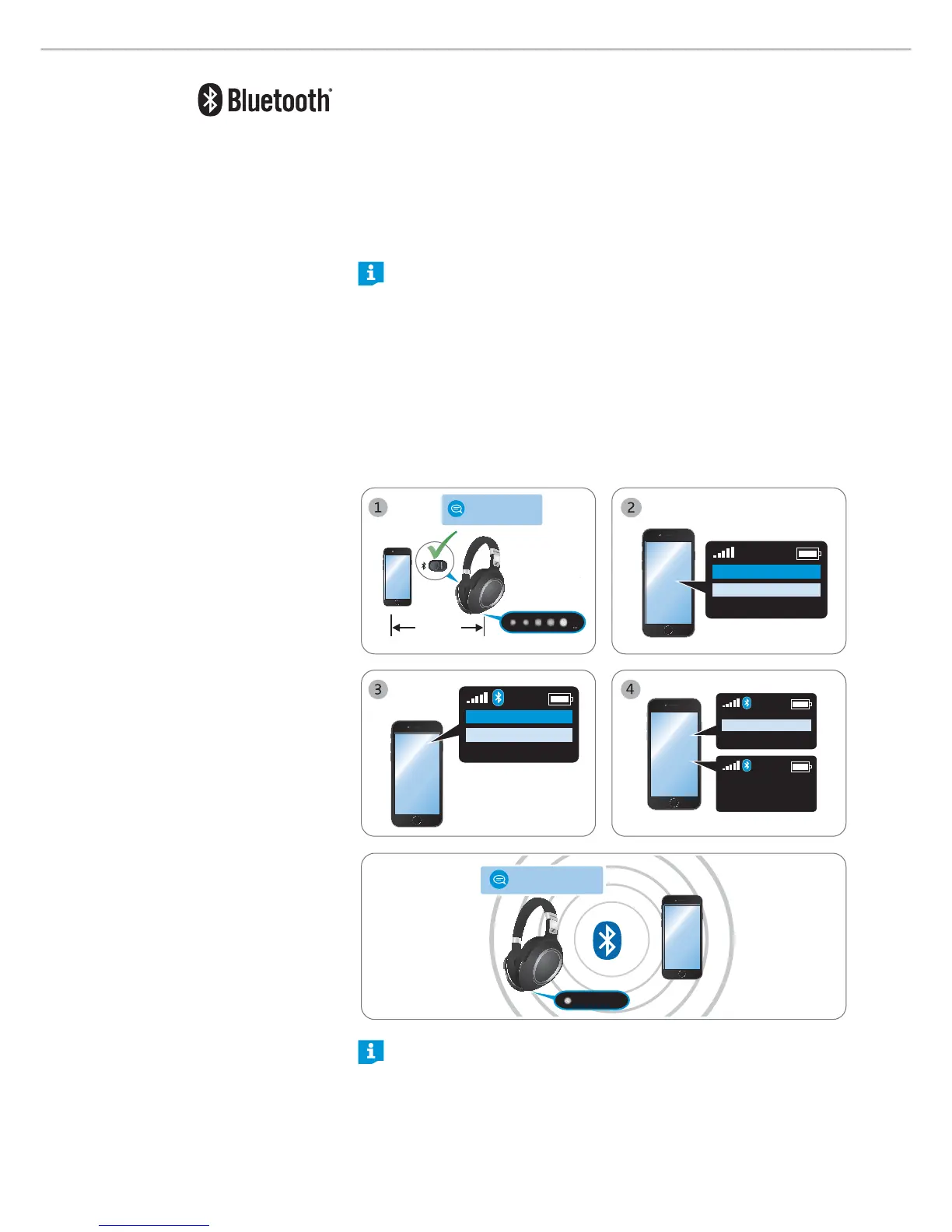
Ensure that your PXC 550 headphones are within the 20 cm range of your
smartphone. Also ensure that the headphones and the Bluetooth switch are in
the “on” position when performing this procedure.
1. Switch the headphones on or unfold the headphones to ready-to-wear
position (see page 23). Press the
Sound button 4 seconds until you hear
the voice prompt
“ pairing” and the 5-LED-array repeatedly flashes white in
a running display.
The headphones are in pairing mode.
At this point, if you decided to not proceed with the pairing, just press the
Sound button once. You will hear the voice prompt
“ pairing cance lle d”
after a few seconds.
2. Enable the Bluet ooth visibility on your smartphone.
3. On your smartphone, start a search for Bluet ooth devices.
All active Bluetooth devices in the proximity of your smartphone are
displayed.
4. From the list of found Bluet ooth devices, select “ PXC 550” to establish a
Bluetooth connection to the headphones.
If necessary, enter the default PIN
code “0000”.
If pairing is successful, you hear the voice prompt “ pairing succe ssful” and a
LED flashes white 3 times.
20 cm
› power on ‹
› pairing ‹
Menu
Bluetooth on
Bluetooth o
Menu
Add device
PXC 550
Keyword: 0000
PXC 550
› connected ‹
3X
If no connection is established, you hear the voice prompt “no connection”.
After attempting to connect for 5 minutes, pairing mode is terminated and
the headphones return to the disconnected state.
Switch the headphones
off and repeat the pairing procedure.




 To Next Page